
Your Team Isn't Slow. Your Workflows Are.

Kathy Prince

Your team’s productivity problems aren’t about individual performance - it’s about inefficient workflows.
Here’s the reality:
73% of operational requests could be automated, but many teams still spend 20% of their time searching for or organizing information.
Businesses lose 20–30% of annual revenue due to outdated processes.
Manual tasks like approvals, ticket routing, and data entry waste hours every week.
The solution? No-code automation. By automating repetitive tasks, you can:
Save hours weekly on approvals, ticket handling, and data syncing.
Cut costs, reduce errors, and improve response times.
This isn’t about working faster - it’s about removing the bottlenecks holding your team back. Let’s explore how automation can simplify workflows and reclaim productivity.
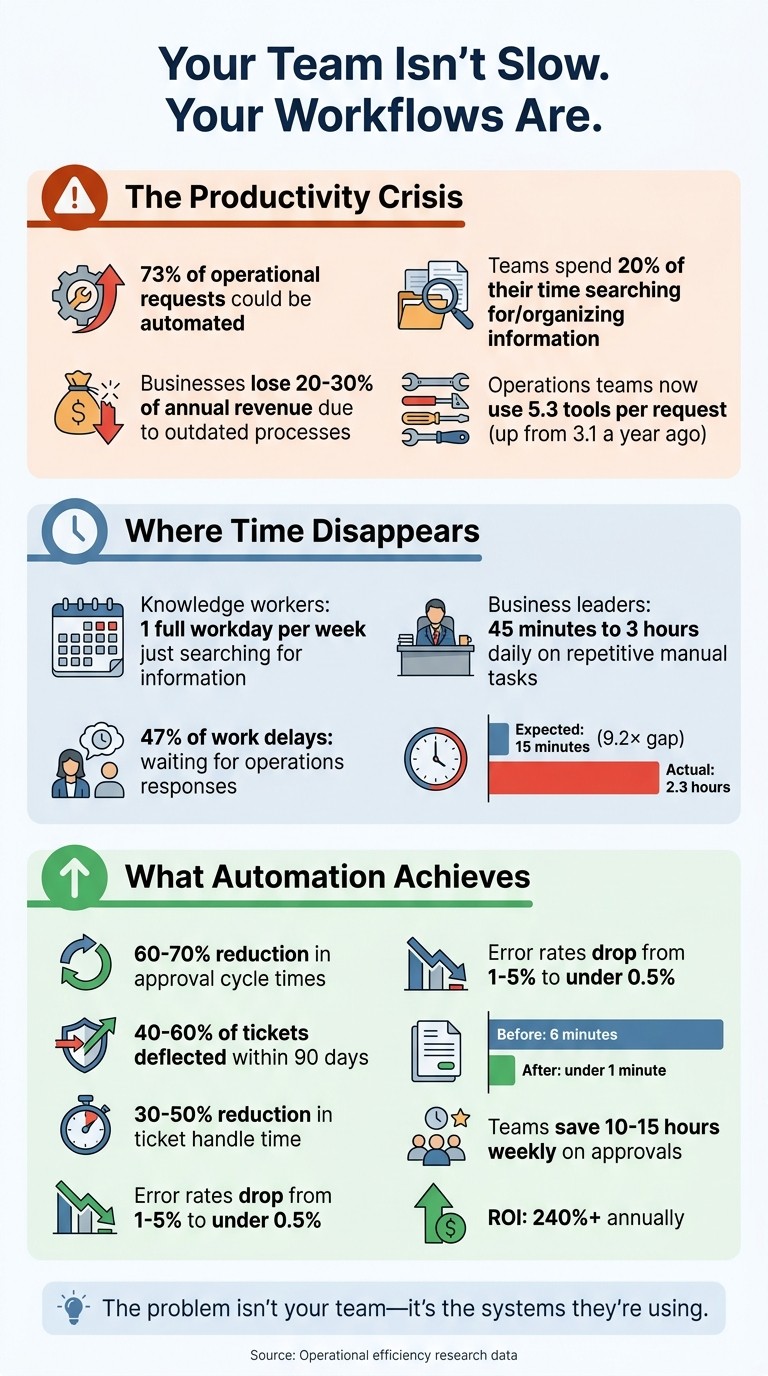
The True Cost of Inefficient Workflows: Key Statistics on Productivity Loss
How Workflow Bottlenecks Slow Down Your Team
Where Bottlenecks Happen in Operations
Bottlenecks often lurk in the routine tasks your team handles daily. Manual approval processes and email-based workflows are common culprits, leading to delays when documents get buried in inboxes or when task statuses remain unclear. These workflows can feel like "black holes", where tasks sit idle with no visibility into their progress or who’s responsible for advancing them.
On average, operations teams now rely on 5.3 tools per request - up from 3.1 just a year ago. These disconnected systems force teams to manually re-enter data, which not only wastes time but also increases the likelihood of errors. For instance, if your CRM doesn’t sync with your spreadsheets, someone has to copy and paste data between them - introducing inefficiencies at every step. Add to this the confusion of managing multiple versions of documents, where several "final" versions of contracts might circulate, and the risk of working with outdated information rises significantly. Without real-time dashboards, managers spend unnecessary time chasing updates through email or Slack just to figure out where a project stands.
These operational inefficiencies don’t just slow things down - they create a ripple effect, impacting productivity and revenue in tangible ways.
What Inefficient Workflows Actually Cost
Inefficient workflows can drain 20% to 30% of a company’s annual revenue. Knowledge workers spend nearly a fifth of their time - equivalent to a full workday each week - just searching for and gathering information. Meanwhile, business leaders often lose 45 minutes to 3 hours daily on repetitive, manual tasks like data entry.
These inefficiencies come at a high price. When senior managers are stuck on basic administrative work instead of focusing on strategic initiatives, businesses hit a ceiling that limits their ability to scale without dropping the ball on critical tasks. For example, Group Health Solutions managed to cut onboarding time from 2–3 days to just 1 day, saving 5 hours per week for every employee.
The impact of these delays is further magnified by communication lags. Nearly half (47%) of work delays occur because teams are waiting for responses from operations. Stakeholders expect quick turnarounds - typically within 15 minutes - but the average response time is 2.3 hours, creating a 9.2× gap between expectations and reality. Teams that work hard can still appear slow, not because they’re unproductive, but because inefficient workflows force them to spend too much time piecing together context instead of focusing on meaningful work. These challenges highlight why rethinking workflow design is not just helpful - it’s essential.
How No-Code Automation Fixes Workflow Problems
What No-Code Automation Does
Solving workflow issues often requires a solution that simplifies automation without the need for coding expertise. That's where no-code automation comes in. It operates using triggers, actions, and integrations to streamline processes. Here's how it works:
A trigger is an event that kicks off a workflow, like receiving a new support ticket or a completed form submission.
The action follows, such as assigning the ticket to the right team member, updating a spreadsheet, or sending out a notification.
Integrations link your existing tools, enabling data to flow automatically between them - no more manual copying and pasting.
Unlike traditional automation methods, no-code platforms don’t require IT teams or developers to set up. You simply describe the desired outcome or show the process through screen-sharing, and the platform handles the technical side. This approach eliminates "decision friction", meaning the delays caused by manual, rule-based steps. The result? A smoother, faster path to efficiency, as seen in platforms like Rivulo, which deliver tangible operational improvements.
Rivulo: No-Code Automation for Small and Mid-Sized Businesses
Rivulo demonstrates how no-code automation can transform operations, especially for small and mid-sized businesses. Designed for operational teams, Rivulo is an AI-powered platform capable of automating browser tasks and integrating with legacy systems - tasks that would typically require developer input. Users can build workflows through a conversational interface or by simply sharing their screens to show Rivulo the process. The system learns and replicates the task.
By automating repetitive and time-consuming tasks, Rivulo helps eliminate inefficiencies that often go unnoticed. The benefits are evident in real-world examples. Teams using Rivulo have:
Reduced meeting recaps from 14 hours to just 4 hours per week.
Cut ticket triage time from 11 hours to 4 hours.
Trimmed status updates from 9 hours to 3 hours.
Take GG Homes, for instance. In 2026, they used Rivulo to integrate call transcription with AI analysis for automating lead qualification. Salesforce was updated automatically, leading to a 25% increase in closed deals and saving 100 hours of manual data entry per week.
The financial benefits are equally compelling. Automated invoice processing, for example, slashes the time per invoice from 6 minutes to under 1 minute, reduces error rates from 1%–4% to less than 0.5%, and cuts costs from approximately $9.00 per invoice to $3.00–$6.00. This translates to an annual ROI exceeding 240%.
Workflow Automation Examples You Can Use
Automating Ticket Routing
Manual ticket routing can be a massive time sink. When every incoming request has to wait in a queue to be read, categorized, and assigned to the right person, your team ends up spending hours on tasks that don’t require human decision-making. Did you know that 60–70% of inbound ticket volume typically involves repetitive, low-complexity tasks that automation can handle instantly?
With no-code automation, intent classification takes over. This technology analyzes incoming messages and automatically directs them to the right specialist. For example, billing questions are routed to finance, technical issues go to IT, and feature requests land with the product team. A printer problem? Sent straight to the hardware specialist. A VIP customer’s ticket? Escalated to urgent status if it sits unresolved for more than four hours.
The results speak for themselves. Teams using no-code AI agents often see 40–60% of tickets deflected within 90 days and experience a 30–50% reduction in ticket handle time. One mid-market SaaS company even transformed their ticketing system from a bottleneck into a strategic advantage after implementing AI-powered routing. By streamlining this process, your team can focus on more impactful tasks while keeping workflows running smoothly.
Next, let’s look at how automation can streamline approvals and eliminate frustrating delays.
Speeding Up Approvals
Manual approval workflows are notorious for slowing things down. Requests can sit in inboxes for days - not because people aren’t doing their jobs, but because manual processes and poor visibility create bottlenecks. Automated approval systems solve this by cutting out unnecessary back-and-forth.
These systems use predefined rules to route requests. For example, orders over $500 might go to a manager for review, while smaller purchases are approved automatically. Multi-level approvals can be set up to happen sequentially (e.g., first by a manager, then by a CFO) or in parallel when multiple stakeholders need to weigh in. And with escalation logic, no request gets stuck - if someone doesn’t act within 48 hours, it’s automatically sent to a backup approver.
This kind of automation can reduce approval cycle times by 60–70%. Teams handling 20–50 approvals a week often save 10–15 hours weekly, and up to 80% fewer follow-up emails are needed to track approval statuses. For accounts payable, automation can slash processing times from 14.4 days to just 3.3 days, while cutting invoice costs from $12.44–$17.00 to $3.34–$6.00. These improvements don’t just save time - they eliminate inefficiencies that drag down productivity.
Of course, approvals are just one piece of the puzzle. Automating data entry can also have a huge impact.
Automating Data Entry Between Systems
Copying data between systems is tedious and error-prone. Whether it’s transferring form submissions into your CRM, updating project management tools, or manually maintaining spreadsheets, this repetitive work eats up valuable hours. Automation can handle it all in seconds.
No-code tools sync data across platforms, ensuring consistency between systems like your CRM, Jira, and Zendesk. For instance, when a customer fills out a form, automation can instantly create a CRM record, assign a support ticket, and update your tracking spreadsheet. AI even processes unstructured data, such as customer comments, and routes them to the right specialist based on intent - not just keywords.
While manual data entry typically has an error rate of 1–5%, automation reduces that to under 0.5%. The time saved here allows your team to focus on tasks that require creative thinking and problem-solving, reinforcing the idea that smarter workflows lead to better productivity.
How to Start Automating Your Workflows
Finding Your Bottlenecks and Setting Goals
The first step to automation is identifying where your team is losing time. Look at metrics like cycle time, queue buildup, backlog volume, and error rates. These figures can highlight areas where demand is outpacing capacity. Also, pay attention to workload distribution - if some team members are consistently overwhelmed while others have downtime, you’ve likely uncovered a hidden imbalance.
To pinpoint tasks ripe for automation, ask yourself: Is this task repeated more than twice a week? Are the steps consistent? Does it involve multiple systems? What’s the cost of errors? These questions help prioritize which workflows to address first. For tasks that aren’t immediately obvious, have employees document their steps using screen recordings. This can reveal unconscious, instinctive actions that might otherwise go unnoticed.
After identifying bottlenecks, rate each task on a 1–5 scale across four areas: how repetitive it is, whether it follows clear rules, how accessible the data is, and how much judgment it requires. Tasks scoring between 16 and 20 are prime candidates for automation. On the other hand, tasks with a score of 4 or 5 are better left as manual processes due to their inconsistency.
Mapping and Building Automated Workflows
Once you’ve identified the areas to improve, the next step is to map out your processes in detail. This means documenting every step, decision point, and system involved in the workflow. Having this clarity is essential before diving into automation.
Platforms like Rivulo make this process easier. You can describe or demonstrate the workflow through screen-sharing, and its conversational interface helps you plan automation without needing technical skills. Start with workflows that span multiple systems - these tend to offer the most time savings. For instance, automating invoice processing can reduce the time per invoice from six minutes to under one minute, cut error rates from 1–4% to under 0.5%, and deliver an annual ROI of 240% or more.
Once your initial workflows are automated, ongoing monitoring will help maintain efficiency and spot areas for further improvement.
Improving Your Automation Over Time
Automation isn’t something you set and forget. Implement real-time error monitoring, such as Slack or email alerts, to catch failed executions or API errors as they happen. On a monthly basis, review performance metrics like time saved, error rates, and task completion rates. Every quarter, revisit your workflows to ensure they align with any changes in pricing, services, or team structure.
Start small to minimize risk. Automate one high-impact workflow, measure its results, and refine it before moving on to the next. This gradual approach allows you to fine-tune processes and builds your team’s confidence with automation. Over time, you’ll uncover more opportunities to streamline operations and improve efficiency even further.
AI Workflow Automation Tutorial | How to Build No Code AI Workflows | AI Automation | Simplilearn

Conclusion
Outdated workflows aren’t just frustrating - they’re costly. The problem isn’t your team; it’s the systems they’re stuck using. When skilled employees are bogged down by endless approvals, juggling multiple tools, or manually transferring data, their productivity takes a hit. As Sophia Duru, Online Business Manager, aptly explains:
Performance = People × Systems. Even great employees struggle inside chaotic environments.
The stats back this up. Knowledge workers spend a staggering 20% of their time - basically one full workday each week - just searching for and organizing information. That’s not an issue with your team’s abilities; it’s a workflow issue. Automating these processes not only saves time but also slashes errors by up to 70%, reduces burnout, and allows your team to focus on meaningful, high-impact work.
This highlights the importance of shifting the focus from employee performance to improving workflows. Tools like Rivulo make this shift easier by offering no-code automation solutions that don’t require technical know-how. By automating repetitive tasks across your existing systems, these platforms help reclaim valuable time. For example, teams using Rivulo have saved 40 hours per week by automating tasks like ticket triage, meeting summaries, and status updates - giving employees more time to tackle strategic priorities.
Streamlining workflows through automation doesn’t just boost productivity; it transforms how teams experience their work. When employees spend less time on tedious, repetitive tasks and more time leveraging their expertise, morale improves, and retention rates follow suit.
The real roadblock to productivity isn’t your team - it’s inefficient workflows. Start small, track your progress, and build systems that allow your team to thrive.
FAQs
How do I find our biggest workflow bottlenecks fast?
Take a closer look at how tasks move through your processes to quickly identify where things might be slowing down. Pay attention to areas where work tends to pile up, approvals get stuck, or workloads are unevenly distributed. Tools like workflow visualizations and workforce analytics can be incredibly helpful for spotting delays, especially during key stages like approvals or handoffs. By pinpointing where work slows or accumulates, you can tackle those critical issues directly - without needing to completely overhaul your entire system.
What should we automate first for the quickest ROI?
Start by focusing on automating tasks that eat up the most time and follow straightforward, repetitive patterns. Think about things like data entry or approval workflows. These kinds of processes are perfect candidates for automation because they’re simple to set up and can save a ton of hours. Plus, they typically deliver a quick return on investment since they don’t involve complicated setups but still make a noticeable impact.
How do we keep automation from breaking when tools change?
To keep your workflows running smoothly, even when tools or platforms evolve, it's important to build flexibility and resilience into your processes. Make it a habit to regularly check and update your integrations, keeping an eye out for platform updates or API modifications. Staying proactive like this helps ensure your automations continue to function reliably over time.
Related Blog Posts

Hand over your first workflow this week
Hand Rivulo your most tedious workflow or your team’s most-asked question. Either way, it starts by understanding how your business works, and then it takes care of the rest.