
5 Signs Your Operations Team Is Wasting Hours on Tasks That Should Be Automated

Kathy Prince

Your operations team might be losing valuable time and money on manual tasks that could easily be automated. Research shows that repetitive processes, inefficiencies, and human errors cost businesses up to 30% of their annual revenue. If your team spends hours on data entry, chasing approvals, or managing customer requests, it's time to rethink your workflows. Automation can save time, reduce mistakes, and free your team to focus on higher-value tasks.
Key Signs to Watch For:
Excessive Data Entry: Hours spent manually transferring data instead of analyzing it.
Reliance on One Person: Critical processes live in someone's memory, creating bottlenecks.
Slow Month-End Closures: Repetitive finance tasks delay closing by weeks.
Approval Delays: Endless email follow-ups to get simple approvals.
Manual Customer Request Handling: Routine tasks like ticket routing bog down your team.
Quick Fact: Automating these processes can cut errors by 70%, reclaim hours of productivity, and reduce costs by up to 30%. Start small by identifying repetitive tasks and using no-code AI tools to automate them. Your team can then focus on work that drives growth and better results.
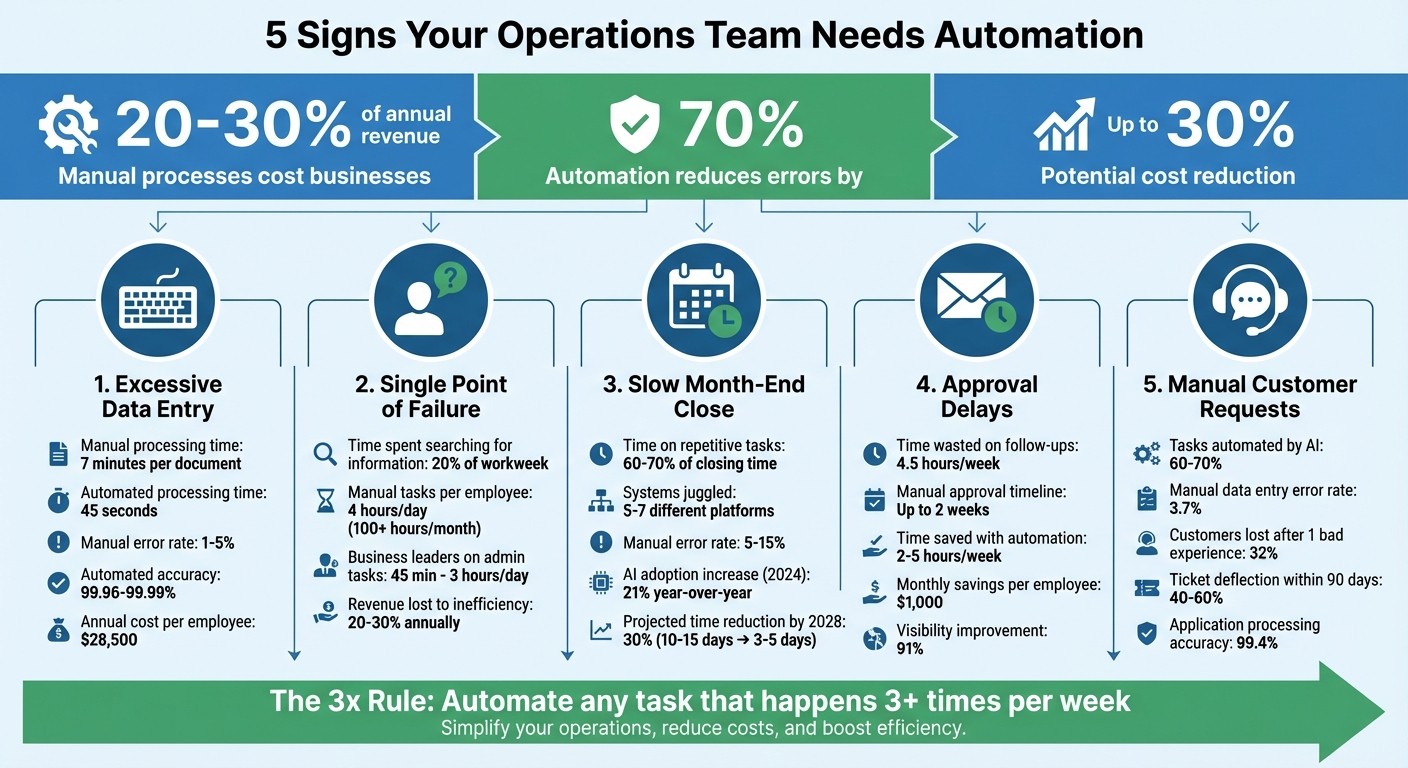
The Cost of Manual Operations: Key Statistics on Automation ROI
1. Your Team Spends More Time Entering Data Than Analyzing It
The Grind of Repetition
Data entry is the ultimate time sink. Chances are, your operations team is stuck copying and syncing data across multiple platforms - sometimes dozens, even hundreds, of times a week.
Here’s the kicker: you’re paying skilled professionals to handle mundane, repetitive tasks. If your operations manager spends two hours daily moving data between spreadsheets, that’s two hours lost on strategic insights. Instead of driving business growth, they’re stuck in a cycle of manual labor.
Time vs. Value: The Cost of Manual Work
Manual data entry isn’t just a time drain - it’s expensive. U.S. companies shell out an average of $28,500 per employee annually on these tasks. Think about this: processing a single document manually takes around 7 minutes. With automation, that same task takes just 45 seconds.
"When your team is buried in paperwork, critical business data remains locked away in PDFs and spreadsheets. This lag means leaders are flying blind, making decisions based on outdated information." - Red Brick Labs
And it’s not just about time and money. Manual entry also opens the door to mistakes - lots of them.
The Risk of Human Errors
Manual data entry comes with an error rate of 1% to 5%. That might sound small, but it adds up quickly - several mistakes for every 100 entries. These errors can disrupt accuracy, leading to customer complaints, billing problems, and last-minute fixes. On the flip side, automated systems boast accuracy rates as high as 99.96% to 99.99%. Plus, automation can slash errors by as much as 70%. That means fewer headaches and more reliable data.
Automation Tools: A Game Changer
Modern AI tools can handle tasks like extracting line items, totals, and vendor details from invoices - all without rigid templates. Look at Koninklijke Dekker, a 140-year-old lumber company. By automating its order processing, the sales team shifted their focus from data entry to strengthening customer relationships. Another example is Ynvolve, which cut quote generation time by 90%, projected 50% revenue growth, and saved $30,000 monthly - all without hiring additional staff.
These examples highlight how automation doesn’t just save time - it unlocks resources for what truly matters. Investing in AI tools can transform your operations and reclaim hours that were once wasted.
2. You Depend on One Person Who Knows All the Unwritten Processes
The Fragility of Tribal Knowledge
When a key team member is out - whether due to illness, vacation, or another reason - it can feel like the entire operation grinds to a halt. Why? Because critical processes often live in that person's memory rather than in a shared, accessible system. These undocumented steps, repeated multiple times a week, rely on personal notes or recollection, leaving your business vulnerable to disruptions.
This reliance weakens your operations, creating bottlenecks and wasting time as others scramble to fill the gap. Without proper documentation, the stability of your workflows is at constant risk.
Time Lost Searching for Answers
When processes aren’t documented, employees are left chasing down information. On average, knowledge workers spend 20% of their time - the equivalent of a full workday each week - searching for scattered details. And it doesn’t stop there. Manual tasks eat up about 4 hours per day per employee, totaling more than 100 hours every month.
Even business leaders aren’t spared. A staggering 70% of them spend between 45 minutes and 3 hours daily on repetitive administrative tasks. If basic questions like, “How many contracts are pending?” require tracking down a specific person, it’s a clear sign of a visibility problem.
The Error Cascade
The more you rely on undocumented processes, the higher the risk of mistakes when others step in. Without clear instructions, errors multiply, outcomes become inconsistent, and rework piles up. This inefficiency can be curbed significantly - automation alone can cut errors by 70%. But before you can automate, those unwritten processes need to be captured and documented.
"When only one person 'knows how things are done,' the workflow becomes fragile. Vacation, illness, or turnover suddenly brings operations to a halt."
– Automation Agency
From Memory to System
No-code platforms offer a way to transform this so-called tribal knowledge into structured, repeatable workflows. Phrases like “that’s just how we’ve always done it” or sudden breakdowns when a key person is unavailable are red flags. The cost of inefficiency is steep - businesses lose 20% to 30% of their revenue every year from process-related issues. Instead of hiring more people, the solution lies in creating systems that function seamlessly, no matter who’s on hand.
3. Month-End Closing Takes a Week or More
The Repetition Problem
Month-end closing can feel like a never-ending loop. Every single month, finance teams go through the same routine: bank-to-GL reconciliations, AP/AR subledger checks, intercompany matching, and recurring journal entries. It’s a predictable cycle, but one that eats up hours due to manual data entry and repetitive cross-checking tasks.
Time-Consuming With Limited Payoff
All this repetition comes at a high cost - time. Manual journal entries, for example, are not only tedious but also don’t add much strategic value. In fact, finance teams spend a staggering 60–70% of their closing time on repetitive tasks like account reconciliations and journal creation. To make matters worse, they often juggle data across 5–7 different systems, leaving little room for meaningful analysis.
The Risk of Errors
When processes are manual, mistakes are almost inevitable. Error rates for manual reconciliations range from 5% to 15%, and fixing these mistakes later can be both time-consuming and expensive. Unsurprisingly, finance leaders rate their confidence in the accuracy of manual closing at just 5.4 out of 7.
Automation: A Game-Changer
The inefficiencies of manual processes are driving more companies to embrace automation. In 2024, 58% of finance teams were already leveraging AI, marking a 21% increase from the previous year. Today’s no-code AI tools seamlessly integrate with ERP systems, automating tasks like journal processing and transaction matching. These tools can streamline up to 80% of journal entries, saving thousands of hours annually. Gartner even predicts that by 2028, AI-enabled cloud ERP systems will cut the financial close time by 30%, transforming what used to take 10–15 days into just 3–5 days.
4. Approval Workflows Require Constant Email Follow-Ups
The Repetitive Nature of the Task
Chasing approvals can feel like an endless loop. Your team sends a request, waits, then follows up with an email asking, "Have you had a chance to look at this?" When that doesn't work, they might turn to Slack or Teams. And the cycle continues. This repetitive back-and-forth eats up time - knowledge workers spend around 4.5 hours a week on tasks like these that could easily be automated.
Time Wasted vs. Its Actual Value
A simple document needing three signatures shouldn't take two weeks to process, but manual systems often drag things out that long. Part of the problem? Managers often have inboxes overflowing with over 200 unread emails, which means follow-up reminders can get buried. Automating these workflows can save teams 2 to 5 hours per week. With an average staff cost of $50 per hour, that adds up to $1,000 in monthly savings for each employee who regains those hours. Beyond just wasting time, these delays can also lead to mistakes that disrupt the process.
The Risk of Human Error
When approvals rely on manual handoffs, documents can easily get lost, misfiled, or sent to the wrong person. These errors lead to even more follow-ups and wasted time. Without automation, spotting where things go wrong is often a guessing game, which only adds to the frustration.
How Automation Tools Solve the Problem
Automation offers a way out of this inefficient cycle. Modern no-code tools can route approval requests directly to the right person through platforms like Teams, email, or mobile notifications. These tools also include built-in reminders and escalation rules. For instance, if an approver doesn't respond within a set timeframe, the system can automatically forward the request to a backup manager. This kind of automation not only saves time but also improves process visibility - organizations report a 91% boost in visibility and a 70% reduction in errors after implementing these solutions. It’s a practical fix for a frustrating problem.
5. Customer Requests Pile Up Because of Manual Processing
The Repetitive Nature of the Task
Handling customer requests manually can be a major time sink. Whether requests come through email, web forms, or chat, team members often need to process each one by hand - reading, categorizing, entering data into the CRM, routing it to the right team, and following up. These tasks include things like order tracking, resetting passwords, checking balances, answering repetitive questions, or copying data between systems. This cycle can happen dozens of times a week, leaving your team spending nearly an entire day just hunting for and organizing information instead of solving more meaningful or challenging problems.
Time Consumption Compared to Its Value
When customer requests pile up, skilled employees often get bogged down with routine tasks like data entry. This not only wastes their potential but also hits your bottom line. Businesses lose 20% to 30% of their yearly revenue due to inefficiencies like these. And it’s not just about wasted time - 32% of customers will leave your brand after just one bad experience. So, while your team is stuck managing repetitive tasks, your customers might be losing patience.
Potential for Human Error
Manual processing comes with another risk: mistakes. With multiple handoffs, errors like mistyped email addresses, tickets routed to the wrong team, or incomplete updates in the CRM become more likely. In fact, manual data entry has an average error rate of 3.7%. These small mistakes can quickly add up, especially when dealing with high volumes of requests. Even worse, 56% of dissatisfied customers don’t bother to complain - they just leave. By the time you notice the problem, it might already be too late to fix.
How Automation Tools Solve the Problem
This is where no-code AI tools step in. They can handle 60–70% of repetitive, low-complexity tasks like answering FAQs, managing billing inquiries, or providing status updates. These tools automate the capture, classification, and routing of requests, significantly cutting down on repetitive work and reducing errors by up to 70%. For instance, in Q3 2025, Greenhouse implemented an automated workflow that processed 2,400 applications weekly with 99.4% accuracy, slashing candidate sourcing time by 70%. Companies that adopt AI agents often see 40–60% ticket deflection within 90 days.
A good way to start is by using a "shadow mode", where AI drafts responses for your team to review before moving to full automation. Automating these processes not only saves time and money but also ensures a smoother customer experience, helping protect both relationships and revenue.
How PMs Can Use No-Code and AI to Drive Ops Efficiency | Airtable
Automate with Rivulo: No-Code AI Solutions for Operations Teams
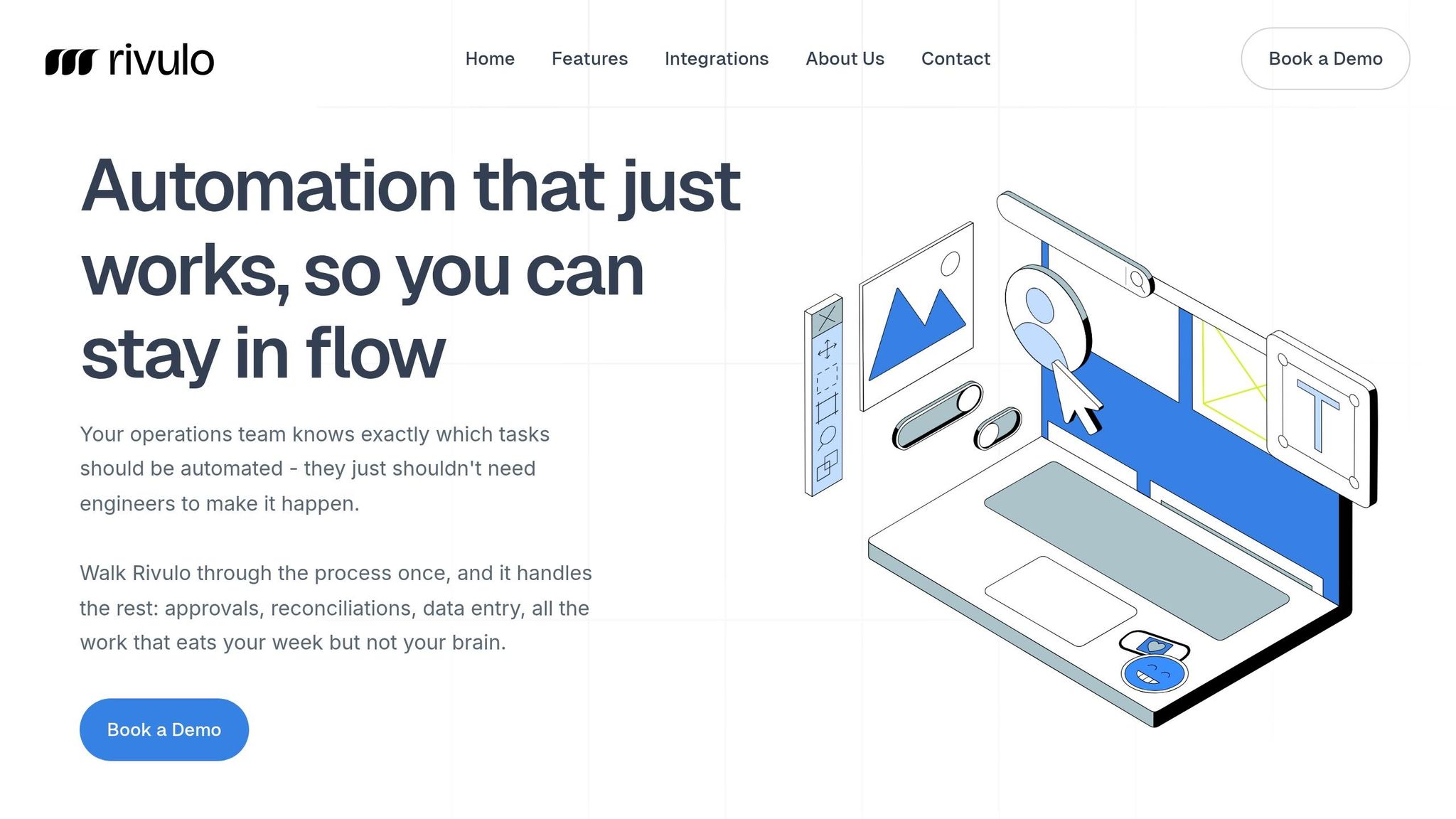
Once you've pinpointed the manual processes that sap your team's time and energy, Rivulo steps in to automate them - no engineers or complicated tools required. Designed specifically for operations teams, Rivulo handles repetitive tasks without the need for technical know-how.
The platform's standout feature is its "teach by showing" method. All you have to do is share your screen while completing a task, and Rivulo observes your actions to build the workflow for you. Just one demonstration is enough - no coding or complex setup involved. This approach works smoothly for any browser-based task, whether it's logging into supplier systems, updating spreadsheets, or reconciling invoices.
Here’s what one user had to say:
"Rivulo works in the browser, so even the clunky legacy tools with no APIs can be automated. Finally, you can connect the unconnectable and stop wasting time on old systems." - Rivulo
What really sets Rivulo apart is its human-in-the-loop design. It doesn’t operate like a mysterious black box. Instead, it collaborates with your team, seeking approvals and acting as a digital teammate. For example, in January 2026, Rivulet IQ - the creators of Rivulo - implemented an AI workflow for a 12-person agency. The results? They saved 40 hours per week across five major tasks: meeting recaps (10 hours), reporting narration (9 hours), ticket triage (7 hours), status updates (6 hours), and late-stage QA rework (8 hours).
For teams overwhelmed by manual tasks, Rivulo eliminates the need to rely on IT support or invest weeks learning complicated software. From streamlining data-heavy processes to cutting down on follow-ups, Rivulo enables your team to focus on work that truly matters.
This kind of automation isn’t just a time-saver - it’s a game-changer for boosting productivity and driving growth.
Conclusion
Manual tasks like data entry and chasing approvals are more than just time-consuming - they're eating into your revenue and hindering growth.
Research shows that inefficiencies can drain 20% to 30% of a company's revenue annually. Think about it: that's not just hours lost, but also untapped potential for innovation and strategic progress. Every minute spent on repetitive manual work is a missed chance to focus on what really matters.
The truth is simple: manual scaling is unsustainable. As the Dilipod team aptly states, "The question is not whether you can afford to automate. It is whether you can afford to keep scaling manually". Automation isn’t just an option - it’s a necessity if you want to reclaim time and resources for growth.
Start by identifying your pain points. Look for bottlenecks and begin small. A great rule of thumb? The "3x Rule": if a task happens at least three times a week, it’s a prime candidate for automation. Begin with tasks that are frequent but low-risk to build confidence, and then expand your efforts.
Automation isn’t about replacing people; it’s about empowering your team to focus on work that drives value. Take a moment this week to review your processes. Spot the gaps, redirect time from repetitive tasks, and channel your team’s energy into strategic initiatives. With no-code AI solutions, you can transform wasted hours into a competitive edge.
FAQs
Which tasks should we automate first?
Start by focusing on tasks that are repetitive, follow clear rules, and consume a lot of time. Think about things like approval workflows, data entry, scheduling, follow-ups, invoice processing, and report generation. These activities often eat up 10–20 hours of an employee's week. By automating them, you can free up valuable time and improve overall productivity, giving your team the chance to tackle more strategic and meaningful work. To get started, target processes that are both easy to automate and have a noticeable impact - this approach delivers quick results and boosts efficiency right away.
How do we document “tribal knowledge” before automating?
To capture tribal knowledge before diving into automation, start by turning informal insights into structured, shareable formats. This could mean creating playbooks, standard operating procedures (SOPs), or detailed training materials to document essential information. Embedding these insights directly into codebases or leveraging templates can also help make this knowledge reusable and accessible across teams. The main objective is to safeguard critical, undocumented expertise and ensure it seamlessly integrates into automation processes.
How can we measure automation ROI in ops?
To determine the ROI of automation in operations, start by calculating the time saved through automation. Then, translate that saved time into monetary value based on employee wages. For instance, if automating tasks saves 4.5 hours per week per employee, that directly cuts down labor costs.
Beyond time savings, consider other factors like error reduction and cost avoidance. Fewer mistakes mean less money spent on fixing errors or dealing with their consequences. Look at scalability too - automation often allows your team to handle more work without needing to hire additional staff. Lastly, assess efficiency improvements, such as quicker approvals or streamlined workflows.
By combining these metrics, you can paint a clear picture of the financial and operational advantages automation brings to your business.
Related Blog Posts

Hand over your first workflow this week
Hand Rivulo your most tedious workflow or your team’s most-asked question. Either way, it starts by understanding how your business works, and then it takes care of the rest.