
5 Signs Your Team Needs Workflow Automation

Kathy Prince

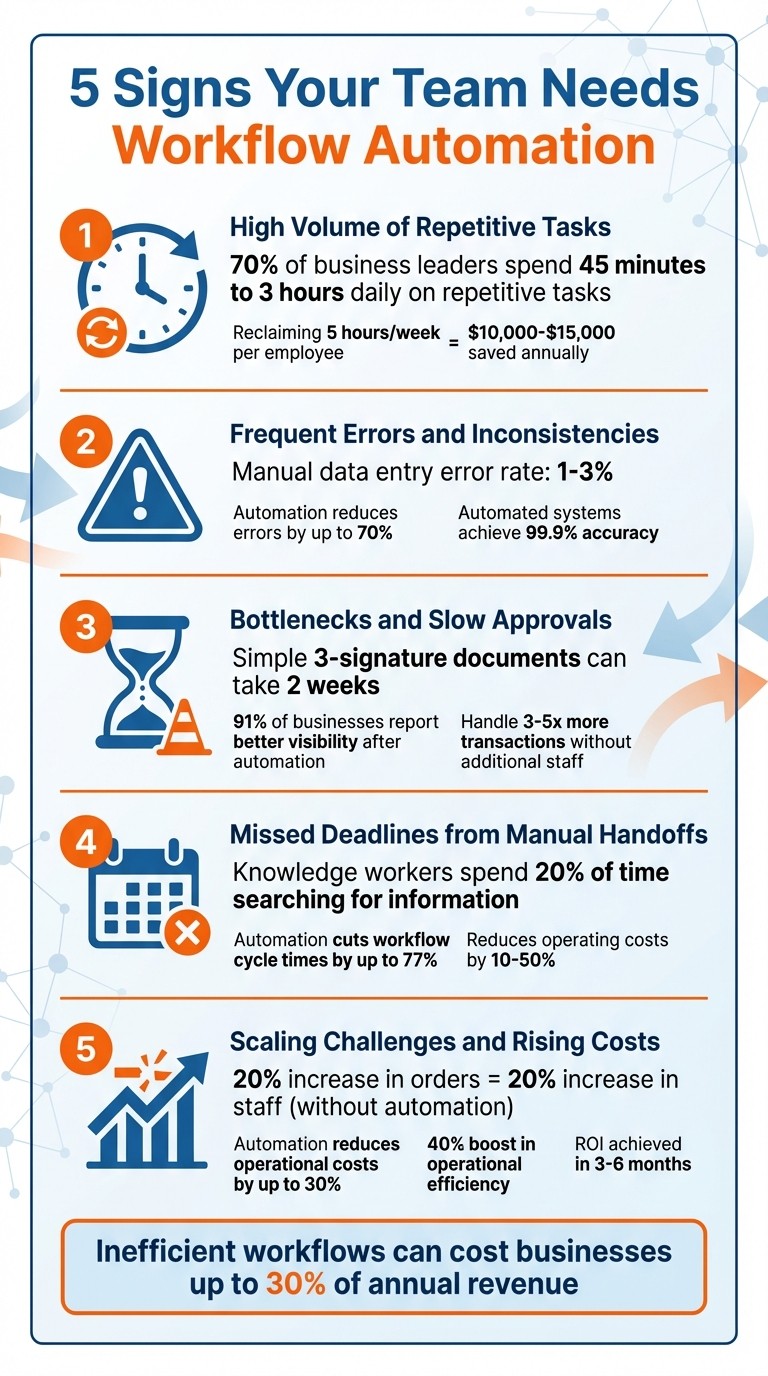
Your team might be losing time and money due to outdated processes. Here’s how to tell if automation can help:
Repetitive Tasks Eat Time: Routine work like data entry or report generation drains hours weekly.
Frequent Errors: Mistakes in invoices or customer records create rework and damage trust.
Approval Delays: Slow sign-offs hold up projects and revenue.
Missed Deadlines: Manual handoffs lead to delays and disorganized workflows.
Scaling Challenges: Without automation, growth means higher costs and more hires.
Key Fact: Inefficient workflows can cost businesses up to 30% of annual revenue. Automating these processes saves time, reduces errors, and enables growth without extra headcount. Tools like Rivulo simplify automation by learning your workflows directly from your screen, cutting repetitive tasks and giving your team more time for impactful work.
5 Signs Your Team Needs Workflow Automation
1. High Volume of Repetitive Tasks
When your team spends hours every week copying contact details, routing emails, or churning out reports, it’s a clear sign of a task ripe for automation. These activities don’t involve creative problem-solving or strategic decision-making - they just need to be done, and they eat up a significant chunk of time.
Impact on Team Efficiency
The data paints a clear picture: 70% of business leaders spend 45 minutes to 3 hours daily on repetitive tasks. And we’re not talking about junior staff - this is time lost by key decision-makers, the very people responsible for driving growth and innovation. When skilled employees are tied up with manual data entry, approvals, or sifting through emails, the work that truly matters takes a back seat.
"If you're spending more than 5 hours per week on tasks that feel like 'digital busywork,' you're losing valuable time that could be spent on strategy, customer relationships, or business development." - Khairul Muhtadin, Founder, Khaisa Studio
Common offenders include tasks like entering data into CRMs or spreadsheets, processing invoices, generating reports, and sorting emails. These are routine, rule-based activities that occur frequently and pull employees away from higher-impact work. This inefficiency doesn’t just slow productivity - it also increases operational costs.
Cost Implications of Inefficiencies
The financial hit from repetitive tasks is twofold. First, manual processes are prone to errors, with typical data entry error rates ranging from 1% to 3%. Fixing these mistakes costs time and money. Second, the time saved through automation can translate into significant savings. For example, reclaiming 5 hours of work per week for just one employee can save $10,000–$15,000 annually. Multiply that across a team of ten, and you’re looking at over $100,000 in recovered capacity.
Now, consider the cost of hiring an administrative assistant, which ranges from $35,000 to $45,000 annually, plus benefits. Automating their repetitive tasks for a fraction of that cost frees up resources for strategic work - like building relationships and making decisions that require a human touch.
Potential for Scalability Through Automation
Automation doesn’t just save time and money - it also sets the stage for growth. Manual workflows often create bottlenecks as transaction volumes increase, requiring more hires to keep up. Automation breaks this cycle, allowing your team to handle higher volumes without adding stress or headcount. In fact, organizations that pair automation with process redesign can cut operational costs by up to 30%. By transforming repetitive tasks into streamlined workflows, automation turns a potential liability into a competitive edge.
2. Frequent Errors and Inconsistencies
Mistakes in invoices, customer records, or order details often point to the strain of manual processes. Manual data entry typically has an error rate of 1% to 3%. Even a single billing mistake can jeopardize a customer relationship that might have been worth thousands of dollars over time. These aren't just small slip-ups - they're clear indicators that it's time to consider automation.
Impact on Team Efficiency
Every mistake demands correction, which takes an average of 30 minutes per error. This not only drains time but also pulls team members away from higher-value tasks like building customer relationships or creating new offerings. On top of that, manual processes often lead to inconsistencies - different team members might use varying formats for the same data, creating confusion and wasting even more time. These inefficiencies hit productivity hard and drive up operational costs.
"Manual processes are inherently error-prone. A study by the American Management Association found that businesses lose an average of 12% of their revenue due to process inefficiencies and human error."
– Khairul Muhtadin, Low Code AI Automations
Cost Implications of Inefficiencies
Errors don’t just eat up time - they also inflate costs. Rework can quickly add up, turning into hours of lost productivity. For example, if a team handles 10 invoice errors a month, that’s about 5 hours wasted on corrections. Spread this across multiple processes and team members, and you’re looking at thousands of dollars lost each year. Beyond the financial hit, inconsistencies in billing, shipping, or customer data can erode trust, leading to customer churn and undoing years of effort in relationship-building. Fixing these errors through automation doesn’t just save money - it also creates a foundation for smoother, more scalable operations.
Potential for Scalability Through Automation
Reducing these errors is critical for improving workflows and cutting unnecessary costs. Automation can slash operational errors by up to 70%, with automated systems achieving accuracy rates as high as 99.9%. Automated workflows stick to a consistent sequence every time, removing guesswork and shortcuts. Built-in validation checks catch formatting issues - like invalid email addresses or incorrect data types - before they enter your system. Plus, error-handling alerts can notify your team immediately, stopping problems from spreading unnoticed. By eliminating these bottlenecks, automation helps businesses scale with confidence.
3. Bottlenecks and Slow Approvals
Imagine this: a document that needs just three signatures ends up taking two weeks to process. This isn’t just frustrating - it’s a glaring sign of a broken workflow. Manual approval chains turn what should be quick tasks into drawn-out sagas. Alice emails Bob, who then forwards it to Charlie, and somewhere along the way, the document gets lost in overflowing inboxes. Meanwhile, project managers waste hours chasing updates through follow-up emails and Slack messages, all to track the status of a single contract. These delays don’t just affect one task - they pile onto existing inefficiencies across the board.
Impact on Team Efficiency
The fallout from these delays is significant. Deals get stuck, projects grind to a halt, and customers are left waiting while your team scrambles to get signatures. Instead of focusing on high-value work like closing deals or strengthening client relationships, employees are stuck in an endless loop of follow-ups and manual updates. This shift in focus drains strategic energy and limits your team’s ability to perform at their best.
Frequency of Recurring Issues
These bottlenecks aren’t rare - they’re part of a larger, systemic issue. Email-based approval systems offer no transparency into where a document is in the process or how long it’s been sitting idle. Worse, inconsistent document versions add another layer of confusion, wasting even more time. These recurring delays amplify inefficiencies, creating a ripple effect that impacts the entire organization.
Cost Implications of Inefficiencies
Every delay in approvals comes with a price. Late signatures can mean postponed revenue, delayed vendor payments, or missing out on critical market opportunities. And when your team can’t keep up without hiring more staff, growth becomes an expensive challenge. This cycle of inefficiency drives up operational costs, making it harder to scale effectively.
Potential for Scalability Through Automation
Approval bottlenecks don’t just slow things down - they keep your team from scaling efficiently. Automation offers a way out of this trap by reducing reliance on manual processes. Companies that pair automation with improved workflows can cut operational costs by up to 30%. Automated systems streamline approvals by routing documents based on pre-set rules, enabling departments like legal, finance, and operations to review documents in parallel rather than one at a time. Escalation features ensure no task sits idle for too long, while centralized dashboards provide managers with real-time updates on bottlenecks. In fact, 91% of businesses report better visibility after adopting workflow automation. This increased efficiency allows teams to handle 3x to 5x more transactions without needing additional staff.
4. Missed Deadlines from Manual Handoffs
Missed deadlines caused by manual handoffs can severely impact your team's productivity.
When processes rely on manual steps, documents can easily get stuck in "inbox black holes". These occur when an approver is unavailable or forgets to forward requests. Unlike automated systems, which handle tasks in seconds, manual workflows depend on people checking emails, remembering to act, and figuring out the next step. As a result, even a simple three-person process can drag on for up to two weeks due to cumulative delays.
Impact on Team Efficiency
On average, knowledge workers spend nearly 20% of their time just searching for and organizing information. This administrative burden eats into time that could be better spent on strategic tasks, engaging with clients, or driving revenue. When team members are stuck chasing down documents or waiting on approvals, overall productivity takes a hit, leaving less capacity for high-value work.
Frequency of Recurring Issues
Manual handoffs often lead to constant waiting, and the problem is widespread. Around 70% of leaders report spending 45 minutes to 3 hours every day on repetitive tasks. These delays aren’t rare - they’re part of a daily routine that drains operational efficiency.
Cost Implications of Inefficiencies
The financial impact of these inefficiencies can be staggering. Delays and rework caused by manual processes can eat up 20%–30% of annual revenue. For example, automating finance-related tasks alone could save a business roughly $46,000 each year.
Potential for Scalability Through Automation
Automation offers a way out of these bottlenecks. By cutting workflow cycle times by up to 77% and reducing operating costs by 10%–50%, automation ensures faster and smoother operations. Features like instant notifications, routing rules, and escalation triggers eliminate delays, allowing your team to handle more work without getting bogged down. This efficiency boost equips your team to scale operations while maintaining reliability and speed.
5. Scaling Challenges and Rising Costs
When your team’s growth starts to plateau unless you add more staff, you’ve hit what’s known as a growth bottleneck. Without automation, businesses often face a harsh reality: for every 20% increase in orders or transactions, they need to increase staff by the same percentage. This one-for-one growth pattern leads to a cycle of rising payroll, training, and management expenses, which eats into profit margins. On top of that, this bottleneck pulls your team away from focusing on strategic priorities.
Impact on Team Efficiency
Manual scaling doesn’t just affect headcount - it drains your team’s ability to focus on what matters most. Top employees often spend 30–40% of their time on repetitive tasks like transferring data or generating reports instead of driving growth. And the inefficiencies don’t stop there. Knowledge workers can lose nearly an entire day each week searching through cluttered emails and shared drives. When your best people are stuck in administrative work, they miss out on opportunities to innovate, strengthen customer relationships, and sharpen your competitive edge.
Cost Implications of Inefficiencies
The financial impact of these inefficiencies can be severe. Beyond the time lost, errors from manual processes can pile up as transaction volumes grow, leading to higher rework costs and billing disputes. And there’s the opportunity cost: when high performers are tied up with busy work, the company forfeits thousands of dollars in potential productivity per employee.
Potential for Scalability Through Automation
Here’s where automation changes the game. By automating repetitive tasks, you can achieve scalable growth without needing to expand your workforce at the same rate. According to Gartner, "Organizations that combine automation technologies with redesigned operational processes can reduce operational costs by up to 30 percent". Companies that embrace process automation have reported a 40% boost in operational efficiency. Even better, many automation projects recoup their costs in just 3–6 months. Automating tasks like invoice processing or lead nurturing allows teams to handle 3 to 5 times more transactions without adding complexity or headcount. It’s a way to break free from the bottleneck and keep growing efficiently.
How Rivulo Solves These Problems
Rivulo offers a straightforward solution to tackle the challenges faced by busy operations teams.
Instead of bogging users down with technical jargon or requiring intricate flowcharts, Rivulo employs a "show, don't tell" approach. Simply share your screen once, and the platform learns the process and builds the workflow automatically. This eliminates the frustrating setup process that often deters teams from embracing automation. By focusing on simplicity, Rivulo directly addresses the inefficiencies discussed earlier.
The platform handles all five warning signs by automating browser-based tasks across any system. Whether it's logging into supplier portals, updating spreadsheets, or navigating legacy systems, Rivulo automates these repetitive tasks seamlessly. For example, a 12-person agency reported saving 40 hours per week. Meeting recaps were cut down from 14 to 4 hours, and reporting narration dropped from 16 to 7 hours.
Rivulo also incorporates a human-in-the-loop governance model, acting like a digital colleague that checks in for guidance when needed. For client-related tasks, teams can enforce a "draft allowed, send not" rule, ensuring all AI-generated content undergoes human review. This method has proven effective, reducing late-stage QA rework from 12 hours to just 4 hours per week for one team.
"The goal isn't to build a robot company. It's to stop re-doing the same steps every week."
– Rivu-adm, Rivulet IQ
Beyond governance, Rivulo excels in transforming unstructured inputs into actionable data. Its Workflow Packets convert chaotic inputs - like meeting transcripts or Slack threads - into structured data that can be used for downstream tasks. This normalization allows teams to scale without needing additional staff. Combined with conversational workflow design using plain language chat, Rivulo enables operations teams to create and refine automations without requiring developers or coding skills.
Conclusion
Is your team bogged down by repetitive tasks, frequent mistakes, delayed approvals, or missed deadlines? If scaling your operations feels impossible without adding more staff, you're not alone. Inefficient workflows can drain up to 30% of a company's revenue.
Automation can change that. By cutting out busywork, it frees up your team from spending 45 minutes to 3 hours a day on routine tasks. Plus, it can reduce errors by up to 70%, allowing your team to focus on work that requires their expertise. Instead of wondering if automation is worth the investment, ask yourself if you can afford to keep losing time and resources. Take a closer look at your team's workflows this week: identify bottlenecks, map out friction points, and pinpoint the processes that are eating up the most time and causing delays.
With a no-code platform like Rivulo, tackling these challenges is straightforward. You don’t need technical skills or a complicated setup. Just show the platform what needs to be automated, and it takes over. Whether it’s managing outdated systems, navigating supplier portals, or updating endless spreadsheets, Rivulo handles browser-based tasks seamlessly while keeping you in control with human-in-the-loop governance.
Your team deserves to focus on meaningful, strategic work - not mundane, repetitive tasks. Start small: automate one high-impact process, measure the time saved, and build from there. It’s time to reclaim your team’s valuable time and energy.
FAQs
Which workflow should we automate first?
Start by automating workflows that are repetitive, time-consuming, and prone to human error - think tasks like data entry, generating reports, or moving data between systems. These types of processes are ideal candidates because automation can quickly eliminate delays, reduce mistakes, and streamline operations. Plus, it frees up your team to concentrate on more strategic, impactful work. Tackling these tasks first sets the stage for scaling automation throughout your organization.
How do we calculate automation ROI for our team?
To figure out the ROI (Return on Investment) of automation for your team, start by tracking key performance indicators (KPIs). These might include productivity increases, shorter cycle times, fewer mistakes, and better satisfaction levels. Put numbers to these benefits - like the hours saved or the cost reductions from cutting down on rework - and weigh them against the expenses of your automation tools. This side-by-side comparison will give you a clear picture of the ROI from your automation initiatives.
What tasks still need human review after automation?
Tasks that still need human oversight after automation include handling exceptions, ensuring data is accurate, and managing workflows that involve complex decisions or unpredictable factors. These responsibilities often depend on human expertise to tackle unique or unexpected situations that automation alone can't fully address.
Related Blog Posts

Hand over your first workflow this week
Hand Rivulo your most tedious workflow or your team’s most-asked question. Either way, it starts by understanding how your business works, and then it takes care of the rest.