
How to Build a Company Knowledgebase That Your Team Will Actually Use

Kathy Prince

Your team wastes hours every week searching for scattered information. Employees spend over 2.5 hours daily on repetitive tasks like hunting for documents or answering the same questions. The solution? A well-organized knowledgebase.
Here’s how to create one your team will actually use:
Identify pain points: Talk to your team, review communication threads, and track repeated questions. Use the "Asked Twice" rule - if a question is asked more than twice, document it.
Focus on high-impact content: Start with 20–30 critical documents like FAQs or onboarding checklists. Organize around tasks, not departments.
Make it easy to navigate: Use clear categories, tags, and a simple structure. Optimize search so users find answers fast.
Leverage AI tools: Use no-code tools like Rivulo to automate creating and updating documentation.
Integrate into workflows: Embed the knowledgebase into tools like Slack or Teams. Use triggers to surface relevant content at the right time.
Keep it updated: Regularly review and improve content. Track metrics like failed searches to identify gaps.
Why it matters: A centralized knowledgebase reduces wasted time, boosts productivity by up to 25%, and ensures consistent information across teams. Done right, it becomes your team’s go-to resource for answers.
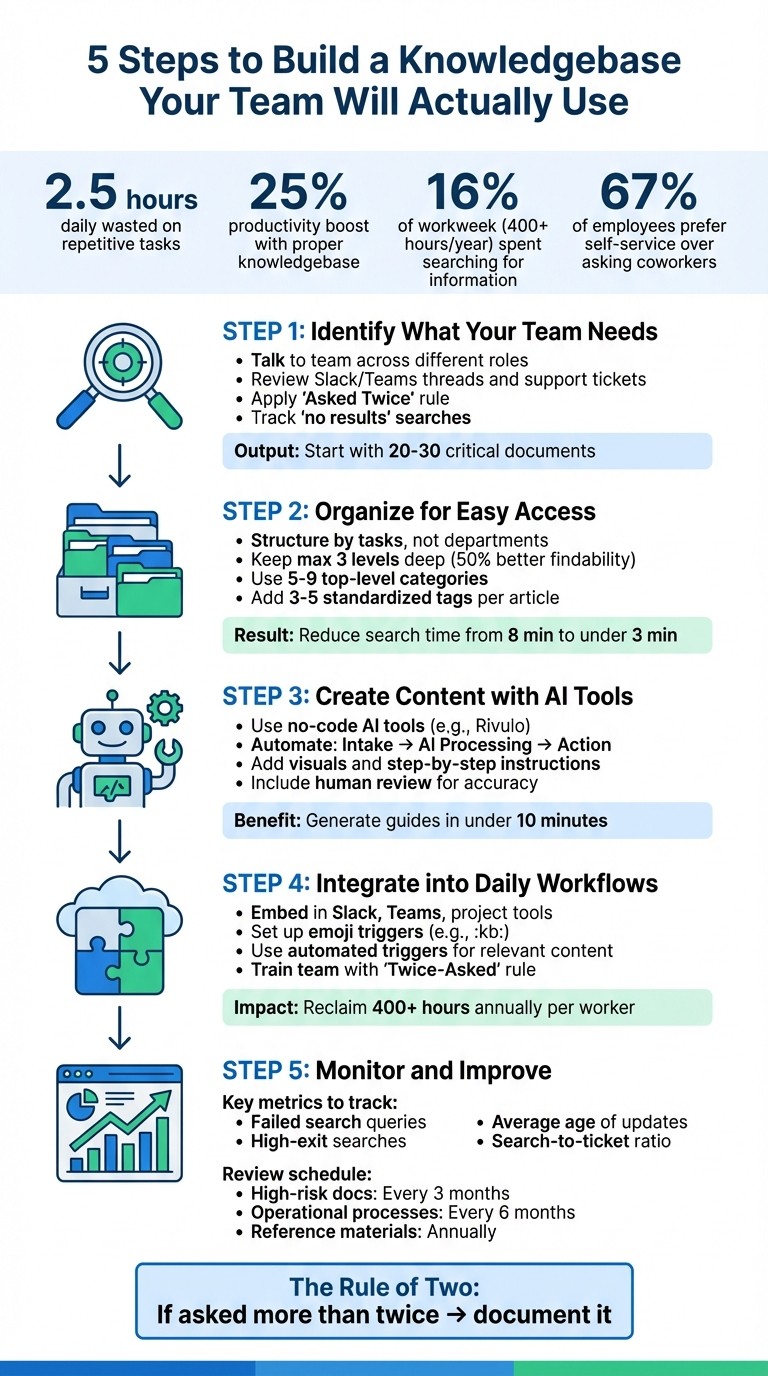
5-Step Process to Build an Effective Company Knowledgebase
How to Build an Internal Knowledge Base
Step 1: Identify What Your Team Needs
Before diving into building your knowledge base, it's crucial to pinpoint the friction points in your workflows. Without addressing real problems, a knowledge base risks becoming just another forgotten repository. The key is to identify the specific challenges your team faces and prioritize the information that will make the biggest difference. This step sets the stage for creating a resource that solves your team's most urgent issues.
Find Where Your Workflows Get Stuck
Start by having direct conversations with your team. Speak with colleagues across different roles and ask questions like, "When do you find yourself stuck?" or "What questions do you have to ask repeatedly?" These insights reveal gaps that might only exist in people's heads - gaps that become major obstacles when those individuals aren't available.
Next, dig into your communication platforms. Review Slack or Teams threads, support tickets, and email chains to uncover recurring themes. For instance, if IT frequently resets passwords or HR spends hours explaining how to submit expenses, it’s a clear sign that your documentation is either missing or outdated.
Apply the "Asked Twice" rule: if a question is asked more than twice, it’s time to create a knowledge base page for it. You can also look at your search analytics - specifically, queries that return "no results." These searches highlight the information your team is actively seeking but can’t find.
Focus on High-Impact Content First
Once you’ve identified recurring problems, zero in on creating content that will have the greatest impact. Tackling the most common issues first ensures you’re addressing the pain points that matter most to your team.
Start with 20–30 essential documents that cover your biggest challenges. This might include onboarding checklists, FAQs, key processes, or troubleshooting guides - anything that saves time and reduces repetitive work.
Rather than organizing content strictly by department, structure it around real workflows. For example, instead of a generic "Sales Department" section, create task-focused guides like "Closing a Sales Deal" or "Handling Customer Objections." This approach ensures team members can quickly find the exact information they need, right when they need it.
Step 2: Organize Your Knowledgebase for Easy Access
Once you've identified the key content to include, the next challenge is organizing it in a way that makes it easy to use. A poorly structured knowledgebase can quickly turn into a forgotten repository where valuable information gathers dust. The key difference between a resource that gets used every day and one that's ignored often lies in how well it's organized and how easily users can find what they need.
Set Up Clear Categories and Tags
Think in terms of tasks, not departments. Instead of dividing your knowledgebase into sections like "Marketing" or "IT", focus on grouping content by the tasks your team performs. For example, create categories like "Onboarding a New Hire", "Processing Customer Refunds", or "Deploying Code to Production." This mirrors how your team naturally searches for help.
Keep the structure simple - no more than three levels deep. Research shows that adding extra layers can reduce the chances of users finding content by nearly 50%. Stick with a straightforward hierarchy, such as: Category → Subcategory → Article. For instance: "Customer Support" → "Refund Requests" → "How to Process a Refund in Under 5 Minutes."
Limit your top-level categories to 5-9 clear, plain-language labels. For instance, use "Billing" instead of something overly technical like "Revenue Operations." This prevents users from feeling overwhelmed by too many choices.
Tagging is equally important. Use 3 to 5 standardized tags per article, and make sure to map synonyms to the same content. For example, ensure that searching for "WiFi" or "Wireless Network" leads to the same result. Avoid dumping content into a "General" or "Miscellaneous" category - this often signals that your structure needs refining.
Once your categories and tags are in place, focus on optimizing search functionality to make finding information even faster.
Make Search Work Well
Roughly half of users prefer to search rather than browse, so your search function needs to be top-notch. Use action-oriented titles that match how your team phrases questions. For example, "How to reset a password" is far more effective than a vague title like "Password Management."
"Failed search queries are a goldmine. What terms are people searching for that yield zero results? That list is your content creation to-do list, straight from the source." – Build A Guide
Incorporate key synonyms into article introductions. This ensures that if your team uses terms like "board" but the documentation says "project", both terms will still lead to the right content. Make sure your search tool can handle typos and partial matches so users can quickly find what they need, even if their spelling isn't perfect.
Regularly check search analytics to identify queries that return no results or have low engagement. By addressing these gaps, you can significantly improve usability. In fact, with proper optimization, the average time it takes to find information can drop from 8 minutes to under 3 minutes, allowing your team to spend more time on meaningful work.
Step 3: Create and Update Content with No-Code AI Tools
Filling the documentation gap doesn't have to mean hours of manual effort anymore. No-code AI tools now make creating and updating documentation faster and simpler. By automating tasks like summarizing, drafting, and formatting, these tools save time while still leaving room for human oversight to ensure quality and accuracy.
Use Rivulo to Automate Documentation
Rivulo is a great example of how automation can simplify documentation. It works in three straightforward steps: Intake (gathering information from transcripts, forms, or notes), AI (processing the data to summarize, classify, and draft), and Action (producing the final document and routing it to your knowledgebase). This means you can transform discovery call transcripts into task lists, turn content requests into structured briefs, or convert meeting notes into polished SOPs - all with minimal effort.
"The goal isn't to build a robot company. It's to stop re-doing the same steps every week." – Rivulet IQ
Rivulo also lets you set up workflow triggers. For example, if a support ticket is tagged as "needs documentation", Rivulo can draft a how-to article based on the conversation history and add it to your knowledgebase for review. This approach tackles the initial hurdle of creating documentation, ensuring your team doesn’t fall behind. However, always include a human review to maintain accuracy and stay aligned with your brand’s voice.
Add Visuals and Step-by-Step Instructions
Automated drafting is just the beginning - adding visuals and clear instructions makes your content even more effective. Text-only guides often leave users confused, but modern AI tools can take a screen recording and generate a complete step-by-step guide with annotated screenshots in less than 10 minutes. Use consistent visuals, like 2px red borders on clickable buttons or numbered callouts, to direct attention exactly where it’s needed.
For more complex processes, break them into numbered steps with clear sections, such as a title, introduction, prerequisites, procedures, and troubleshooting tips. Adding callout boxes to explain why certain actions are necessary can also reduce confusion and help users better understand the process. And for workflows involving motion or multi-step interactions, short GIFs or screen recordings are far more effective than static images. They’re easier to follow and eliminate the need for lengthy text explanations.
Step 4: Connect the Knowledgebase to Daily Work
For a knowledgebase to make a difference, it needs to seamlessly fit into your team’s daily routine. Building on earlier steps, the goal is to ensure that your documentation becomes a natural part of their workflow. The trick? Make sure the knowledgebase integrates directly into the tools your team already relies on. When information is accessible exactly when and where they need it, adoption becomes second nature.
Add Access to Tools Your Team Already Uses
Your team isn’t logging into standalone portals - they’re living in tools like Slack, Microsoft Teams, and project management platforms. That’s why integration is non-negotiable. For instance, you can set up emoji triggers in Slack (like :kb:) to capture important discussions and transform them into structured knowledgebase entries. This way, critical insights shared in chat threads don’t disappear into the void.
Rivulo takes this a step further with automation features that embed AI-powered widgets into internal portals or help centers. These widgets provide instant answers from your documentation, available 24/7. For teams juggling multiple tools, Rivulo can link specific project management tasks directly to relevant SOPs or checklists. This ensures that the right process documentation pops up exactly when it’s needed. Considering knowledge workers spend around 16% of their workweek - over 400 hours annually - searching for information, integrating the knowledgebase into their workflow can reclaim a significant chunk of that time.
Automated triggers can also surface process documentation at just the right moment, ensuring no one has to hunt for the correct steps. But once the system is in place, you’ll need to actively encourage your team to use it regularly.
Train Your Team and Encourage Use
Integration is just the first step - building consistent habits is the real challenge. One effective strategy is the "Twice-Asked" rule: if a question gets asked more than twice in a chat, it should be documented as a knowledgebase page. Then, train your team to respond by sharing links to those pages instead of retyping answers. This small adjustment reinforces the knowledgebase as the go-to resource while saving everyone time.
"If your team groans when someone says, 'It's in the knowledge base,' you don't have a documentation problem - you have an adoption problem." - Asrify
You can also weave the knowledgebase into everyday activities. Use meetings and onboarding sessions to showcase relevant SOPs, emphasizing the knowledgebase as the ultimate source of truth. For new hires, take time during their first week to guide them through the knowledgebase and show them how to find what they need. Assign "Hub Owners" to oversee main categories and "Page Owners" to manage individual articles. This ensures content stays accurate and up-to-date. When leaders actively use and maintain the knowledgebase, the rest of the team is more likely to follow their lead.
Step 5: Keep Improving and Track Results
A knowledge base isn’t a “set it and forget it” tool - it thrives on regular updates. Without consistent upkeep, outdated documents can erode trust and push teams back to informal knowledge-sharing methods.
"Once people get burned a few times by outdated docs, they stop relying on the system. That's when knowledge-sharing shifts back to DMs, hallway conversations, and tribal memory." - Asrify
The key is to integrate monitoring and updates into your regular workflow.
Monitor Usage and Collect Feedback
Tracking how your knowledge base is used can reveal gaps and areas for improvement. Here are some key metrics to focus on:
Metric | What It Reveals |
|---|---|
Failed Search Queries | Highlights missing content users are searching for |
High-Exit Searches | Points to articles that confuse users or don’t answer their questions |
Average Age of Update | Indicates how "stale" or potentially inaccurate content might be |
Search-to-Ticket Ratio | Shows how well self-service reduces support requests |
If an article gets a lot of views but little engagement, it may not fully address users' needs. Compare overall visits with support ticket volume to assess how effective your documentation is at solving problems.
Use this feedback to keep your content relevant and helpful.
Update Content Regularly
To preserve the benefits of a centralized knowledge base, schedule routine content reviews. Here’s a suggested timeline:
High-risk documents: Review every 3 months
Operational processes: Review every 6 months
Reference materials: Review annually
Assign subject matter experts to specific articles for accountability. Including metadata like "Owner", "Last Updated", and "Next Review Date" at the top of each page builds user confidence in the content.
Set aside time each month for a "KB health" review. Analyze search terms and popular pages to decide which articles need updates, consolidation, or archiving. Treat searches with no results as a to-do list for creating new content. Tools like Rivulo’s AI-powered features can help by flagging outdated documents or even drafting articles based on changelogs and feature updates.
Building a routine for maintenance ensures your knowledge base stays accurate and trustworthy.
Conclusion: Build a Knowledgebase Your Team Will Use
A knowledgebase only works if people actually use it. To make it a go-to resource, focus on organizing content around tasks, assigning ownership, and embedding it into the tools your team already uses. For example, employees are more likely to search for "How to handle refund requests" than "Finance Department policies", so structure content to match how they think and work.
When done right, managing knowledge effectively can boost productivity in big ways. But this only happens if the system stays up-to-date and easy to access. Assign clear ownership for content updates, and try the "Rule of Two": if a question gets asked more than twice, create a knowledgebase page for it.
The best knowledgebases fit seamlessly into daily workflows. Integrate them into tools like Slack or MS Teams, and use automated triggers to share the right info at the right time. Tools like Rivulo’s no-code AI can help by auto-generating updates, spotting gaps, and drafting new articles quickly.
To make your knowledgebase indispensable, focus on features that employees love. Did you know 67% of employees prefer self-service options over asking coworkers for help? Make it easy for them by using powerful search functions, action-oriented titles, and visuals to simplify complex ideas. Encourage a "document as you go" habit so insights are captured in real time, not left for quarterly updates.
Your knowledgebase should grow and adapt with your business. Watch for failed searches to spot missing content, review pages with high exit rates for clarity issues, and set up regular review schedules to keep everything relevant. By focusing on team needs, organizing by tasks, automating updates, and integrating into daily workflows, you can build a knowledgebase your team relies on every day. With tools like Rivulo simplifying the process, maintaining it becomes much easier.
FAQs
What should I document first?
To get started, document the essential processes, policies, and information your team uses every day. This includes things like onboarding procedures, troubleshooting guides, and key operational instructions. Prioritize content that’s frequently referenced or crucial to daily operations. This approach makes the knowledge base immediately helpful, cuts down on repetitive questions, and encourages your team to actually use it. Once the basics are in place, you can always build on it over time.
How do I get the team to actually use it?
To make sure your team actually uses the knowledgebase, design it to fit seamlessly into their daily workflows. Make information easy to locate and update, and emphasize how it benefits them. Integrate the knowledgebase into regular routines and offer incentives to encourage engagement.
Organize the content by specific use cases, assign clear ownership for maintaining it, and ensure it stays current. Leverage tools like no-code platforms or AI solutions to keep it user-friendly. Highlight its importance during onboarding and training sessions to build consistent usage habits from the start.
How do I keep the knowledgebase up to date?
To keep your knowledgebase current, set up a system for regular reviews and updates. Assign specific team members to oversee different sections to ensure accountability. Make content reviews part of your daily workflows and encourage your team to highlight outdated information as they come across it. Periodic audits and feedback loops can pinpoint areas needing updates, while AI-powered tools can streamline the process, turning your knowledgebase into a constantly evolving resource for your team.
Related Blog Posts

Hand over your first workflow this week
Hand Rivulo your most tedious workflow or your team’s most-asked question. Either way, it starts by understanding how your business works, and then it takes care of the rest.