
Manual vs Automated Workflows: Which Saves More Time?

Kathy Prince

Automation saves time, reduces errors, and cuts costs compared to manual workflows. While manual processes rely on human effort and are prone to delays and mistakes, automated workflows handle repetitive tasks faster and more accurately. Here's what you need to know:
Manual Workflows: Require human input at every step, causing delays when people are unavailable. Error rates range from 1% to 4%, and inefficiencies can cost businesses 20%-30% of their revenue annually.
Automated Workflows: Use software to complete tasks with minimal human involvement. They reduce invoice processing time by over 80%, cut error rates below 0.5%, and deliver ROI within the first year for 60% of businesses.
Quick Comparison:
Criteria | Manual Workflows | Automated Workflows |
|---|---|---|
Time per invoice | 6 minutes | <1 minute |
Error rate | 1%-4% | <0.5% |
Cost per invoice | $9.00 | $3.00-$6.00 |
ROI | - | 240%+ in the first year |
Scalability | Requires more staff | Handles growth without hiring |
Key Insight: Automation transforms repetitive tasks, saving time and money while allowing teams to focus on higher-value work. Tools like Rivulo make it easy to implement automation without technical expertise.
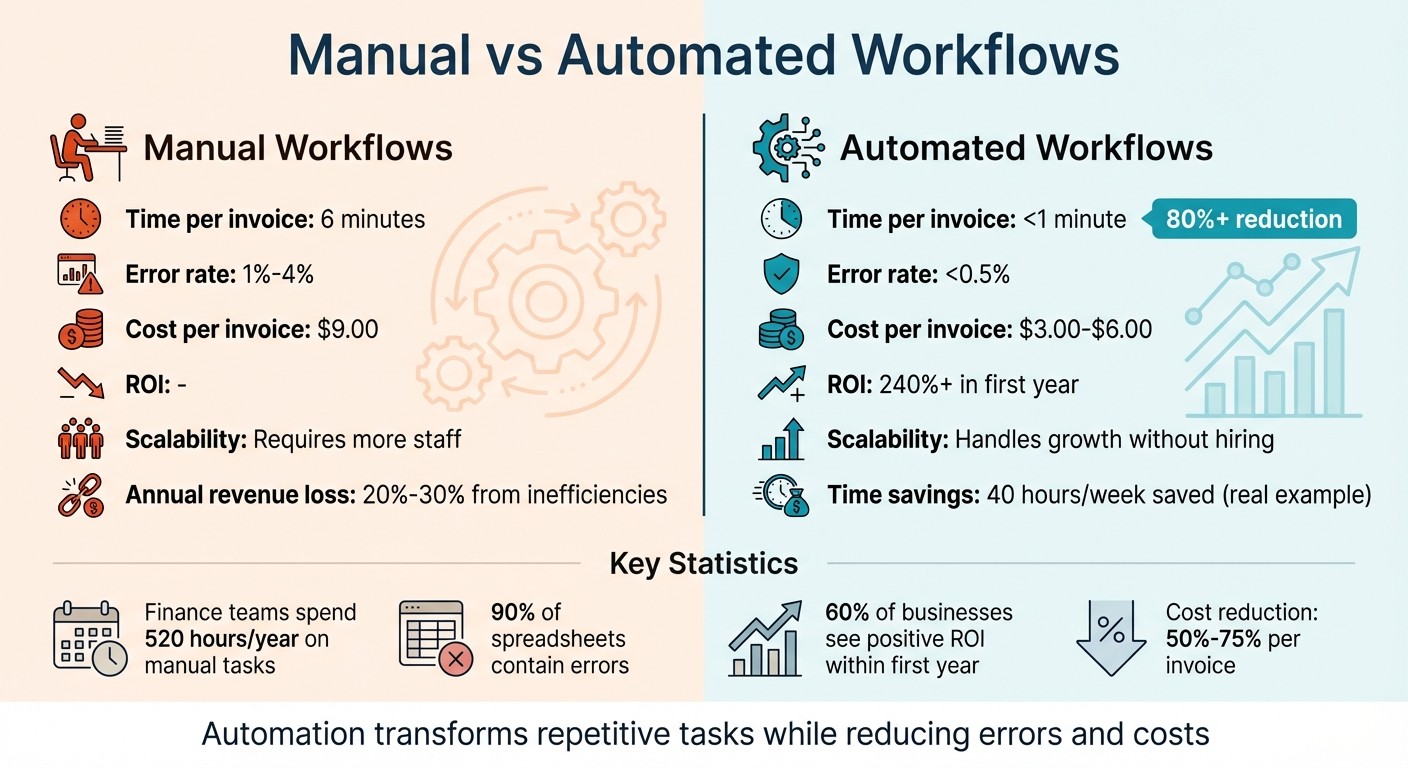
Manual vs Automated Workflows: Time, Cost, and Error Rate Comparison
Manual vs Automated Data Entry | Statswork Guide
Problems with Manual Workflows
Manual workflows often create three major obstacles that can slow down productivity as businesses grow - impacting time, accuracy, and the ability to expand effectively.
Time Consumption
Manual workflows rely on step-by-step human input, which means any delay - whether from someone being unavailable or overwhelmed - can bring everything to a standstill. Jamie Gyloai from Lean Technologies explains it well:
"Manual workflows create data lag: operators log on paper → supervisor reviews at shift end → data entered into spreadsheet → problems surface hours or days later".
This lag can result in critical issues going undetected for hours or even days. For example, finance teams spend an average of 520 hours each year on repetitive manual tasks, and in manufacturing, missing a manual alert could stop production lines, costing anywhere from $10,000 to $250,000 per hour.
Error Rates
In addition to wasting time, manual workflows are prone to errors. Manual data entry alone typically has an error rate of 1% to 4% per field, with common mistakes including transcription errors, misplaced decimals, and inconsistent entries. These errors can have serious financial consequences. One high-profile mistake caused nearly $900 million to be sent to the wrong recipients. In sales, delays in manual approvals - if they stretch beyond 10 days - can reduce win rates from 73% to 44%, a 29% drop. Overall, inefficiencies caused by errors in manual workflows can cost companies 20% to 30% of their annual revenue.
Scaling Difficulties
Manual workflows also make it harder for businesses to scale. As workload increases, manual processes often require nearly proportional increases in staffing, which drives up costs for hiring, training, and labor. For instance, 70% of finance teams spend up to 10 hours a week on tasks that could be automated. Additionally, as teams expand, information can get stuck in silos - like paper logs, email threads, or individual memories - making it tough for managers to pinpoint bottlenecks without asking team members directly. This lack of visibility allows minor issues to grow unchecked until they disrupt the entire workflow.
These challenges highlight why moving to automated workflows is key to boosting efficiency and enabling scalable growth.
How Rivulo Automates Workflows
Rivulo tackles the challenges of manual workflows by automating tasks directly in your browser - no coding or IT delays required. It integrates effortlessly with both legacy systems and modern web applications, making it a flexible solution for businesses of all sizes.
Automating Repetitive Tasks
Instead of building workflows from scratch with complicated tools, Rivulo simplifies the process by learning through observation. By watching you perform tasks via screen sharing - whether it’s logging into a portal, copying data into a spreadsheet, or processing invoices - Rivulo records every click, step, and decision. It then transforms these actions into automated workflows. This approach significantly reduces setup time and makes automation accessible even for teams without technical expertise.
To ensure teams focus on tasks that deliver the most impact, Rivulo uses an Automation ROI Score. This score is calculated by multiplying task frequency, time spent per occurrence, and a risk factor. For example, in January 2026, a 12-person web and SEO agency implemented Rivulo’s system and saved 40 hours per week across five workflows. This was equivalent to the output of a full-time employee.
Once workflows are automated, Rivulo executes tasks immediately through real-time processing.
Real-Time Processing
Manual workflows often suffer from delays due to data lag. Rivulo eliminates this issue by processing tasks instantly when triggered by events like form submissions or incoming emails. Tasks are categorized, summarized, and routed to the correct destination automatically, cutting out the delays caused by manual handoffs.
Additionally, Rivulo provides real-time monitoring with detailed logs, giving managers complete visibility into task execution - no need to follow up with team members. In one case study, automating status updates and handoffs reduced manual effort from 9 hours to 3 hours per week, while time spent on meeting recaps dropped from 14 hours to just 4 hours weekly.
This instant processing capability sets the stage for businesses to scale their operations without increasing headcount.
Scaling Without Hiring
Scaling with manual workflows often requires hiring more staff, but Rivulo’s automation allows businesses to handle increased workloads without adding to their team. Using a human-in-the-loop system, Rivulo drafts work for review, ensuring quality while enabling teams to process more tasks efficiently. Automated drafts are reviewed by humans before final approval, maintaining accuracy and client trust.
For example, the same SEO agency faced a situation where they had enough retainers to sustain the business but not enough margin to hire additional staff. By automating time-consuming "invisible drag" tasks like data processing, work routing, and quality assurance, they were able to significantly reduce their workload. Reporting narration dropped from 16 hours to 7 hours weekly, and ticket triage time decreased from 11 hours to 4 hours.
This combination of automation and human oversight allows teams to scale effectively without compromising on quality.
Manual vs Automated: Side-by-Side Comparison
When you put manual and automated workflows side by side, the differences are striking. Manual processes rely heavily on human involvement at every stage, which often leads to delays, inconsistencies, and higher costs as your team scales. Automation, on the other hand, takes over repetitive tasks instantly, freeing up your team to focus on tasks that demand critical thinking and creativity.
Time Savings
The time saved through automation is hard to ignore. For example, processing a single invoice manually takes an average of 6 minutes, while automation cuts this down to under 1 minute - a reduction of over 80%. Tasks like updating spreadsheets or manually transferring data can consume 8–20 hours per week, but automation can nearly eliminate this burden. Plus, research shows it takes over 20 minutes for employees to regain full focus after switching between tasks. Frequent interruptions from manual tasks can severely impact overall productivity. Automation not only saves time but also reduces errors, boosting efficiency even further.
Error Reduction
Errors are a common issue with manual workflows. Data entry mistakes occur in 1% to 4% of cases, and an astonishing 90% of spreadsheets contain errors. Automation dramatically lowers these error rates; organizations report reductions ranging from 40% to 75%. For instance, in a case involving 10,000 invoices per month, automation reduced the error rate from 2.5% to less than 0.5%. This level of consistency minimizes the need for rework and facilitates quicker, more accurate decision-making - both of which can lead to substantial cost savings.
Cost Efficiency and ROI
The financial benefits of automation are equally compelling. Processing an invoice manually costs around $9.00, compared to $3.00–$6.00 with automation - a cost reduction of 50% to 75%. Across all operations, inefficiencies in manual processes can cost companies 20% to 30% of their annual revenue. Automation, by contrast, delivers an average ROI of 240% within the first year, with 60% of organizations seeing positive returns in that time frame. Additionally, companies often spend 60% to 80% of their IT budgets on maintaining manual systems, leaving little room for innovation. Automation flips this dynamic, enabling operational teams to shift from being cost centers to drivers of growth.
"Every minute an employee spends on a task that a machine could do is a direct hit to the bottom line." - Nsovo Shimange, Struto
Real Examples of Time Savings with Rivulo
In January 2026, a 12-person digital agency specializing in web, SEO, and paid media found itself overwhelmed by repetitive tasks like weekly client reports, ticket triage, meeting recaps, and status updates. By introducing Rivulo's AI workflows - complete with human approval - they slashed their weekly workload from 62 hours to just 22 hours, saving 40 hours every week. Here's how these time savings played out across various operational areas.
Customer Support Automation
Support teams often lose valuable hours handling ticket routing and responding to repetitive questions. For this agency, ticket triage alone took up 11 hours each week. With Rivulo automating the process, converting chaotic client email threads into well-organized tasks became seamless. The result? Time spent dropped to just 4 hours - a 64% reduction. Rivulo's "teach by showing" feature made setup easy: the team simply demonstrated the process via screen sharing, and the platform learned to replicate it.
Operational Reporting
Turning dashboard data into client-friendly reports can be a major time drain. This agency spent 16 hours weekly creating these reports. Rivulo stepped in to automate the narration process, pulling key metrics and drafting plain-language summaries. The outcome? A 56% cut in time, reducing the reporting workload from 16 hours to 7 hours a week. To maintain quality, they adopted a "draft is allowed, send is not" policy, ensuring every report was reviewed by a human before being sent out.
Compliance and Audit Tasks
Tasks like meeting recaps and documenting next steps can be tedious and time-intensive. For this agency, these activities consumed 14 hours every week. By leveraging Rivulo, they reduced this to just 4 hours - a 71% time savings. The platform streamlined the process by capturing meeting transcripts, organizing the data, and generating structured summaries. This efficiency allowed the agency to handle more work without needing to hire additional staff.
How to Choose the Right Approach
To save time and cut costs, it's essential to evaluate your workflows carefully and pick the approach - manual, automated, or hybrid - that best fits each task. Factors like task frequency, the need for judgment, and potential bottlenecks should guide your decision. Inefficiencies in workflows can directly affect your bottom line, making this a critical step.
Audit Your Current Workflows
Start by assessing how your team's time is spent. Over a two-week period, categorize tasks into four groups: Transform, Route, Explain, and Check. This "toil bucket" method helps identify tasks that take up time without adding real value. Did you know that knowledge workers spend about 20% of their time - one full day per week - just searching for and collecting information? These are exactly the kinds of tasks that are ripe for automation.
After identifying the time-draining activities, prioritize them using a simple formula:
Frequency × Minutes per occurrence × Risk factor
(Assign 1.0 for low-risk tasks and 2.0 for high-impact ones). Focus first on repetitive, high-frequency workflows with clear, standardized outputs. However, don’t automate a process that’s already broken. If your team spends a lot of time fixing errors, clean up the workflow manually first before automating it.
Once you’ve mapped out these tasks, calculate their impact to build a strong case for automation.
Calculate Automation ROI
To justify automation, calculate the cost of manual work using a "loaded" hourly rate. Here’s how: take an employee’s annual salary, divide it by 2,080 hours (the number of work hours in a year), and multiply by 1.5 to account for benefits, taxes, and overhead. For example, an employee earning $60,000 per year has a loaded rate of about $43 per hour, not $29. Multiply the hours saved weekly by 52 to estimate annual savings.
Next, compare these savings to the costs of automation, such as setup time and monthly subscriptions. Small and medium-sized businesses that calculate ROI before automating report success rates 3.2 times higher. Typical first-year ROI for automation can range from 300% to 800%. When presenting your case to stakeholders, focus on guaranteed time and error reductions rather than speculative revenue increases. Manual processes often have error rates of 5–10%, but automation can reduce this to under 1%. This means fewer mistakes, less rework, and an improved customer experience.
Armed with these numbers, you can confidently decide which tasks to automate.
Test Rivulo's Automation
Begin with one repetitive task, such as weekly reporting or ticket routing. This test allows you to apply the ROI insights you’ve calculated while keeping disruption minimal. Using Rivulo, you can demonstrate the process via screen-sharing, and the platform will learn and automate the workflow for you - no technical expertise required.
To maintain quality, set up human-in-the-loop checkpoints. For example, Rivulo can draft the output, but a team member reviews it before finalizing. This "draft is allowed, send is not" policy captures most of the time savings while ensuring accuracy. Allocate 2–4 hours each month for monitoring and updates. Once you’ve successfully automated one workflow, expand to other high-impact tasks identified during your audit.
Conclusion
Choosing between manual and automated workflows isn’t just a tech decision - it’s about reclaiming time and resources. Did you know companies lose between 20% and 30% of their revenue every year due to inefficiencies? On top of that, knowledge workers spend nearly an entire day each week just searching for information. These gaps drain resources that could be fueling growth.
Rivulo is here to change that by removing technical hurdles. You don’t need to code or wait on developers. Simply share your screen or explain the task, and Rivulo creates the workflow for you. It integrates seamlessly with your existing browser-based tools - even older systems without APIs - making it possible to automate those processes that were previously stuck in manual mode.
Consider this: in January 2026, a 12-person agency started using Rivulo and saved around 40 hours per week across five key workflows. This allowed them to grow without hiring additional staff. By combining automation with human-in-the-loop checks, they preserved quality while cutting time spent on tasks like meeting recaps, reporting, ticket triage, status updates, and QA rework.
As Rivulet IQ puts it:
"If you want AI to save time, you have to stop asking it to guess what your agency meant." – Rivulet IQ
Streamlining your processes is essential for operational success. Start by auditing your repetitive tasks. Use loaded hourly rates to calculate your ROI, and pilot Rivulo on one workflow to see the results for yourself.
FAQs
Which tasks should I automate first?
The best place to start with automation is by tackling tasks that are repetitive, take up a lot of time, or are prone to human error. Think about processes like data entry, report generation, or approval workflows - these are prime candidates for automation.
Departments such as HR, payroll, IT, and finance often have a lot of routine tasks that can be streamlined. Automating these areas not only saves time but also cuts down on mistakes. Begin with tasks that are high-volume and repetitive. This approach can quickly improve efficiency and free up your team to focus on more strategic, high-value work.
How do I estimate automation ROI for my team?
To figure out the ROI of automation, hone in on three main benefits: time savings, fewer errors, and increased revenue. Start by calculating how much time automation saves compared to doing the same tasks manually. Then, look at how much you're saving by reducing mistakes or rework. Finally, assess how improved efficiency and happier customers lead to either higher revenue or lower costs. Putting these pieces together gives you a clear picture of whether automation is worth the investment.
How do I keep quality high with human approval?
Balancing automation with human oversight is essential for maintaining high-quality outcomes. Incorporate workflows that pause at key stages for review, giving individuals the chance to verify accuracy before moving forward. Keep approval processes straightforward and supportive rather than bogged down by unnecessary bureaucracy, and provide reviewers with clear, actionable guidelines. By blending automation with human judgment and using transparent, well-defined criteria, you can minimize errors and maintain consistent standards.
Related Blog Posts

Hand over your first workflow this week
Hand Rivulo your most tedious workflow or your team’s most-asked question. Either way, it starts by understanding how your business works, and then it takes care of the rest.