
Why Operations Teams Shouldn't Have to Wait for Engineering to Automate Processes

Kathy Prince

Operations teams often face delays when relying on engineering to automate workflows, leading to inefficiencies and financial losses. The solution? No-code AI automation tools empower teams to create and manage their own processes without needing technical expertise. Here's why this matters:
Delays Are Costly: Waiting for engineering can result in weeks of manual work, costing companies up to $50,000 per month in lost productivity.
No-Code Tools Save Time: Teams can automate tasks in hours rather than months, reducing repetitive work by up to 90%.
Immediate Benefits: Examples include cutting customer support ticket volume by 50% and saving 40 hours per week in small teams.
With tools like Rivulo, operations teams can automate processes by simply walking through tasks, bypassing engineering bottlenecks. This approach ensures faster execution, fewer delays, and more time for high-impact work.
Key Features of Rivulo:
Automate tasks by demonstrating them on-screen.
Use plain-language instructions to create workflows.
Manage and adjust automations with full control and visibility.
AI Workflow Automation Tutorial | How to Build No Code AI Workflows | AI Automation | Simplilearn

Why Engineering Backlogs Slow Down Operations
The Cost of Engineering Delays: Operations Automation Statistics
How Waiting for Engineering Creates Delays
Engineering teams often find themselves buried under daily crises, leaving little to no room for proactive tasks like automation. Instead, their time is consumed by manual fixes, spreadsheet duplication, and responding to incident alerts. This constant cycle of firefighting - what some call the "hidden loop" - prevents them from focusing on strategic process improvements or developing automation systems.
Automation is frequently seen as a task that’s important but not urgent. Michael Zelensky, Founder of liteed.com, captures this perfectly:
"Automation is important, but never urgent. Firefighting fills the week. The work that would eliminate firefighting never receives a time slot."
The irony is clear: the very automations that could reduce manual workloads are perpetually sidelined by immediate crises.
Even when automations are built, they can create new bottlenecks. Any minor tweak requires a full development cycle, leaving operations teams unable to make quick changes to their workflows. The problem worsens if the original engineer leaves, turning the automation into an "opaque artifact" - a process no one wants to touch because the context is lost, and the risks feel too high.
These bottlenecks don’t just slow things down - they lead to measurable financial losses.
The Cost of These Delays
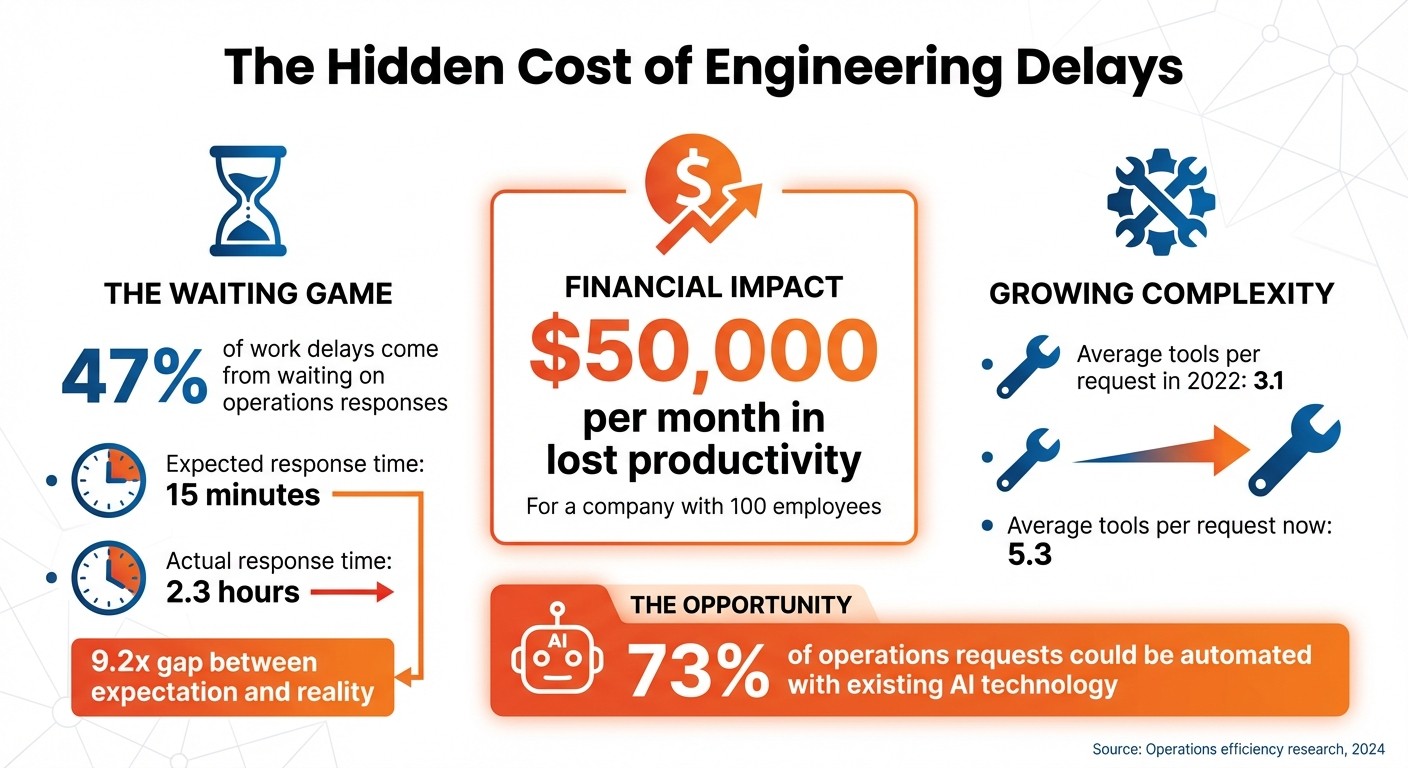
The financial toll of these delays is striking. 47% of work delays stem directly from waiting on operations responses. While stakeholders expect responses within 15 minutes, the average operations team takes 2.3 hours - a 9.2x gap between expectation and reality.
For a company with 100 employees, this response time can result in approximately $50,000 per month in lost productivity. The problem is compounded by the increasing complexity of operations requests. On average, a single request now involves 5.3 tools - up from 3.1 in 2022 - turning these tasks into a frustrating scavenger hunt for context.
The most frustrating part? 73% of operations requests could be automated with existing AI technology. Yet, teams remain stuck in manual workflows because engineering doesn’t have the bandwidth to implement the necessary solutions.
These challenges highlight the pressing need for operations teams to embrace no-code AI automation tools, allowing them to sidestep traditional engineering roadblocks and keep workflows moving.
Why No-Code AI Automation Works for Operations Teams
What No-Code AI Automation Means
No-code AI automation offers a practical and accessible way for operations teams to tackle their daily challenges. Using visual, drag-and-drop tools, these platforms make it easy to transfer information between applications while integrating AI for tasks like summarizing meeting notes, classifying support tickets, or pulling data from emails. Unlike traditional automation systems that rely on rigid rules, no-code tools handle messy, unstructured data - the kind that operations teams encounter regularly.
This approach organizes workflows into three main layers: Intake, AI, and Action. This structure allows non-technical users to create complete systems without writing any code. The growing trust in no-code solutions reflects their reliability, with the integration platform as a service (iPaaS) market reaching $8.5 billion in 2024 and projected to surpass $17 billion by 2028.
What makes no-code AI automation stand out is its ability to address specific business problems. Operations teams, being deeply involved in everyday processes, can design solutions tailored to their unique workflows. This flexibility not only simplifies tasks but also creates opportunities for meaningful improvements.
What Operations Teams Gain
The advantages of no-code AI automation are clear: faster execution, greater independence, and measurable savings. Workflows that once took months can now be built in hours - teams report completing tasks up to 90% faster. For instance, in March 2026, the Portland Trail Blazers used no-code AI to process fan feedback, cutting their review time by an impressive 94%. Similarly, Rebrandly reduced their customer support ticket volume by 50% using these tools.
Another major benefit is the ability for operations teams to manage their own systems without relying on IT. Hybrid teams that combine business and engineering expertise have seen productivity gains of over 60%. On average, these tools save teams 23.5 hours per week once they’re up and running.
The impact of these automations extends beyond individual teams, creating efficiencies across entire organizations. For example, when one team automates lead enrichment, both sales and marketing reap the rewards. Author.Inc achieved 70% profit margins by automating their content workflows from start to finish. In fact, for 80% of business use cases, no-code AI tools are just as effective - or even better - than custom-built engineering solutions, all while requiring far less time and money.
How Rivulo Helps Operations Teams Automate
What Rivulo Offers
Rivulo brings fast, user-controlled automation tailored for teams that need results without delay. Its standout feature, "Automate by Showing", transforms a simple screen walkthrough into a repeatable process. By capturing every click, step, and decision point, Rivulo makes automation as easy as explaining a task to a colleague - no coding or complicated tools required.
"If you can explain a task to a colleague, you can automate it with Rivulo." – Rivulo
Rivulo operates directly in your browser, making it compatible with any web-based tool, even older legacy systems. From updating outdated internal databases to transferring data across popular platforms, Rivulo integrates seamlessly with over 3,000 applications.
Its conversational workflow planning feature takes automation design to the next level. Using a plain-language chat interface, you can create or modify workflows by simply describing the changes you need. Before launching, you can review every step, and with human-in-the-loop controls, you can pause, edit, or stop automations on the fly - no IT intervention required. Real-time logs provide full visibility into each step of the process.
These tools not only make automation accessible but also deliver immediate improvements that streamline everyday operations.
Before and After Using Rivulo
Rivulo's capabilities translate into real-world time savings for operations teams. Here's an example: In January 2026, a 12-person agency specializing in web, SEO, and paid media faced capacity challenges. By automating five core repetitive tasks - meeting recaps, reporting narration, ticket triage, status updates, and QA rework - they saved 40 hours per week.
Workflow Area | Before Rivulo (hrs/week) | After Rivulo (hrs/week) | Time Saved (hrs/week) |
|---|---|---|---|
Meeting recaps & next steps | 14 | 4 | 10 |
Reporting narration | 16 | 7 | 9 |
Ticket triage | 11 | 4 | 7 |
Status updates & internal handoffs | 9 | 3 | 6 |
Late-stage QA rework | 12 | 4 | 8 |
Total Weekly Savings | 62 | 22 | 40 |
These time savings went beyond just numbers. The team dealt with fewer interruptions and reduced "decision debt", as automated workflows kept all necessary context intact. Tasks that once required weeks of engineering support could now be set up in minutes - just walk through the process once. This shift allowed the team to focus on strategic, high-impact projects instead of repetitive work.
How to Start Automating with Rivulo
Now that you understand Rivulo's automation capabilities, let’s dive into how you can integrate them into your daily workflows effectively.
Finding Tasks to Automate
Begin by identifying the tasks that frustrate your team the most. These are usually the ones causing delays - think about processes like onboarding new employees, routing sales contracts, or waiting on vendor approvals. Any task that often gets stuck waiting for action is a great candidate for automation.
Pay close attention to repetitive, browser-based tasks. This might include logging into supplier portals, transferring data between spreadsheets, updating outdated systems, or extracting information from emails and meeting notes.
Don’t overlook tasks that require decision-making. Rivulo can handle workflows involving tasks like summarizing meeting transcripts, classifying support tickets by urgency, or pulling out key details from messy inputs like call notes. To get started, map out your current process - identify who creates, reviews, and stores the information, as well as the next steps in the workflow.
Here’s a simple way to prioritize: use the formula Frequency × Minutes per occurrence × Risk factor. This will help you pinpoint the manual processes that could save the most time when automated. Start with high-volume, repetitive tasks like data entry, document routing, or inventory updates. Automating these tasks can eliminate the delays caused by manual work.
Setting Up Workflows with Rivulo
Rivulo makes setup simple with its "Automate by Showing" feature. Instead of writing out detailed instructions or building complex flowcharts, you just perform the task once on your screen. Rivulo observes your actions - clicks, decisions, and steps - and transforms them into a repeatable workflow.
"Teach Rivulo by showing, not telling. Just share your screen and let Rivulo watch you work." – Rivulo
The conversational planning interface allows you to design workflows in plain language. It’s like explaining a task to a teammate. You describe what needs to be done in a chat-style format, and Rivulo converts your input into actionable steps. Need to tweak something? Just describe the change, and the workflow updates instantly - no technical expertise required.
Before launching any workflow, Rivulo lays out each step for your review. You can approve it, make adjustments, or remove unnecessary parts. You’ll also have access to real-time logs and controls to pause or edit workflows whenever needed.
To structure your workflows, try the "Trigger-AI-Action" framework:
Define the trigger (e.g., a form submission).
Add an AI step (e.g., summarizing the request).
Specify the final action (e.g., creating a record in your CRM).
For workflows that generate client-facing output, always include an approval step. Let the AI draft the response, but have a human review it before it’s sent.
Once your workflow is set up, it’s time to test and refine it.
Testing and Scaling Your Automation
Start small by automating one internal handoff that happens weekly and can be reviewed quickly - ideally in under two minutes. This low-stakes approach helps you get comfortable with Rivulo’s functionality. Test the workflow manually until its results consistently meet expectations. Take note of what works and where adjustments are needed.
Push your testing further by trying edge cases. Feed the workflow incomplete data, unexpected formats, or unusual inputs to see how well it adapts. If you find yourself making frequent manual corrections, pause the workflow and refine the prompts or data inputs. This method ensures quality as you scale up.
Once a workflow runs smoothly for two weeks, you can expand to similar tasks. For instance, if you’ve successfully automated meeting recaps, apply the same structure to tasks like status updates or ticket triage. Rivulo’s user-friendly design makes it easy to build and refine automations incrementally without disrupting your operations.
Assign a dedicated owner for each automation. This person will monitor logs, handle exceptions, and make improvements based on how the workflow performs in practice. As your library of workflows grows, you’ll gain a clear understanding of which tasks provide the most value and which ones to tackle next.
Conclusion
Operations teams shouldn't need to rely on engineering to get things done. The real obstacle isn't a lack of ideas - it's the constant dependence on technical resources that are already stretched too thin. Rivulo changes the game by giving automation power directly to the people who understand the processes best.
"Your operations team knows exactly which tasks should be automated - they just shouldn't need engineers to make it happen." - Rivulo
With Rivulo's "show, don't tell" approach, creating workflows is as simple as performing the task on your screen. Its conversational interface allows you to design and tweak automations using plain language, while human-in-the-loop controls ensure you maintain full control. Whether it's automating older systems without APIs or handling browser-based tasks, Rivulo integrates seamlessly into the tools your team already uses.
This shift - from waiting on IT to building your own solutions - turns operations from a reactive cost center into a proactive force for efficiency. For instance, organizations have saved over 22,000 hours by automating call center workflows, and support agent tasks are now up to 80% faster thanks to automated processes. These aren't future possibilities - they're results you can achieve right now by taking action.
Start small, test what works, and scale from there. The tools are ready. The only question is: will you keep waiting, or start automating today?
FAQs
Which ops tasks should I automate first?
Start by focusing on automating those repetitive, time-consuming tasks that follow clear, predictable rules. Think of things like approval workflows, report generation, or routine data entry. These are perfect candidates for no-code tools, which allow operations teams to streamline their work, save valuable time, and boost efficiency - all without relying on engineering support.
How do I keep AI automations accurate and safe?
To make sure AI automations stay accurate and safe, it's important to set up guardrails like approvals, detailed logs, and clear rules. These measures help prevent automating tasks that shouldn't be automated, while also keeping outputs in check and minimizing mistakes. On top of that, implementing governance practices and setting strict limits on how AI is used can go a long way in maintaining both safety and precision in your workflows.
Can Rivulo automate tools with no API or legacy systems?
No-code automation platforms allow Rivulo to streamline tools and processes even when APIs or legacy systems aren't available. These platforms work by integrating with existing systems without needing direct API connections or overhauling the entire infrastructure. This approach simplifies automation, making it easier and more effective for operations teams to implement.
Related Blog Posts

Hand over your first workflow this week
Hand Rivulo your most tedious workflow or your team’s most-asked question. Either way, it starts by understanding how your business works, and then it takes care of the rest.