
Business Process Automation: A Beginner's Guide

Kathy Prince

Business Process Automation (BPA) helps businesses save time and reduce errors by automating repetitive tasks like data entry, email responses, and approvals. It works through triggers (events that start a process), actions (tasks completed automatically), and conditions (rules that guide workflows). BPA ranges from simple task automation to advanced AI-driven processes.
Key Benefits:
Save Time & Cut Costs: Automation can reduce manual workflows by up to 30%, saving businesses 20+ hours per week and cutting costs by 25–40%.
Reduce Errors: Automation minimizes errors by up to 90%.
Scalability: Businesses can handle growth without adding staff, with an average ROI of 240%.
How to Start:
Identify repetitive, rule-based tasks (e.g., data entry, approvals).
Use tools like Rivulo to automate workflows without coding.
Test and monitor automations to ensure smooth operations.
Automation transforms how businesses operate, freeing up time for strategic work and improving efficiency.
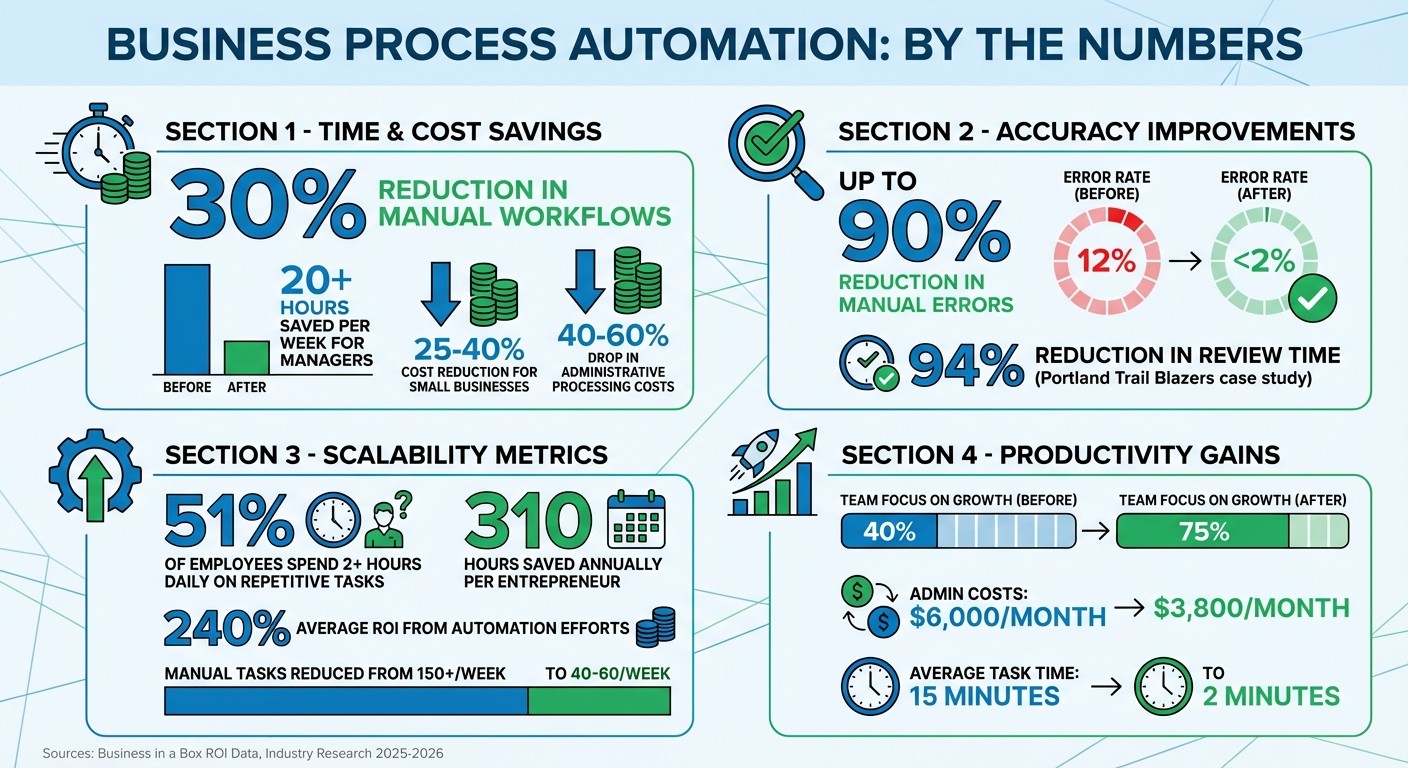
Business Process Automation ROI and Impact Statistics
The Beginner's Guide to Automating Your Business
Benefits of Business Process Automation
Business Process Automation (BPA) delivers on its promise to simplify manual tasks, offering clear advantages like saving time, reducing errors, and enabling scalable growth. Let’s take a closer look at these benefits.
Save Time and Reduce Costs
Automating repetitive tasks frees up significant time. For example, manual workflows can drain up to 30% of a company's productive capacity, with employees often stuck copying data, chasing approvals, or handling routine emails instead of focusing on impactful work.
The financial savings are just as striking. Small businesses that adopt automation report 25–40% cost reductions, while administrative processing costs can drop by 40–60%. Managers, on average, reclaim 20+ hours per week, which can be redirected toward strategic goals, customer engagement, and revenue-driving activities.
Take SolarEdge Consulting, a 15-person firm, as an example. In late 2025, they automated project updates and invoice templates. Within just 60 days, they saved 25 hours weekly and cut administrative costs by 22%.
These time and cost benefits naturally pave the way for greater accuracy, as discussed next.
Reduce Errors and Improve Accuracy
Human errors, whether it’s a typo, a forgotten follow-up, or a miscalculation, can cost both time and money. Automation addresses this by reducing manual errors by up to 90%, thanks to consistent application of rules and processes.
"Properly designed and executed automation eliminates the risk of human error." - Bryce Emley, Author, Zapier
A great example comes from the Portland Trail Blazers’ guest management team. In February 2026, they automated their fan feedback triage process using Qualtrics, OpenAI, and Slack. Before automation, three departments spent 50 hours weekly reviewing surveys, often missing complaints. The new system assessed sentiment and routed responses automatically, cutting review time by 94% and ensuring responses in under 24 hours.
Beyond reducing errors, automation also creates a detailed audit trail, which is invaluable when scaling operations.
Scale Your Operations Without Adding Resources
Scaling traditionally means more administrative work. Automation changes that equation, enabling businesses to grow without proportionally increasing staff or costs. Automated workflows handle routine decisions - like expense approvals, lead qualification, or ticket routing - without bottlenecks, allowing teams to maintain momentum during growth.
Consider this: 51% of employees spend at least two hours daily on repetitive tasks. Automating these tasks frees up time for higher-value work. On average, entrepreneurs save 310 hours annually by automating tasks like document management, lead generation, and data entry. The payoff? Businesses report an average ROI of 240% from automation efforts.
Metric | Before Automation | After Automation |
|---|---|---|
Manual Tasks/Week | 150+ | 40–60 |
Average Task Time | 15 minutes | 2 minutes |
Error Rate | 12% | <2% |
Admin Cost | $6,000/month | $3,800/month |
Team Focus on Growth | 40% | 75% |
(Source: Business in a Box ROI Data)
How to Identify Processes You Can Automate
Not every task in your business is a good fit for automation. The trick is figuring out which processes will give you the best return on your effort. Start by pinpointing time-consuming workflows that happen often and follow consistent, predictable patterns. These are the areas where automation can save the most time and money.
What Makes a Process Good for Automation
The best candidates for automation share a few key qualities: they’re high-volume, follow clear rules, are standardized, and rely on digital data. Let’s break that down:
High-volume tasks: These are the repetitive jobs that happen daily or weekly, eating up a lot of manual effort. They’re perfect for automation.
Rule-based logic: Automation thrives on clear "if-then" rules. Tasks requiring human judgment or creativity aren’t ideal.
Standardization: Processes with fewer exceptions - ideally, less than 15% - are easier and cheaper to automate.
Digital data inputs: Automation needs structured data, like spreadsheets or forms, to work effectively.
Some common examples include email responses, data entry, invoice processing, report generation, and customer onboarding. For instance, in 2025, Intuit used custom bots and Slack integrations to automate customer support workflows. The results? A 12% boost in customer satisfaction, a 36% faster case resolution time, and 9,000 hours saved annually.
Manual vs. Automated Process Comparison
Let’s compare manual processes with automated ones to see where automation really shines:
Feature | Manual Process | Automated Process |
|---|---|---|
Efficiency | Limited by human speed and work hours | Runs 24/7 at digital speeds |
Error Rate | High; prone to mistakes like typos | Low; follows rules consistently |
Time Consumption | Needs active human involvement | Completes tasks in seconds |
Scalability | Hard to scale without adding staff | Handles growth with minimal effort |
Cost | High labor and correction costs | Lower operational expenses |
"Automation applies the same rules every time, which reduces inconsistencies and downstream cleanup." - Nicole Replogle, Staff Writer, Zapier
This side-by-side comparison makes it clear where automation can deliver significant advantages.
How to Evaluate Your Workflows for Automation
To make the most of automation, you’ll need to audit your current workflows. Spend a week tracking your repetitive tasks. Note how much time they take, how often they occur, the exact steps involved, and rate their "frustration level" on a scale of 1 to 10. This will help you spot where your team’s time and energy are being drained.
Next, focus on the 20% of processes that cause 80% of your inefficiencies - those bottlenecks or tasks with frequent delays and errors. Evaluate each process based on three factors: technical readiness, potential impact, and feasibility. Processes scoring over 30 are strong candidates for automation.
Before diving into automation, it’s crucial to refine the process itself. Automating a broken workflow only amplifies the problems. Simplify and standardize the steps first to avoid "automating dysfunction". For example, in 2025, Coles, an Australian supermarket chain, optimized its incident management workflows in Slack. This prep work cut bug-fixing time from 12 hours to just 30 minutes once automation was implemented.
Also, pay attention to feedback from your team. Comments about delays or needing to check multiple tools are often strong clues that automation could make a big difference.
How Rivulo Simplifies No-Code AI Automation
When manual processes become a bottleneck, Rivulo steps in to transform those inefficiencies into streamlined, automated workflows. Identifying the processes you want to automate is only half the battle - the real challenge is setting up automation, especially if you’re not tech-savvy. That’s where Rivulo shines. Designed specifically for operations teams, it eliminates the need for coding expertise, so you can focus on getting things done without spending weeks learning new skills. Let’s dive into how Rivulo’s features make automation accessible to everyone.
What Rivulo Offers
Rivulo takes a refreshingly simple approach to automation. Instead of requiring users to create complex logic flows, the platform allows you to share your screen and perform the task manually. Rivulo’s AI watches and learns, automatically building workflows based on your actions. This "automate by showing" method removes the technical hurdles that often discourage teams from starting.
Another standout feature? Rivulo operates directly in your browser, making it compatible with any web-based tool, even older systems without modern APIs or integrations. With connections to over 3,000 applications, including popular tools like Gmail, Slack, HubSpot, and Airtable, you don’t have to worry about managing API connections yourself.
The platform also gives you complete control and transparency. Before any workflow goes live, you can review, pause, edit, or stop it as needed - no tech support required. Real-time logs provide a clear record of what ran and when, ensuring there are no hidden surprises in your automation process.
Feature | How it Helps Beginners |
|---|---|
Screen Sharing | Lets the AI learn tasks by watching, skipping complex logic mapping. |
Conversational Planning | Enables workflow creation using natural, everyday language. |
Browser Automation | Works with any website or legacy tool, no API needed. |
Human Review | Ensures workflows are reviewed and approved before execution. |
3,000+ Integrations | Automatically connects to popular tools like Gmail, Slack, and HubSpot. |
How Rivulo Works for Beginners
Rivulo’s conversational interface is a game-changer for beginners. You can design and refine automations using plain language, just like explaining a task to a colleague. Forget about deciphering technical jargon or navigating complicated settings. As Rivulo puts it:
"If you can explain a task to a colleague, you can automate it with Rivulo".
Here’s how it works: simply record yourself performing the task manually. When adjustments are needed, you describe the changes in natural language, and Rivulo updates the workflow accordingly. This straightforward approach is perfect for operations teams that need to eliminate repetitive tasks without becoming automation experts.
Why Operations Teams Choose Rivulo
Rivulo’s simplicity is why operations teams trust it. It’s designed to save time without adding complexity. Consider this: the average business owner spends 21.3 hours a week on repetitive tasks that could be automated. Rivulo handles these tasks in the background, freeing your team to focus on more meaningful work.
The platform is especially useful for automating legacy tools and manual handoffs - those tedious tasks like copy-pasting or following up repeatedly. Because Rivulo operates within the browser, it can automate even older systems that lack integrations, bypassing the need for APIs. This means you’re not restricted to automating only modern tools; you can address the outdated systems causing the most headaches.
"Rivulo carries those tasks downstream, so you can stay in flow and focus on the work that truly adds value." - Rivulo
For teams under pressure to adopt AI while lacking technical expertise, Rivulo acts as a bridge. It empowers non-technical users to embrace automation without requiring them to become developers. The benefits? Lower costs, fewer errors, and higher productivity - all without the steep learning curve.
How to Automate Your First Process with Rivulo
Rivulo’s user-friendly design makes automating your first process straightforward. You don’t need to code or deal with complex diagrams. Let’s break it down into three simple steps to transform a manual task into an automated workflow.
Map Your Current Workflow
Before diving into automation, take a close look at your existing process. Start by identifying the trigger - the event that initiates the task, like receiving a customer inquiry email or a form submission. Then, outline every action that follows, step by step, until the process is complete.
Pay attention to the tools and data involved. List the apps you use - whether it’s Gmail, Excel, HubSpot, or even an older system - and note how information moves between them. Don’t forget to include decision points, like “Does this order need approval?” Stick to a manageable scope for your first automation by limiting the process to 5–7 key steps. To make things easier, spend a week auditing your tasks: track repetitive actions, how long they take, and how often they occur.
Here’s a quick example of what your mapping might look like:
Mapping Component | Description | Example |
|---|---|---|
Trigger | Event that starts the process | New customer inquiry email received |
Steps | Actions performed in order | Check CRM, calculate price, draft reply |
Data Used | Information required for the task | Customer history, pricing tiers |
Systems | Tools or apps involved | Gmail, Excel, HubSpot |
Decision Points | Rules or conditions to follow | Is the customer a VIP? |
End Result | Final outcome of the process | Quote sent and logged in CRM |
Once you’ve mapped everything out, you’re ready to move on to setting up your automation in Rivulo.
Set Up Automation with Rivulo
In Rivulo, setting up automation is as simple as showing it what to do. Share your screen and perform the task manually while Rivulo observes and learns. As you click, type, and navigate through the process, the platform captures your actions and builds the workflow automatically.
You can refine the workflow using Rivulo’s conversational interface. Just describe adjustments in plain language - like adding an approval step or handling a specific scenario - and Rivulo will update the automation accordingly. If needed, configure the process to generate drafts for human review before final execution. Once everything looks good, review the workflow one last time before activating it.
The next step is to ensure everything runs smoothly by testing and monitoring your automation.
Test and Monitor Your Automation
Testing is crucial to confirm that your automation works as expected. Start with sample data to check the basic logic, then test edge cases or unusual scenarios to see how the automation handles them. Aim to run 10–20 test cases, covering every step from the trigger to the final output. Monitor key metrics like throughput, error rate, and handling time to ensure everything is functioning as planned. Only proceed to full deployment once you achieve a success rate of over 95% in your tests.
When the automation goes live, keep a close eye on it during the first week. Check daily for any errors or failed executions. After this initial period, switch to weekly performance reviews and collect feedback from your team. Monthly evaluations should focus on the bigger picture, such as total time saved, return on investment, and potential areas for scaling.
To measure the impact of your automation, track metrics like throughput, error rate, average handling time, and cost per transaction. Calculate ROI using this formula: (hours saved per week × hourly rate) − implementation cost. Keep in mind that AI models may lose accuracy over time, with performance naturally degrading by 5% to 15% without retraining. Setting up drift alarms can help you identify when adjustments are needed.
Getting Started with Business Process Automation
Starting your journey into business process automation doesn't require a deep technical background. The best way to begin is by focusing on one repetitive task that's consuming too much of your time. By automating a single process, you can build momentum and confidence to tackle more complex workflows later.
Tools like Rivulo make this transition straightforward. You can simply share your screen while performing the task manually, and the tool will capture the workflow. Then, you can refine it by giving clear instructions like "add an approval step here" or "handle this scenario differently."
Start with tasks that are repetitive and follow clear, rule-based patterns - especially those done in a browser. Examples include routing customer inquiries, updating records across multiple systems, or generating routine reports. To identify the best candidates for automation, spend a few days tracking these tasks. Pay attention to how long they take, how often they occur, and what data they involve. This audit will help you zero in on processes that are both time-consuming and offer immediate benefits when automated.
When automating, it's important to include built-in human oversight, particularly for tasks that affect clients. For instance, set up automations to create drafts for you to review before they are finalized. Also, establish fallback options so that tasks can be routed to a person if the automation encounters an issue. This "human-in-the-loop" approach ensures quality while still saving significant time. Businesses that adopt process automation typically see a 40–60% reduction in routine processing costs and a 90% drop in manual errors.
A great starting point is to aim for a quick win - a simple workflow that takes 60 minutes or less to set up. For example, you could automate routing form submissions to Slack with an AI-generated summary. Seeing the immediate impact on your workload will not only save time but also give you the confidence to tackle more advanced automations. The ultimate goal isn’t to automate everything at once but to free yourself from repetitive tasks so you can focus on work that demands your expertise.
FAQs
What’s the difference between a trigger, an action, and a condition?
In business process automation, a trigger is what kicks off a workflow - like when an email lands in your inbox. An action follows the trigger and completes a task, such as automatically sending a reply. A condition adds a layer of decision-making, setting rules to determine if the action should proceed, like checking whether a form has all required fields filled out. These elements work together to streamline workflows, ensuring tasks are initiated, managed, and executed smoothly.
What business tasks should I automate first for the fastest ROI?
Automating repetitive and time-consuming tasks is a smart way to achieve quick ROI. Start with processes that follow clear rules and don’t rely on strategic decision-making. Think about tasks like data entry, appointment scheduling, or email follow-ups. These activities are often resource-heavy but simple to automate.
By streamlining these tasks, you can cut costs, reduce errors, and free up your team to focus on more impactful work. The result? Faster results that are easy to see and appreciate.
How do I keep automation accurate and safe with human review?
To maintain accuracy and safety in automation, include 'Human in the Loop' checkpoints in your workflows. These checkpoints give your team the chance to review, adjust, or approve content at critical stages before the automation proceeds. By doing this, you minimize errors, ensure dependable results, and combine the speed of AI with the careful oversight of human judgment, creating a system that's both efficient and secure.
Related Blog Posts

Hand over your first workflow this week
Hand Rivulo your most tedious workflow or your team’s most-asked question. Either way, it starts by understanding how your business works, and then it takes care of the rest.