
How to Connect Legacy Systems Without IT Support

Kathy Prince

If you're tired of waiting on IT to integrate outdated systems, there's good news: you can now connect legacy tools without writing code or relying on APIs. No-code platforms like Rivulo let you automate browser-based workflows by simply showing the process. Here's how it works:
Legacy systems are tough to integrate because they lack APIs, use outdated formats, and store data in silos.
No-code solutions like Rivulo automate workflows directly in your browser, even for systems without modern integration points.
How it works: You screen-share your process, and the platform learns and builds the automation for you - no technical skills needed.
Benefits: Save time, reduce manual effort, and deploy integrations in weeks instead of months.
This approach empowers operations teams to bypass IT bottlenecks and boost efficiency without overhauling existing systems. Ready to automate? Start with one repetitive task and let Rivulo handle the rest.
What Are Legacy Systems and Why Are They Hard to Integrate
Legacy systems are the backbone of many large organizations. Think about COBOL mainframes managing bank transactions or AS/400 systems overseeing warehouse inventory. These text-heavy applications have been running for decades, trusted for their ability to handle critical data and large transaction volumes. Their longevity is no accident - they’ve proven to be reliable and hold years of institutional knowledge, often embedded in custom fields and reporting logic. However, this reliability comes at a price: integrating these systems with modern tools is notoriously challenging.
In fact, 62% of U.S. companies still depend on legacy systems for essential operations. The problem? These systems weren’t designed with modern software in mind. Without APIs, modern apps can’t easily tap into their data. Picture a locked vault: the information is there, but cloud-based apps, mobile platforms, and AI tools struggle to get inside.
Adding to the complexity are data silos. Critical information is often buried in intricate SQL databases filled with countless tables and undocumented logic. On top of that, data is frequently stored in outdated formats like XML or proprietary binary files, while today’s applications expect cleaner, more accessible formats like JSON. Even when access is possible, legacy systems can be fragile. High-speed requests from modern apps can cause crashes, requiring careful rate limiting to keep these systems stable.
"The goal is to stop viewing legacy systems as 'technical debt' and start viewing them as 'foundational assets.'" – Ezinne Anne Emilia, Software Engineer
It’s no wonder 85% of business leaders are concerned that their current infrastructure can’t support AI initiatives. Replacing these systems entirely isn’t cheap - costs range from $200,000 to $2 million. This has pushed many operations teams to explore more efficient, no-code solutions to bridge the gap between old and new.
How Rivulo Makes Legacy System Integration Easier
Rivulo streamlines legacy system integration by automating workflows directly in your web browser - no coding or IT expertise needed. Essentially, if you can access a system through your browser - even outdated tools without APIs - Rivulo can automate it.
The platform is built around a straightforward idea: if you can explain a task to a coworker, you can automate it. There's no need to learn coding, navigate complex API documentation, or wrestle with complicated automation tools. Instead, Rivulo allows users to demonstrate tasks naturally. Plus, every workflow is presented for review before going live, giving you the freedom to approve, adjust, or stop automations without relying on IT.
No-Code Automation for Non-Technical Users
Rivulo operates entirely in your browser, automating any web-accessible tool - even those older systems that lack APIs. With integration support for over 3,000 applications, it bypasses the need for modern connection points or technical setups.
The interface is designed to use plain, everyday language, so you won’t need to deal with technical jargon like JSON formatting, webhooks, or authentication tokens. You simply describe what needs to happen, and Rivulo takes care of the technical details. This user-friendly approach is further enhanced by its screen-sharing capabilities, which make automation setup even more intuitive.
Screen-Sharing for Workflow Setup
Rivulo takes its no-code approach a step further by allowing users to set up workflows through screen-sharing. Instead of mapping workflows in a visual builder or writing scripts, you simply share your screen and perform the task manually while Rivulo observes and learns.
"Teach Rivulo by showing, not telling. Just share your screen and let Rivulo watch you work. It learns the steps and builds the workflow for you - saving you hours of setup." – Rivulo
During the session, Rivulo captures every action, click, and decision you make. You can explain the process as if you were training a new team member - clarifying why you click certain buttons, how you handle exceptions, or what specific data you’re using. This method turns what would typically be hours of configuration into a quick, hands-on demonstration. Because Rivulo works at the browser level, it can even automate legacy systems with no API access.
Conversational Interface for Workflow Planning
Once you’ve demonstrated a task, Rivulo’s chat interface makes it easy to refine and adjust automations. You can tweak workflows on the spot without needing to start from scratch. The interface also provides clear logs, so you can monitor what ran and when without dealing with confusing or hidden processes. If a process changes - like a new field being added to your warehouse management system - you can update the automation quickly as your needs evolve, all without requiring technical assistance.
Step-by-Step Guide to Connecting Legacy Systems with Rivulo
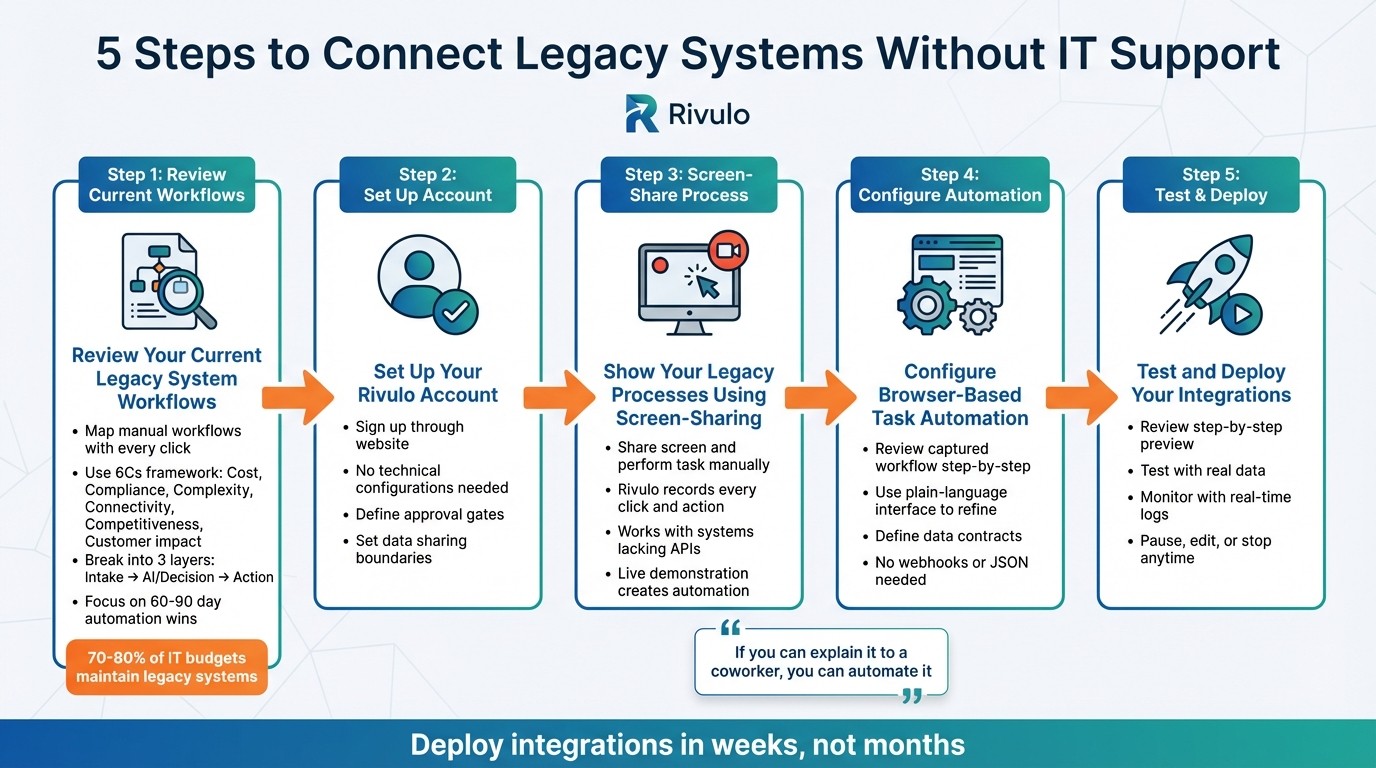
5-Step Process to Connect Legacy Systems with Rivulo Without IT Support
Here’s a straightforward guide to help you integrate your legacy systems using Rivulo. These steps are designed so operations teams can handle the process without needing IT support.
Step 1: Review Your Current Legacy System Workflows
Start by mapping out your current manual workflows. Instead of relying on outdated documentation, capture every click and decision point as it happens.
To evaluate your systems, use the "6Cs" framework: Cost, Compliance, Complexity, Connectivity, Competitiveness, and Customer impact. It's worth noting that most IT budgets allocate 70% to 80% to maintaining legacy systems, leaving only 20% to 30% for new projects.
Break each workflow into three layers:
Intake: Where information enters the system.
AI/Decision: How the system processes and decides.
Action: What happens next.
Rather than revamping everything at once, focus on automating a small, impactful part of the workflow - like invoice triage or lead routing - that can be completed in 60 to 90 days. Pay special attention to systems with monolithic architectures, outdated technologies (like COBOL or older Java), or limited API capabilities that rely on batch exports.
Step 2: Set Up Your Rivulo Account
Sign up for a Rivulo account through their website and complete the initial setup. The process is user-friendly, avoiding the need for technical configurations or API setups.
Once your account is active, you'll have access to tools like a conversational interface and screen-sharing. Before diving into automation, define clear "approval gates" for client-facing outputs and decide what data - such as sensitive personal information - can be shared during the AI step.
With your account ready, you’re set to begin automating your processes.
Step 3: Show Your Legacy Processes Using Screen-Sharing
Next, share your screen and manually perform the task you want to automate while Rivulo observes. The platform records each click and action during the live demonstration, turning your manual process into an automated workflow.
Since Rivulo works directly in your browser, it can handle legacy tools even if they lack modern APIs or standard integration points.
Step 4: Configure Browser-Based Task Automation
Once the screen-sharing session is complete, review the captured workflow step-by-step before activating it. This is your chance to make adjustments or approve the automation.
Use Rivulo's plain-language conversational interface to refine the process. Need to tweak a step? No problem - you can make changes without starting from scratch. To ensure smooth automation, define "data contracts" for legacy systems, covering schema, freshness, and null policies. This prevents bad data from disrupting your workflows.
Since Rivulo replicates the exact manual steps, you don’t need to worry about technical details like webhooks, JSON formatting, or authentication tokens. And if your legacy system’s interface changes, you can quickly update the specific step that’s affected.
Step 5: Test and Deploy Your Integrations
Before rolling out your automation, carefully review the step-by-step preview generated by Rivulo. This ensures everything is set up correctly.
"Monitor every workflow in real-time with clear logs showing what ran, when it ran, and whether it succeeded. If something needs attention, you'll know immediately." – Rivulo
Start with a small test using real data from your legacy system. If any issues arise, Rivulo will notify you immediately, so you’re never left guessing.
Once testing confirms everything is running smoothly, deploy the automation for everyday use. You can pause, edit, or stop workflows anytime without needing technical support. And if your business process changes or your legacy system gets updated, you can modify the affected step using the conversational interface to keep things running seamlessly.
How Operations Teams Use Rivulo to Connect Legacy Systems
Operations teams often face challenges when transferring data between outdated systems and modern tools, especially without IT support. Rivulo steps in to simplify this process, allowing non-technical users to automate browser-based tasks that would otherwise require tedious manual work.
Take this common scenario: logging into supplier portals to extract order data. Instead of manually copying information, Rivulo uses screen-sharing to turn a single demonstration into an automated workflow. Each action is captured and converted into a background automation, saving time and effort while setting the stage for more advanced integrations.
Another example involves updating modern CRM systems with data from older, browser-based ERPs. Imagine needing to update HubSpot records with information stored in a legacy ERP that lacks an API. Rather than hiring developers to create a custom integration, the operations team can simply demonstrate the process using Rivulo's screen-sharing. This enables seamless updates, showcasing Rivulo's ability to make automation accessible for non-technical users.
"Rivulo works in the browser, so even the legacy tools lacking modern APIs can be automated. Finally, you can connect the unconnectable and eliminate wasted time on manual processes." – Rivulo
Best Practices for Scaling Legacy System Connections
Once you've successfully automated your first legacy workflow, the next step is scaling these connections effectively and reliably. To do this, it's crucial to establish thoughtful safeguards. Start by assigning a single owner for each automation to ensure someone is always accountable for maintenance. This avoids gaps that can arise when business processes shift or evolve.
For workflows involving sensitive records, take advantage of Rivulo's "Review before it runs" feature. This feature allows you to review and adjust outputs before deployment, ensuring accuracy and giving non-technical teams the confidence to expand automation without worrying about errors. Additionally, real-time logs provide transparency by showing exactly what ran, when it ran, and whether it succeeded. This eliminates the "black box" issue that often complicates automation efforts.
As you scale, optimize performance to handle the increased load. Here are a few tips:
Use filtered views, such as "Active Records Only", to limit unnecessary data fetching and stay within system rate limits.
When updating records, rely on the PATCH method instead of PUT to modify specific fields, reducing the risk of accidental overwrites.
For large datasets, implement pagination to work within the constraints of legacy systems, which often cap data fetches at 100 records per request.
These strategies ensure smoother scaling and prevent performance bottlenecks.
A great example of scaling success comes from the UK Crown Prosecution Service. Between 2019 and 2026, they expanded their citizen developer team from just 2 to 16 members and created over 30 applications, averaging about four months per app. Their approach? Start small with workflows that deliver high ROI and only add complexity once the initial automations are stable.
To further safeguard your automation efforts, build fallback paths for failed automations so issues are redirected to a human owner. Establish clear data boundaries upfront by defining what sensitive information, such as PII, credentials, or contracts, can flow through automated steps. By combining performance optimizations with data safeguards, you can scale your automation efforts while maintaining control and minimizing risks.
This approach reflects Rivulo's focus on empowering operations teams to expand their automation capabilities without relying heavily on IT. With these guardrails in place, you can confidently scale your legacy system connections while keeping everything running smoothly.
Conclusion
Connecting legacy systems no longer has to mean waiting on IT support or investing in costly system overhauls. Rivulo helps operations teams bypass traditional technical hurdles, making integration accessible even without coding skills or API expertise.
With browser-based automation, Rivulo works seamlessly with any system you can access via your browser. Simply share your screen once to automate your workflow. Its conversational interface allows you to refine processes using plain language, while the "Review before it runs" feature ensures you stay in control before anything goes live.
This approach redefines how operations teams handle their day-to-day tasks. Instead of wasting time on repetitive data entry or manual updates, you can delegate those tasks to Rivulo and focus on initiatives that truly drive your business forward.
Here’s how to get started: pick one repetitive task that takes up your time each week. Use Rivulo’s screen-sharing feature to set it up, review the automation to ensure accuracy, and deploy it. Once you see the time savings, you can scale up to tackle more complex processes. Automate your first task today and see the difference. This method allows operations teams to leave manual processes behind and achieve meaningful efficiency gains.
FAQs
Is it secure to automate legacy systems through a browser?
Automating legacy systems through a browser can be safe, but only if you take the right precautions. Use modern, supported tools and ensure secure protocols are in place. Older browsers and systems often come with vulnerabilities, so keeping software updated and adhering to best practices is essential to reduce potential risks.
What happens if the legacy system UI changes after I automate it?
When the user interface (UI) of a legacy system changes, automation can break because it often relies on specific interface elements. To tackle this, consider using flexible no-code tools that require only minimal adjustments when changes occur. It's also important to regularly monitor and maintain workflows to keep them running smoothly, even after UI updates. Additionally, event-driven integration can help by reducing dependence on UI elements, making your system more resilient.
How do I choose the first legacy workflow to automate for quick ROI?
To see a fast return on investment, begin with workflows that are repetitive, time-intensive, and have clear, trackable results. Prioritize tasks that are high in volume but low in complexity - think lead intake, meeting notes, ticket tagging, or weekly reporting. These are the kinds of processes your team handles often, where automation can quickly cut down on manual labor. The result? Greater efficiency and shorter turnaround times. Starting here not only delivers immediate benefits but also lays a solid foundation for scaling automation in the future.
Related Blog Posts

Hand over your first workflow this week
Hand Rivulo your most tedious workflow or your team’s most-asked question. Either way, it starts by understanding how your business works, and then it takes care of the rest.