
We Spent 15 Hours a Week on Ticket Triage. Here's How We Got It Down to Two.

Kathy Prince

Every week, we wasted 15 hours manually sorting and assigning support tickets. This wasn’t just frustrating - it slowed response times, caused misrouting, and left our team stuck in repetitive admin tasks. After implementing Rivulo, an automation platform, we slashed triage time to just 2 hours per week. Here's how:
Manual triage issues: Delays, misrouted tickets, and overburdened staff.
Solution: Rivulo automated ticket categorization, prioritization, and routing.
Results: An 87% time reduction, faster ticket resolution, and fewer errors.
This shift freed up time for meaningful work, improved efficiency, and reduced burnout - without needing coding skills or extra hires.
The Manual Process: 15 Hours Per Week
How Manual Triage Worked
We took a deep dive into the inefficiencies of our manual triage process to understand why automation was essential.
The manual triage process involved several time-consuming steps every single day. First, a triage lead reviewed each incoming ticket to understand the problem. They also checked the reporter's history and scanned the last 30 days of issues related to the same component to gather context. Afterward, tickets were categorized by type (e.g., bug, feature request, or billing issue) and source, while urgency was determined using an impact-versus-urgency matrix. This matrix assigned priority levels ranging from P1 (Critical) to P4 (Low). Once categorized, tickets were either placed into team queues or directly assigned to specialists based on their workload.
This initial triage process alone took the team lead 30–60 minutes every morning. On top of that, agents spent an additional 10–15 minutes per ticket asking follow-up questions to pinpoint details like the specific device, software, or network component involved - since this information wasn’t automatically linked. With a team handling 500 tickets daily at an average of 45 seconds per ticket, the manual triage process consumed over 6 hours of labor each day. At a rate of $25/hour, this added up to an annual cost of about $39,000.
Where the Process Failed
This manual system created delays at multiple stages. Routing alone introduced a 30–90-minute lag before agents could even begin working on tickets. Once tickets reached agents, they often spent 10–15 minutes gathering basic context, contributing to an average resolution time of 48 hours and a 34% SLA breach rate.
"The triage layer becomes a human routing engine, and that's where big blocks occur."
Mark Sherwood, CX Strategist, Swifteq
Manual workflows also led to cherry-picking, with agents prioritizing simpler tickets to improve their resolution stats. This left more complex issues unresolved. Another recurring problem was tickets being misrouted - for example, a technical bug mistakenly landing in the Tier 1 support queue. Each reassignment delayed resolution even further. Skilled engineers often found themselves bogged down with administrative tasks instead of focusing on solving critical issues.
These inefficiencies made it clear that our workflow needed a serious overhaul.
Customer Support AI Agent: Ticket Triage for Zendesk & Slack
How Rivulo Changed the Workflow
When faced with repetitive workflows like ticket triage, we needed a straightforward, no-code solution. That’s where Rivulo came in - a platform designed specifically for operations teams to streamline their processes.
What Rivulo Does
Rivulo takes the hassle out of managing browser tasks and working with older systems, all without requiring technical skills. You simply describe your needs in plain language, and the platform creates automated workflows. For instance, you can say, “When a ticket mentions billing, route it to the finance team,” or “Mark any ticket with the word ‘urgent’ as high priority.” It’s that simple.
By automating these background tasks and integrating directly with our ticketing system, Rivulo allows our team to focus on resolving issues instead of spending time on triage. The platform automatically pulls in relevant context and makes routing decisions based on the rules we set. This shift has made our workflow far more efficient.
Setting Up Rivulo
Getting started with Rivulo was quick and intuitive. We reviewed our existing triage process using its conversational interface, outlining our criteria and routing rules. The platform then translated our input into automated workflows - no coding required.
Here’s an example: In January 2026, a 12-person agency adopted Rivulo for ticket triage. They reduced the time spent on this task from 11 hours per week to just 4 hours, saving 7 hours weekly. They achieved this by using "Workflow Packets" to standardize their processes while letting AI handle the heavy lifting within predefined constraints. We took a similar approach, fine-tuning our automation over the first two weeks to handle edge cases and adapt routing rules with simple conversational adjustments.
The Automated Workflow: 4 Steps
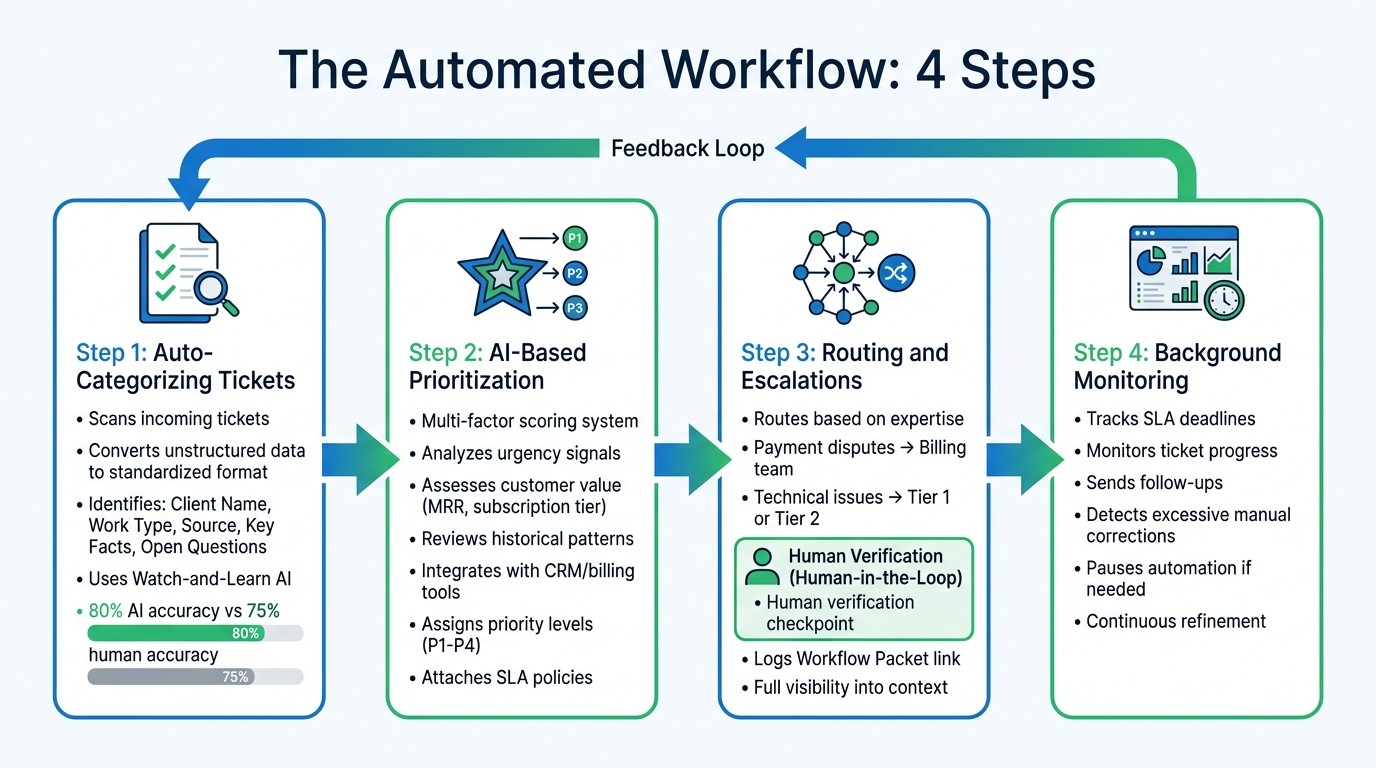
4-Step Automated Ticket Triage Workflow with Rivulo
Rivulo has redefined ticket triage with an automated, streamlined workflow. Once configured, it takes over multiple internal tasks like normalization, enrichment, and verification, cutting down manual involvement to just four essential steps. The system operates independently but keeps human input available when needed. Here’s a closer look at each step in action.
Step 1: Auto-Categorizing Tickets
Rivulo begins by scanning incoming tickets and converting unstructured data into a standardized format. This normalization process identifies key fields such as Client Name, Work Type (e.g., billing, technical, urgent), Source, Key Facts, and Open Questions. Unlike traditional keyword-based systems, Rivulo uses its "Watch-and-Learn AI" to observe how you manage tickets, developing a deep understanding of your workflows. You can easily adjust the categorization logic with plain instructions - for example, telling the system to tag messages mentioning payment failures as billing issues.
Step 2: AI-Based Prioritization
After categorization, Rivulo evaluates ticket urgency using a multi-factor scoring system. It analyzes ticket content for urgency signals, assesses customer value (e.g., monthly recurring revenue or subscription tier), and considers historical patterns like recurring issues or past dissatisfaction scores. Studies show AI classification systems achieve 80% accuracy, outperforming the 75% accuracy rate of human agents. Rivulo also integrates with CRM or billing tools to flag high-value enterprise clients instantly. Tickets deemed highly urgent are automatically marked as high priority (such as P1), with SLA policies attached to ensure timely resolution. Once prioritized, tickets move to the next phase for expert handling.
Step 3: Routing and Escalations
Rivulo ensures tickets are routed to the right team members based on their expertise. For example, a payment dispute goes to the billing team, while complex technical concerns escalate from Tier 1 to Tier 2 depending on complexity. Before final routing, the system incorporates a "Verify" step, where a team member reviews the AI’s draft and routing decision. This human-in-the-loop approach ensures accuracy and prevents errors. Additionally, the system logs a Workflow Packet link with the ticket, giving full visibility into the completed steps and context.
Step 4: Background Monitoring
Even after tickets are routed, Rivulo stays engaged. It tracks SLA deadlines, monitors ticket progress, and sends follow-ups as needed. If the system detects excessive manual corrections on AI-generated drafts, it pauses automation and escalates the issue to address the root cause. This ongoing monitoring and feedback loop allow Rivulo to refine its processes over time without requiring constant oversight.
Results: From 15 Hours to 2
Switching from a manual process to automated triage brought dramatic time savings. Weekly triage time dropped from 15 hours to just 2 hours - a staggering 87% reduction. This freed up nearly two full workdays each week, allowing the team to shift their focus to solving customer issues rather than spending hours sorting through tickets.
Before and After Metrics
The impact of automation is reflected in the numbers:
Metric | Manual Process | Rivulo Process |
|---|---|---|
Weekly Triage Time | 15 hours | 2 hours |
This shift didn’t just save time; it also addressed inefficiencies. Automation removed the "handoff tax" - the wasted effort from copying and pasting between tools, chasing approvals, and managing notifications. Tickets that previously sat idle in queues for hours now reach the right team in just minutes. Workflow Packets played a key role here, ensuring that all necessary context followed the ticket, cutting down on repetitive clarifications and making the process more consistent.
"The real problem was that the agency had built a delivery engine that relied on memory, context, and heroics." - Rivulo Case Study
Rivulo replaced this reliance on individual effort with a system that operates smoothly and consistently, no matter who’s on duty.
Improving the Automation Over Time
Automation isn’t a "set it and forget it" solution. Weekly reviews of routing decisions and draft quality help identify areas where the AI might fall short. For example, if certain ticket types frequently require manual adjustments, it’s a sign to refine the categorization logic or add more context to the Workflow Packet.
A helpful strategy is using an "error budget." If more than 20% of AI-generated drafts need major edits, take a step back. Pause any further expansion, refine the prompts or inputs, and make sure facts and opinions are clearly separated to simplify revisions. These regular reviews make it easier to spot issues early, allowing for continuous improvement and potentially cutting oversight time even further.
Conclusion
Reducing ticket triage time from 15 hours to just 2 hours per week doesn’t merely save time - it creates space for more meaningful work. By automating the tedious tasks of sorting, categorizing, and routing with Rivulo, teams can focus their energy on solving customer issues and boosting overall service quality. This shift eliminates the bottlenecks of manual processes, allowing operations teams to dive into strategic projects instead of getting stuck in administrative tasks.
What’s even better? Setting up Rivulo is simple and doesn’t require coding knowledge or developer assistance. Considering that SMBs lose up to 45% of their operational hours on tasks that don’t add value, automating ticket triage is an easy win for reclaiming that lost time.
Take this example: In January 2026, a 12-person partner agency adopted Rivulo for five core processes, saving 40 hours per week overall. Their ticket triage time alone dropped from 11 hours to just 4 hours weekly. Beyond that, similar workflows have seen error rates in data entry plummet from 4.3% to 0.2%, while client response times improved dramatically - shrinking from 6.2 hours to just 47 minutes.
For SMBs aiming to grow without hiring more staff, no-code automation offers a practical path forward. Start small, track your progress, and fine-tune as needed. With the right processes in place, cutting manual task hours by 73% is entirely within reach.
FAQs
What ticket data does Rivulo need to triage accurately?
For accurate triage, Rivulo relies on ticket data like request descriptions, urgency, priority levels, impact, and related metadata. This data enables efficient sorting and routing of tickets, ensuring they are handled correctly and resolved faster.
How do we keep humans in control of AI routing decisions?
To ensure humans remain in charge of AI routing decisions, it's essential to create systems that include human oversight, clear guidelines, and measurable safeguards. Incorporate low-risk AI triage processes where human reviewers can evaluate AI's decisions to catch potential errors or misrouting. This approach allows AI to act as a support tool rather than a replacement for human judgment, enabling teams to retain control over critical routing choices while enhancing overall efficiency.
How long does it take to set up and tune ticket triage automation?
Setting up ticket triage automation can be a quick process, taking just a few hours for simpler systems, or it might stretch to a few days if your setup is more complex or goal-specific. Once the system is in place, fine-tuning becomes the next step. This involves tweaking rules, adjusting priorities, and refining workflows to ensure everything runs smoothly. Achieving the best results might take a few days or even weeks of adjustments. If your workflow is straightforward, the setup will naturally be faster, but more customized configurations may need extra time to get just right.
Related Blog Posts

Hand over your first workflow this week
Hand Rivulo your most tedious workflow or your team’s most-asked question. Either way, it starts by understanding how your business works, and then it takes care of the rest.