
Month-End Reconciliation Shouldn't Take a Week. Here's Why It Still Does.

Kathy Prince

Month-end reconciliation is taking too long for most companies - often more than six business days. Why? It boils down to three main issues: manual processes, disconnected systems, and unclear workflows. These inefficiencies waste hundreds of hours, lead to high error rates (up to 23%), and prevent finance teams from focusing on meaningful analysis.
Here’s the problem in numbers:
53% of companies fail to close in under six days.
Manual reconciliation consumes 120–150 hours per month.
Error rates for manual tasks can reach 23%.
Teams spend 40% of their time on repetitive tasks instead of analysis.
The solution? Automation and AI tools. By automating data matching, creating standard workflows, and integrating systems, companies can cut reconciliation time by up to 50%, reduce errors to under 2%, and free up finance teams for higher-value work.
This article breaks down why reconciliation is so slow and how automation can transform the process.
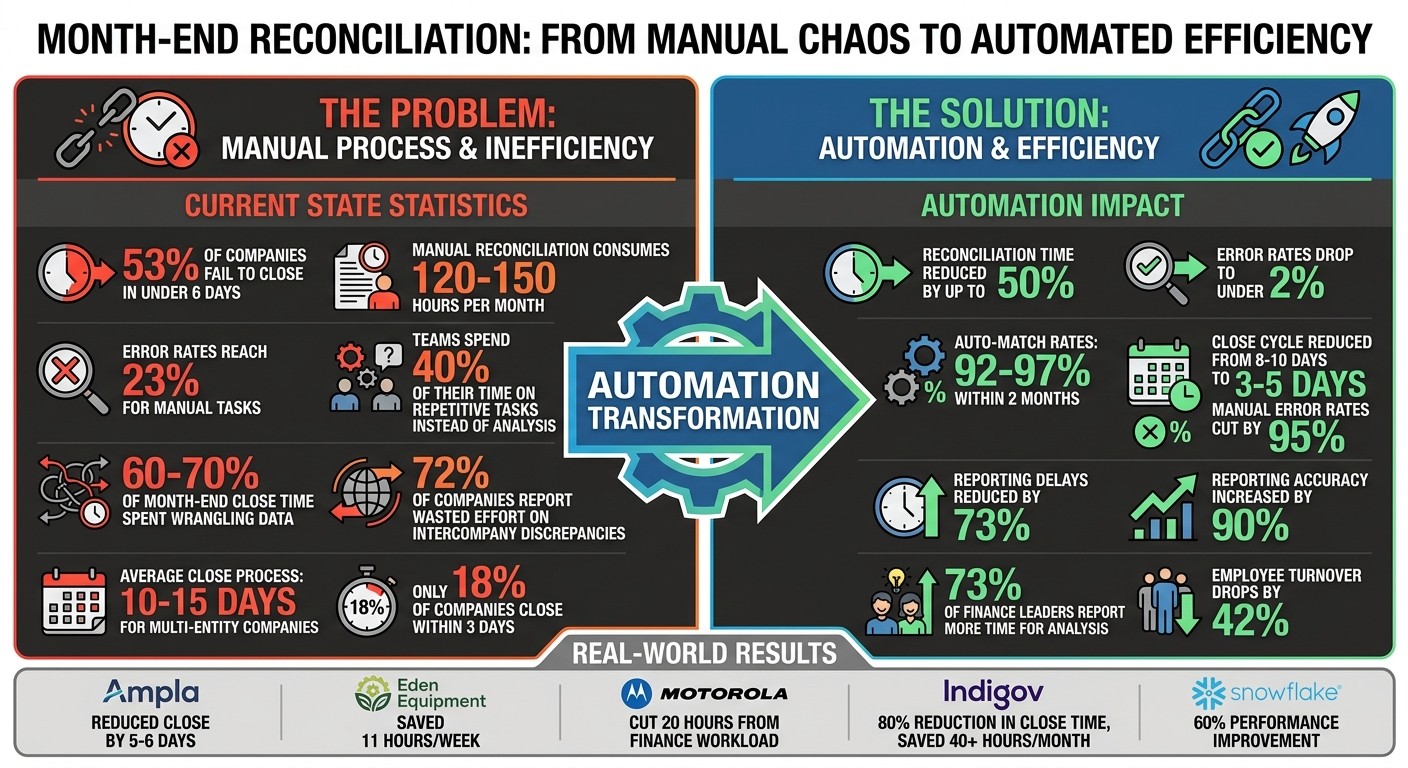
Month-End Reconciliation Statistics: Time, Errors, and Automation Impact
How to Automate Your Month End Close Process and Save 8+ Hours a Month | Allison James, CFO
Why Month-End Reconciliation Takes So Long
The reasons behind drawn-out reconciliation timelines are no mystery - they boil down to a few key issues. The biggest culprits? Manual processes that consume hours, systems that don’t integrate well, and a lack of standardized procedures, all of which force teams to start from scratch every month.
Manual Processes Slow Everything Down
Manual work is the primary reason reconciliation takes so long. Finance teams often extract data from various systems - like ERPs, CRMs, and bank portals - and then rely on complex spreadsheet formulas to align product codes with SKUs. Tasks like transaction matching, journal entry validation, and variance analysis are painstakingly done by hand, one line at a time.
This approach creates a domino effect. Instead of focusing on analysis, FP&A teams spend more than half their time just gathering data. Before reconciliation even begins, they’re chasing down missing receipts, emailing for overdue expense reports, and waiting on approvals from departments that don’t see the close deadline as a priority. As one Financial Controller at a SaaS company put it:
"The manual processes and lag in extracting data due to system load eats up time we don't have."
Manual work also leads to frequent errors, which means teams must spend even more time triple-checking data and fixing mistakes. To make matters worse, version control becomes chaotic when multiple “final” versions of mapping files circulate, leaving everyone unsure which one is accurate.
But manual processes are only part of the problem. Disconnected systems add another layer of complexity.
Disconnected Systems Fragment Your Data
Even companies with advanced software face challenges when their tools don’t integrate. Finance teams often spend 60-70% of their month-end close time wrangling data instead of analyzing it. One Controller summed up the frustration:
"We have all the tools, but they don't talk to each other. We spend more time prepping data than analyzing it."
As companies grow, the problem gets worse. Mergers and acquisitions often mean reconciling data from incompatible systems - think one subsidiary using SAP while another uses Oracle. Intercompany transactions become a major headache, with 72% of companies reporting wasted effort trying to resolve discrepancies between entities. For instance, if Entity A’s sales don’t match Entity B’s purchases, someone has to manually track down the source of the mismatch.
This lack of integration creates “multiple versions of the truth,” where different departments report conflicting numbers. Leadership often ends up making decisions based on outdated or incomplete data because reconciliation takes too long to finalize. For multi-entity companies, the average close process drags on for 10-15 days, largely due to manual data gathering and mapping.
And if that wasn’t enough, the absence of standardized procedures adds yet another hurdle.
Missing Standard Procedures Cause Delays
Without clear, documented workflows, reconciliation becomes a guessing game. Teams rely heavily on “tribal knowledge” - informal processes stored in people’s heads rather than written down. Undefined roles and responsibilities lead to wasted time as everyone waits for responses or approvals.
The inefficiency stems from countless small delays: manual checks, endless email follow-ups, and repeated requests for missing documentation. These bottlenecks force Controllers to spend their time putting out fires rather than ensuring strategic accuracy. Morgan Hunsaker, Product Manager at Netgain, highlighted this issue:
"Inconsistent workflows lead to errors and delays that add up to an unnecessarily long close timeline."
This lack of standardization also creates risks for audits and compliance. Missing documentation and inconsistent sign-offs invite external scrutiny and can damage internal trust. Plus, undocumented processes don’t scale. As companies grow - adding entities or dealing with multiple currencies - the time and cost of closing the books increase exponentially. These gaps not only slow reconciliation but also amplify the inefficiencies caused by manual work and fragmented systems, creating a cycle that’s tough to break.
How to Speed Up Reconciliation with Automation and AI
The challenges that slow down your month-end reconciliation process are fixable. With no-code automation and AI-powered tools, you can eliminate repetitive, time-consuming tasks, allowing your team to focus on higher-priority work. Let’s dive into how automation can transform data matching and significantly cut processing times.
Automate Data Matching and Reconciliation
Automation has revolutionized transaction matching. No-code tools now leverage four matching techniques - exact, tolerance, fuzzy, and pattern matching - to shrink hours of manual work into just minutes. For instance, tasks that used to take 2–4 hours per complex account can now be completed in about 5 minutes. Mid-sized accounting teams managing 200–400 accounts monthly often achieve auto-match rates of 92–97% within two months of using these tools.
Here’s how it works: automated systems assign a confidence score (ranging from 0 to 100) to each transaction. High-confidence matches are automatically certified, while low-confidence ones are flagged for manual review.
"The fundamental shift: your team reviews reconciliations instead of preparing them." – Team Arvexi
Automation also supports continuous accounting by reconciling transactions in real time as they enter the ledger, rather than waiting for month-end. AI agents can autonomously handle tasks like transaction reconciliation, variance detection, and even drafting journal entries for review. This reduces error rates from up to 23% to below 2% and shortens close cycles from 8–10 business days to just 3–5 days.
Create Standard Reconciliation Workflows
Standardized workflows eliminate unnecessary guesswork. No-code platforms allow you to create repeatable processes using natural language instructions like “match vendor invoices to accruals,” removing the need for complex coding. By documenting tasks, assigning roles, and setting clear timelines, you can pinpoint delays and streamline operations.
Recurring tasks, such as rent, utilities, and depreciation journal entries, can be automated. Trigger-based automation, for example, can automatically link vendor invoices to related accruals as soon as they hit accounts payable. Setting exception thresholds (e.g., flagging variances over $50,000) lets your team focus on the 10% of cases that genuinely require human judgment while AI handles the rest. This shift allows your team to spend less time on manual prep and more time on higher-level analysis.
Connect Systems for Real-Time Data Access
Integrating your systems is key to achieving a single source of truth. Connecting ERPs, CRMs, bank portals, and payroll systems through APIs ensures that data flows seamlessly, eliminating the need for manual data extraction. Real-time data consolidation ensures consistent reporting across departments, enabling leadership to make quick, informed decisions.
The results speak for themselves. In 2024, fintech company Ampla reduced its month-end close process by 5–6 days using automated reconciliation tools. Eden Equipment saved 11 hours per week on manual matching tasks, and Motorola cut 20 hours off their finance team’s workload by automating invoice processing and reconciliation. These examples highlight the time and accuracy gains that come with integrated, automated systems.
Before diving into automation, clean up your data. Audit your general ledger chart of accounts to archive inactive entries and standardize vendor and customer master data. Start small by automating high-impact tasks like bank reconciliations or payroll accruals, then expand to more complex processes. Finally, establish a feedback loop by reviewing rejected AI exceptions regularly. This helps refine matching rules and improves the system’s accuracy over time.
What You Gain from Faster Reconciliation
Better Efficiency and Fewer Errors
Automation can transform reconciliation processes by eliminating tedious manual tasks that often consume 40%–60% of a finance team's time. By automating these workflows, companies not only save time but also drastically reduce errors - automated systems can cut manual error rates by up to 95%. Nathan Freystaetter, Founder & CEO of Go Fig, highlights this shift:
"The goal isn't to remove the accountant, it's to remove the Excel ETL that eats 40–60% of their time." – Nathan Freystaetter, Founder & CEO, Go Fig
The impact of automation goes beyond error reduction. Many organizations report a 30%–50% reduction in their close cycle time thanks to AI-powered exception detection and standardized processes. A great example is GovTech startup Indigov, which introduced an automated billing and revenue recognition platform in 2025. This upgrade reduced its month-end close time by 80% and saved over 40 hours of manual work each month. Similarly, Snowflake streamlined its revenue recognition and journal entry creation processes, achieving a 60% improvement in performance compared to manual methods.
Faster, More Accurate Financial Reports
The efficiency automation brings also improves financial reporting. Real-time data syncing reduces reporting delays by 73% while increasing accuracy by as much as 90%. This means leadership has quicker access to reliable insights. Currently, only 18% of companies close their books within three days, while half take more than six days. However, a study by MIT and Stanford revealed that skilled accountants using AI can shave 7.5 days off the month-end close process. By adopting continuous accounting - reconciling throughout the month rather than waiting for month-end - companies ensure their leadership is always working with up-to-date information, not outdated figures.
More Time for High-Value Work
Perhaps one of the most compelling benefits of automation is the time it frees up for strategic, high-impact work. When teams no longer spend hours tracking down missing receipts, they can focus on deeper financial analysis and delivering actionable insights. In fact, 73% of finance leaders say their teams now dedicate more time to analysis and business insights after automating reconciliations. This shift allows finance teams to move from data collection to tasks like tax optimization, M&A analysis, and scenario planning, significantly increasing their value to the organization.
"If I could touch the data as little as possible, that's a win." – FP&A Analyst, Milliken
Automation also boosts morale. Teams experience less burnout from month-end crunches, and turnover rates drop by 42% in departments that have embraced automation. Without adding extra staff, companies can reduce stress and redirect saved hours toward meaningful work, enhancing both productivity and job satisfaction.
How to Start Automating Month-End Reconciliation
Review Your Current Reconciliation Process
Before diving into automation, it’s essential to understand where your time and effort are currently going. Start by mapping out your workflow - document every task, who handles it, how long it takes, and any dependencies involved. This step helps you uncover hidden bottlenecks. For instance, you might spot inefficiencies like manually transferring data between spreadsheets or chasing approvals through endless email threads. Another common issue is dealing with disconnected systems, which forces your team to hunt for CSV files scattered across various portals.
To zero in on problem areas, measure how much time is spent on manual tasks. Focus especially on the 15–25 accounts that pose the highest risk, such as cash, accounts receivable, accounts payable, and payroll. These accounts often account for 30% to 40% of the overall effort required to close the books. By thoroughly documenting these processes, you’ll be in a better position to target the areas where automation can have the most impact.
Start with High-Impact Tasks First
When it comes to automation, start where you’ll see the most immediate results. Tasks like bank and credit card reconciliation are great first steps - they’re high-volume, repetitive, and follow straightforward rules. While manual bank reconciliation can take 8 to 12 hours each month, automated systems can handle this work continuously in real time. Similarly, subledger reconciliations for accounts payable and receivable are major time sinks, often requiring 20 to 30 hours of manual effort. Automation can drastically cut this time by flagging exceptions automatically.
Recurring journal entries, such as those for depreciation, amortization, and prepaid rent, are also ideal candidates for automation. Their predictable and consistent nature makes them easier to automate effectively. Another area to consider is the three-way matching process for purchase orders, goods receipt notes, and invoices. Automating this step can clear up invoice backlogs and prevent unexpected bills from disrupting your month-end close. To maximize these gains, standardize your chart of accounts and vendor data - it’ll make automation smoother.
Pick the Right No-Code Automation Tool
Once you’ve identified inefficiencies, it’s time to choose an automation tool that doesn’t require heavy technical expertise. The ideal platform should allow your team to create workflows without needing developer support. Look for tools that integrate seamlessly with your existing ERP systems - such as NetSuite, QuickBooks, or Xero - and offer features like automated audit trails and exception-based reporting. These features ensure that only mismatches or errors require human attention.
One example is Rivulo, a platform designed to let operations teams automate reconciliation processes without technical roadblocks. It can handle browser-based tasks and integrate with older systems, making it a strong option for organizations that lack extensive developer resources. When implementing any tool, it’s crucial to run the automated process alongside your manual system for at least two cycles. This parallel testing helps confirm that the automated outputs match expectations and allows you to fine-tune the rules before fully transitioning. This step not only ensures accuracy but also builds trust in the new system.
Conclusion
Month-end reconciliation doesn’t have to feel like an uphill battle. The common roadblocks - manual data entry, disconnected systems, and delays in approvals - are challenges that can be addressed. Leveraging no-code automation and AI tools can trim reconciliation time by 30% to 50% while slashing error rates from as high as 23% to under 2%.
But the benefits go beyond just saving time. Automation reshapes the role of finance teams. By cutting out tedious Excel-driven tasks, your team can shift its focus to strategic activities like analyzing variances, investigating discrepancies, and supporting key business decisions. This shift elevates finance from a reactive role to a proactive partner, providing insights that drive decisions on cash flow, staffing, and growth opportunities.
Automation also helps ease the stress of the "month-end crunch", a notorious cause of burnout and turnover among accountants. With continuous accounting practices - spreading reconciliations across daily or weekly intervals - your team can avoid the frantic rush of the final week. This steady approach not only improves accuracy but also fosters a healthier work environment.
To accelerate your close, start by mapping out your process, zeroing in on high-impact tasks, and adopting a no-code solution that integrates smoothly with your existing systems. Tools like Rivulo make it simple to streamline browser-based workflows and connect legacy systems without the need for developers, allowing you to hit the ground running.
For companies still taking over six days to close their books, the solution isn’t out of reach. By adopting these automation strategies, reconciliation can transform from a time-consuming chore into an efficient, strategic process that benefits the entire organization.
FAQs
Which accounts should we automate first?
Automating accounts that rely heavily on manual reconciliation - like bank accounts, subledgers, and accounts payable/receivable - should be a top priority. These areas are notorious for causing delays due to the time spent on tasks like gathering data, matching transactions, and resolving errors.
Start with accounts that have high transaction volumes or operate across disconnected systems, such as bank statements, ERP accounts, or intercompany transactions. Once these are automated, you can take it a step further by automating recurring journal entries and approval processes. This approach can significantly speed up month-end closes while reducing the workload on your team.
How do we keep audit trails and approvals clean with automation?
Automation keeps audit trails and approvals neat and organized by recording every transaction and action in detail. Automated tools log changes and approvals in real-time, cutting down on mistakes and delays. These systems assign, track, and document approvals systematically, improving transparency and accountability. Plus, they make audits much easier by providing clear and easily accessible records.
How long does it take to see results after automating reconciliation?
Automation often starts showing results in just 3 to 5 days. It can cut month-end close times by 50–70%, allowing for faster and more precise reconciliations. This not only simplifies workflows but also reduces errors, helping teams work more efficiently in no time.
Related Blog Posts

Hand over your first workflow this week
Hand Rivulo your most tedious workflow or your team’s most-asked question. Either way, it starts by understanding how your business works, and then it takes care of the rest.