
How to prepare your business processes before implementing AI

Kathy Prince

Automating messy processes with AI can lead to costly mistakes. Here's what you need to know: 70% of AI success depends on your people and processes, not the algorithms. Yet, most companies fail to prepare. Only 16% of workflows are fully documented, and 95% of enterprise AI pilots never make it to production.
To avoid these pitfalls, follow these six steps:
Review current workflows: Map out processes, document decision points, and track inefficiencies.
Prioritize automation: Start with repetitive, high-volume tasks that have clear rules and strong business impact.
Document and standardize: Create detailed workflow diagrams and eliminate unnecessary steps.
Simplify for AI: Connect systems, clean up data, and reduce complexity.
Test small first: Run a pilot program to validate improvements before scaling.
Track performance: Monitor metrics like time savings, error rates, and ROI for ongoing improvement.
Businesses that optimize processes before introducing AI see 3x higher ROI and are 43% more likely to boost productivity in the first year. Start small, focus on measurable results, and build a solid foundation for long-term success.
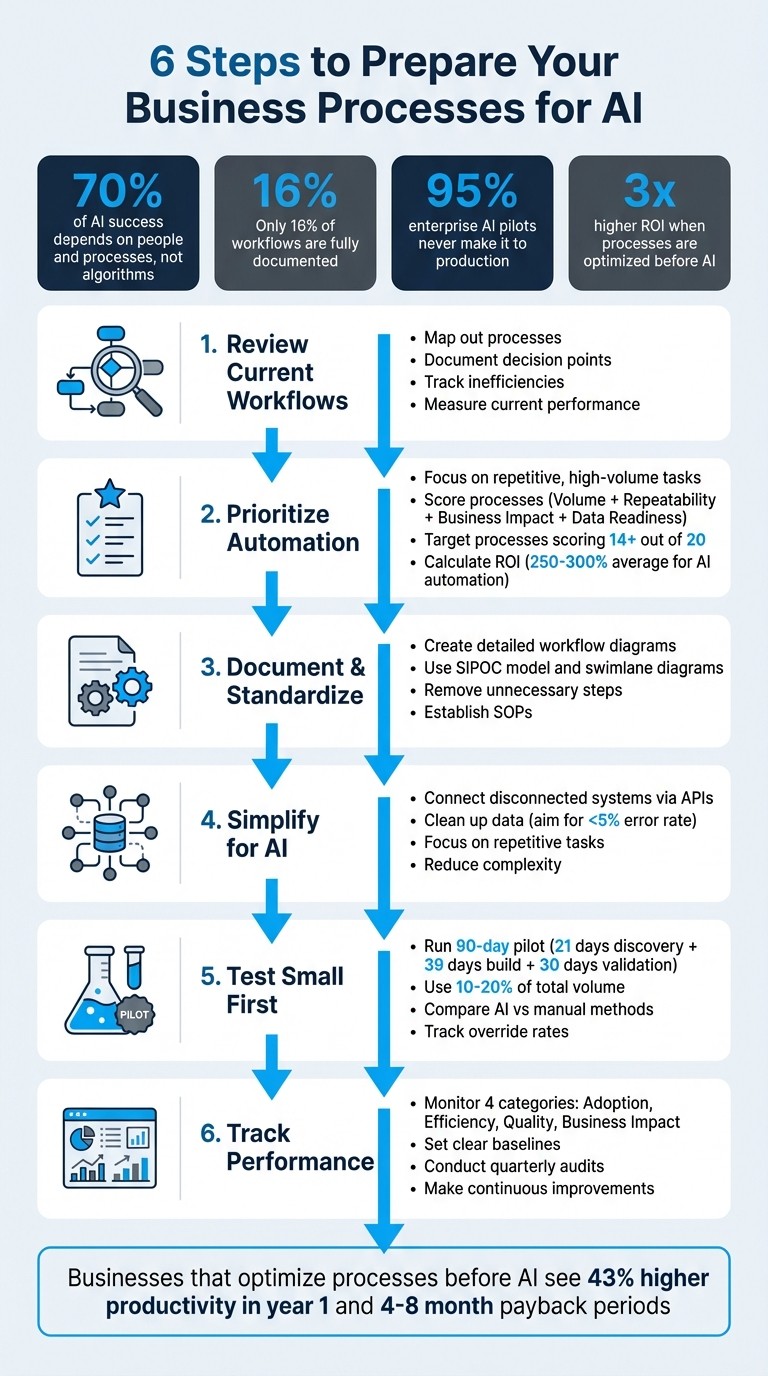
6 Steps to Prepare Business Processes for AI Implementation
How to Automate Any Business With AI in 3 Steps (Beginner's Guide)
Step 1: Review Your Current Processes
Before you can see any benefits from AI, you need to get a clear picture of how your workflows operate right now. The reality is, many processes exist solely in people's minds, not in a system that AI can analyze or learn from.
The focus here isn't on how processes should function according to official guidelines. Instead, you need to capture how work actually happens - including all the shortcuts, workarounds, and informal methods. As Patrick Saul, Solutions Consultant at Lucid, explains:
"Adding AI to an inefficient process would only magnify the inefficiency, not fix it".
Here’s how you can document and evaluate your current workflows.
Map Out Your Workflows
Start by working closely with the people who handle these tasks daily. Walk through each process step-by-step and document how it’s actually performed - even if some steps seem obvious. For every step, note the following:
Who is responsible for it
What data is used
Which systems are involved
What decisions are made along the way
Pay close attention to decision points. If someone says they "just know" when to escalate an issue or approve a request, dig deeper. Translate these gut decisions into clear, structured rules - like if-then statements - that define when and how tasks should be routed to specific teams.
Don’t forget to document exceptions. List every edge case you can identify, how frequently it happens, and how your team currently manages it. This is crucial because AI systems often struggle with scenarios they haven’t been trained to handle.
Once your workflows are fully mapped, the next step is to measure their performance to uncover inefficiencies.
Measure Current Performance
To establish a baseline, track key metrics like how long each process takes, how many people are involved, and where errors typically occur. You can also calculate the cost of inefficiencies by multiplying wasted hours by the hourly rate of the employees affected.
Look for common areas of waste, such as:
Rework or corrections
Delays and bottlenecks
Unnecessary handoffs
Overproduction
Tasks piling up in queues
Work being done below the required skill level
Extra steps that don’t add value
Redundant movement of information
Identifying these problem areas will help you pinpoint where AI can deliver measurable improvements.
Finally, prioritize processes for AI automation by evaluating them across three key factors: volume (how often the process occurs), repeatability (how structured and rule-based it is), and business impact (its cost in terms of time or money). Processes that score high in all three areas are the best candidates for automation.
Step 2: Choose Which Processes to Automate First
After mapping your workflows and assessing their performance, it’s time to decide which processes to automate next. While current technology can automate about 45% of business tasks, trying to tackle everything at once often leads to failure - 80% of the time, in fact. Instead, start small by automating a single process that can quickly demonstrate the value of automation.
As Vishakha Rao, Head of AI Transformation at SyncAppTech, explains:
"The fastest-growing companies in 2026 are not the ones with the most models, but the ones that know exactly where automation removes friction, protects margins, and scales output".
Here’s how to pinpoint the best candidates for automation.
Set Your Selection Criteria
To narrow down your options, apply clear and measurable criteria. The most suitable processes for automation share these traits: they occur frequently (at least 20 times per week), follow clear rules that can be documented, rely on structured data like spreadsheets or forms, and remain stable without major changes expected in the next 12–24 months.
To go a step further, use a scoring system to rank potential candidates. Evaluate each workflow on four dimensions - volume, repeatability, business impact, and data readiness - using a scale of 1 to 5. Processes scoring 14 or higher should be prioritized.
Dimension | Low Priority (Score 1) | Medium Priority (Score 3) | High Priority (Score 5) |
|---|---|---|---|
Volume | <150 times/month | 150–800 times/month | >800 times/month |
Repeatability | Few rules/ambiguous | Some branching logic | Highly structured/SOP-based |
Business Impact | <$2,000/month value | $2,000–$10,000/month value | >$10,000/month value |
Data Readiness | Mostly offline/analog | Partial digital systems | Centralized, digital, & labeled |
A simple formula can help calculate business impact: multiply the hours spent on a task each week by your team’s hourly cost, then multiply by 52. This "$10K rule" highlights the most expensive manual processes first.
Look for "quick wins" - tasks that are relatively easy to automate but deliver high returns. Examples include lead qualification, customer support triage, invoice processing, data entry, and resume screening. These types of repetitive tasks often make up 20% or more of operating expenses.
Once you’ve identified and ranked your candidates, move on to calculating their expected returns to strengthen your case for automation.
Calculate Expected Returns
To measure ROI, consider factors like time savings, error reduction, revenue gains, and cost avoidance.
For time savings, multiply the weekly hours saved by your team’s fully-loaded hourly rate (typically 1.25× to 1.4× their base salary to include benefits, taxes, and overhead), then multiply by 52. For error reduction, estimate the annual cost of mistakes - such as rework, penalties, or lost business - and calculate how much automation can lower that rate. Manual processes often have error rates exceeding 3%, making them strong candidates for improvement.
ROI Input Category | How to Calculate |
|---|---|
Time Savings | (Weekly hours saved) × (Fully-loaded hourly rate) × 52 |
Error Reduction | (Annual error cost) × (Estimated reduction rate) |
Revenue Enablement | Value of increased capacity or faster turnaround |
Cost Avoidance | Future expenses prevented (e.g., headcount not hired) |
From your total annual benefits, subtract the costs of implementation, software licensing, integration, and ongoing maintenance. Then, calculate your ROI percentage: divide the net benefit by the total cost and multiply by 100. Most well-planned automation projects for mid-sized businesses recover their costs within four to eight months.
AI-powered automation delivers 250–300% ROI on average, far surpassing the 10–20% returns typical of traditional automation. Companies using a comprehensive ROI framework like this achieve 40% higher returns compared to those focusing only on labor cost reduction.
When projecting outcomes, stay conservative. Discount vendor claims by 15–20% to ensure your estimates hold up under scrutiny from finance leaders. It’s always better to under-promise and over-deliver than to risk losing credibility with projections that don’t pan out.
Step 3: Document and Standardize Your Workflows
Once you've mapped out your workflows and identified performance metrics, the next step is to create detailed documentation. This is a crucial move toward preparing your systems for AI integration. AI thrives on well-defined tasks, but it falters when faced with undocumented exceptions or edge cases. Without proper documentation, you're essentially leaving AI to guess - and those guesses can lead to security vulnerabilities, operational slowdowns, or even greater inefficiencies.
Documentation serves as the foundation for creating training datasets, designing prompts, and setting validation rules for your AI models. It also helps uncover informal "shadow processes" - those unofficial, gut-instinct steps that employees rely on but aren't written down. These need to be translated into clear, digital instructions before AI can replicate them. Without this baseline, it’s nearly impossible to pinpoint which bottlenecks are worth addressing with AI.
Create Detailed Workflow Diagrams
Every part of your process should be mapped out: the people involved, inputs, decision points, data sources, and exceptions. A helpful tool for this is the SIPOC model (Suppliers, Inputs, Process, Outputs, Customers), which ensures your documentation stays focused and includes clear "definitions of done" for every step or handoff.
Swimlane diagrams are another excellent way to visualize who owns each part of the process and to identify where tasks get stuck during handoffs between teams or systems. For decision-making points, use decision tables to turn subjective judgments into structured "if-then" logic that AI can reliably execute. For example, instead of saying, "escalate if the customer seems important", specify: "if customer lifetime value exceeds $50,000 and issue severity is high, route to senior support within 15 minutes."
You should also maintain an exception registry that lists edge cases, how often they occur, and how they are currently resolved. Additionally, inventory all data sources, formats, and quality requirements. This includes identifying where data originates and how it’s validated. Ensure that data is captured digitally at the point of work and aim for an error rate below 5% before attempting automation.
Thorough documentation like this not only sets the stage for AI but also highlights inefficiencies that you can address before introducing automation.
Remove Unnecessary Steps
Once your workflows are standardized, it's time to eliminate unnecessary steps before layering AI into the process. Value stream mapping is a great method to separate actual "work time" from "wait time" and identify bottlenecks, especially during departmental handoffs. This approach measures flow time and efficiency, exposing delays, rework, and silos that could worsen if automated without correction.
Lean principles can help identify waste in your workflows. Look for common issues like defects (rework), overproduction, waiting (idle time), underused talent, excessive movement of information, backlogs, unnecessary steps, or redundant approvals. For each step, ask: Can this be eliminated, automated, simplified, or consolidated? Standardize "definitions of done" for every handoff, ensuring each is tied to a clear deliverable - like a completed invoice or an activated account - with specific acceptance criteria.
Conduct a process audit with employees who perform the tasks daily to uncover informal workarounds that aren't part of the official procedures. These "shadow processes" often present the best opportunities for streamlining. Once waste is identified, establish a minimum viable standard operating procedure (SOP) before implementing AI, ensuring the foundation is stable. To prioritize improvements, calculate the cost of waste by multiplying the hours lost per week by the employee's hourly wage. This not only helps decide where to start but also strengthens your case for making these changes.
Step 4: Simplify Processes for AI
Once your workflows are documented and standardized, the next step is to streamline them for AI execution. This involves reducing complexity, connecting isolated systems, and focusing on tasks where AI can provide the most impact. As Rebecca Pearson, Operational Architect at CodeWords, aptly points out:
"Applying technology to a broken workflow does not fix it; it just makes the bad process run faster".
The aim here is to create clear, frictionless pathways for data to flow through your systems without requiring manual intervention. AI thrives on repetitive, rule-based tasks, but it falters when faced with fragmented systems, inconsistent data, or unclear instructions. By addressing these pain points, you ensure that automation functions smoothly and produces reliable results. This step builds on the standardized workflows you’ve already established, laying the groundwork for effective AI integration.
Connect Disconnected Systems
In many businesses, data is scattered across various platforms - CRMs, project management tools, email, spreadsheets, and messaging apps like Slack. When these systems don’t communicate, employees waste hours manually transferring information, leading to bottlenecks and errors. If left unresolved, these issues can undermine AI by amplifying inefficiencies.
The solution? Use APIs and automation platforms to link your systems and create a seamless data flow. Tools like Rivulo can act as the glue that connects your disparate tools, eliminating the need for manual handoffs. For instance, instead of manually copying client details from an email to your CRM and then into a project management tool, you can automate the process so data flows automatically to all relevant systems.
Here’s a real-world example: In January 2026, Rivulo implemented an AI workflow for a small web and SEO agency struggling with manual data transfers. By connecting platforms like Google Drive, Slack, and their project management tools, the team saved around 40 hours per week. They used a "Workflow Packet" system - an internal object that standardized diverse inputs like meeting notes, dashboard snapshots, and email threads into a consistent format for AI processing. This streamlined approach allowed AI to handle tasks like meeting recaps (saving 10 hours/week), reporting narration (9 hours/week), and ticket triage (7 hours/week).
When integrating systems, focus on creating a normalization layer to standardize data inputs. Whether the input comes from a Slack message, email, or form submission, it should be converted into a consistent format with fields like client name, project type, key details, and open questions before AI processes it. This ensures clean, structured data, minimizing errors and improving AI performance.
Additionally, include error handling mechanisms from the outset. Use retry logic for API calls (aim for at least three attempts) and set up alerts via Slack or email for connection failures. Without these safeguards, a single broken link could disrupt your entire workflow. These measures directly address potential bottlenecks, ensuring smoother system operations.
Focus on Repetitive Tasks
Once your systems are integrated, shift your attention to automating repetitive, rule-based tasks. AI is most effective with tasks that occur frequently, follow predictable patterns, and require minimal decision-making. Examples include data entry, status updates, email categorization, invoice generation, meeting summaries, and ticket routing.
To decide which tasks to automate first, audit your processes using "toil buckets" to identify repetitive work. These categories include:
Transform: Converting data into outputs like reports.
Route: Moving tasks between people or systems.
Explain: Providing updates or clarifications.
Check: Performing quality assurance reviews.
Once tasks are categorized, calculate an ROI score by multiplying frequency × time per task × risk factor. This helps prioritize tasks that will save the most time and resources.
For example, in 2025, CNA Insurance used AI tools to automate repetitive steps in their underwriting and claims processes, cutting cycle times by 60%. Similarly, Leroy Merlin streamlined its financial workflows, reducing refund processing times from 15 days to under 2 days.
Before automating, review the process to eliminate unnecessary steps. For instance, if a task has 10 approval checkpoints, see if you can reduce it to three manually. Simplifying before automating ensures that you’re not embedding inefficiencies into your AI systems.
For tasks involving client-facing outputs, adopt a "draft-first" approach. Let AI generate the initial version, but have a human review it before finalizing. This balances efficiency with quality control. As Rivulet IQ highlights:
"AI works best when it's doing transformation inside constraints, not improvisation inside ambiguity".
Step 5: Run a Small Test Before Full Rollout
Once you've streamlined your processes, the next step is to test your improvements with a focused pilot program. Instead of jumping straight into automating everything, start small by selecting a single, high-volume workflow. This pilot phase helps validate your changes, identify potential issues early, and build confidence before rolling out automation across your organization. As Gurusup explains:
"Most AI automation projects fail not because the technology does not work, but because the implementation was wrong. No pilot phase, no baseline measurement, no change management, no governance".
A good pilot typically follows a 90-day structure:
The first 21 days are for discovery, mapping workflows, and defining KPIs.
Days 22–60 involve building the automation, with human checkpoints along the way.
The final 30 days are for validation, using 10–20% of your total volume.
This phased approach keeps risks low while providing real data to justify a full-scale rollout.
Start a Pilot with Rivulo
Rivulo's no-code platform simplifies launching a pilot, even if your team lacks technical expertise. Instead of writing code, you can train the AI by showing it what to do. Simply perform your manual tasks - like updating spreadsheets, logging into portals, or transferring data between systems - while Rivulo observes and learns the workflow.
Once the AI understands the basics, you can further refine the automation using plain language instructions. Just describe the changes you want, and the system adjusts without requiring technical jargon.
For your pilot, choose a repetitive, high-volume task with predictable steps. Examples include meeting recaps, ticket triage, status updates, or generating reports - tasks that occur daily or weekly and take up significant time. Avoid rare or highly subjective tasks for your first test. Focus on straightforward workflows where the AI can consistently deliver results.
Take the example of Rivulet IQ, the developers behind Rivulo. In January 2026, they worked with a 12-person partner agency overwhelmed by capacity issues. The team automated tasks like meeting recaps, reporting narration, and ticket triage. By using a "Workflow Packet" to standardize messy inputs - such as transcripts, notes, and dashboard snapshots - into a clear format, the AI reliably processed information. The outcome? Around 40 hours saved per week. Meeting recaps alone dropped from 14 hours to 4 hours weekly, while reporting narration went from 16 hours to 7 hours.
During your pilot, consider using "Shadow Mode" for the first 1–2 weeks. In this mode, the AI generates drafts or outputs, but a human reviews every result before it's finalized. This builds trust in the system and identifies areas where the AI may need fine-tuning. As Rivulet IQ advises:
"If you want AI to save time, you have to stop asking it to guess what your agency meant".
Once the pilot is running, start comparing AI-generated results with your manual processes to measure effectiveness.
Compare AI and Manual Methods
Keep your manual process running alongside the AI during the pilot. This parallel approach allows you to compare outputs, identify discrepancies, and pinpoint exceptions the AI struggles with. It also provides concrete data to calculate ROI and validate your changes.
Set 2–3 measurable KPIs - like processing time, error rate, or labor hours saved - and compare them to the AI's performance.
To streamline reviews, divide AI outputs into two categories: verifiable facts (e.g., metrics, dates, client names) and interpretation (e.g., recommendations, analysis). This structure makes it easier for reviewers to quickly check facts without rewriting entire outputs. Track the "override rate" to see how often human corrections are needed and adjust prompts or processes accordingly.
Limit the pilot to 10–20% of your total volume to control risk while gathering enough data to evaluate the approach. Collect daily feedback from operators to understand where the AI feels less efficient than manual methods. Both qualitative feedback and quantitative metrics are critical for refining the system.
A pilot is successful when it meets three key criteria: it achieves your KPI targets, can be operated without constant engineering support, and handles edge cases effectively. If the AI requires frequent manual corrections, pause the pilot and address the underlying issues before scaling further.
Once you've confirmed the process works and delivers measurable improvements, you're ready to expand. As Rivulet IQ puts it:
"The goal isn't to build a robot company. It's to stop re-doing the same steps every week".
Step 6: Set Up Performance Tracking
Once your pilot project proves successful, the real challenge begins. AI systems need ongoing monitoring - without structured performance tracking, you risk wasting your AI investment on metrics that don't align with actual business goals. This step is crucial for turning the success of your pilot into long-term AI value.
The trick lies in focusing on the right metrics. Break them down into four key categories: Adoption, Efficiency, Quality, and Business Impact. These categories help you measure whether people are using the system, how quickly it operates, how accurate it is, and whether it positively impacts your bottom line. Keeping an eye on these metrics after implementation can significantly boost your returns. As AIQ Labs puts it:
"Business impact, not model benchmarks, builds trust".
Start by setting clear baselines before scaling up. Track your current process times, error rates, and costs over a 2–3 month period to create a solid "before" snapshot. Then, monitor both leading indicators (like how often the AI is used and the volume of prompts) and lagging indicators (such as reduced cycle times and improved cost efficiency) to get a complete view of your system's performance.
Monitor Performance Metrics
Building on the success of your pilot, keep a close eye on real-time performance to ensure the AI continues delivering value. Use dashboards to track metrics like processing time, error rates, and labor hours saved. But don't stop there - also monitor human correction time. If corrections take up more than 30–40% of the process, the system may be shifting the workload rather than improving efficiency.
Another key metric is the "AI-to-human completion ratio", which shows how much of the work the AI handles independently versus what requires human intervention. Pay attention to decision reversals, too - how often a business decision is undone because of incorrect AI input. This can signal a drop in system reliability.
For quality control, implement a pass/fail rubric with clear acceptance criteria. These should include required elements, rules for factual accuracy (e.g., "must cite sources"), and risk guidelines for high-stakes tasks. Track the "override rate" - how often humans need to step in to correct the AI - and adjust your prompts or processes as needed.
Make Regular Improvements
Tracking performance doesn’t stop at implementation - it’s a tool for continuous improvement. Use feedback from your team and performance data to refine the system regularly. Conduct quarterly audits to catch hidden issues, such as a rise in output volume paired with a decline in decision quality. Google Cloud reported that while 57% of organizations had AI agents in production by 2026, 32% still identified quality as a major obstacle to deployment.
Gather qualitative feedback from users to identify areas where the AI feels less effective than manual processes. Look for specific pain points: Does the AI require multiple prompts to deliver usable results? Are certain edge cases consistently causing errors? Insights like these can help you decide whether to tweak prompts, standardize inputs, or redesign parts of the workflow.
Establish promotion gates with defined thresholds - like minimum pass rates, safety scores, or latency limits - before rolling out AI updates to production. Companies that adopt forward-thinking ROI metrics like these see returns that are 3.2 times higher than those using traditional cost-based metrics. The goal isn’t to achieve perfection immediately but to build a system that evolves and improves as your business grows and changes.
Conclusion
Getting your business processes ready for AI isn’t just a technical step - it’s a critical factor that can determine whether you achieve scalable success or face costly setbacks. Research shows that 70% of AI success depends on people and processes, while algorithms account for just 10%. This highlights the importance of preparation and strategic planning.
The six steps we’ve discussed form a strong foundation for long-term AI success. By following a structured approach - starting with process reviews and ending with performance tracking - you can ensure a smoother transition to AI integration. As this guide emphasizes, well-designed and optimized workflows are the backbone of any scalable AI initiative.
Begin with small, manageable steps. Use real data to test your assumptions, and expand gradually. Rachel Woods, Founder of DiviUp, puts it best:
"The real value comes when you automate entire processes - scaling what your team does best and unlocking 'infinite time' for the work only humans can do".
Keep your process documentation and performance metrics up to date, treating them as tools that grow and adapt alongside your business.
The potential economic impact of AI is massive. By 2030, AI could contribute $13 trillion to the global GDP. However, reaping those rewards requires careful groundwork. Data shows that organizations that refine their processes before introducing AI are nearly three times more likely to see meaningful returns compared to those that automate poorly designed workflows. Proper preparation isn’t just a best practice - it’s the key to building AI systems that create lasting value while avoiding unnecessary pitfalls.
FAQs
How do I know if a process is “AI-ready”?
A process is considered AI-ready when it is thoroughly documented, streamlined, and organized. The essential signs of readiness include having clear documentation that outlines inputs, decision points, and outputs, along with standardized workflows that avoid unnecessary complications. It's also critical to ensure that the supporting data is reliable, easy to access, and properly integrated. Lastly, evaluate whether your team is both technologically equipped and open to embracing AI-driven workflows.
What data do I need before automating a workflow with AI?
To set up AI-driven workflow automation, start by thoroughly analyzing your existing processes. Break them down into key components such as inputs, outputs, decision points, exceptions, and the people or systems involved. It's also critical to have a solid data infrastructure in place and evaluate how advanced your current systems are. This groundwork is essential for designing and monitoring AI models effectively, minimizing potential errors, and ensuring the automation runs smoothly.
How should we pilot AI safely before rolling it out company-wide?
To implement AI safely, it's smart to follow a structured, step-by-step plan. Begin by evaluating your current processes, the quality and readiness of your data, and system access to pinpoint where an AI pilot might work best. Choose a small, manageable scope to minimize risks, keep a close eye on AI behavior, and establish clear rules for when humans should step in. Focus on testing a single, well-defined use case, measure its performance, and confirm whether it delivers a solid return on investment (ROI). If the pilot shows promise, expand its use gradually while maintaining strict monitoring and governance to keep operations safe and dependable.
Related Blog Posts

Hand over your first workflow this week
Hand Rivulo your most tedious workflow or your team’s most-asked question. Either way, it starts by understanding how your business works, and then it takes care of the rest.