
How to Automate Proactive Customer Support with AI

Kathy Prince

Most customer support teams wait for problems to arise before acting. This reactive approach leads to higher costs, frustrated customers, and silent churn - 91% of unhappy customers don’t complain; they just leave. AI can transform support by identifying issues early, like failed payments or shipping delays, and addressing them before they escalate. Amazon, for instance, predicts delivery delays and notifies customers in advance, reducing support costs by 30–60%.
Here’s how you can shift from reactive to predictive support using AI:
Analyze common support issues: Identify recurring problems like password resets or billing errors.
Monitor customer behavior: Track signals like rage-clicking, usage drops, or payment failures.
Set up AI workflows: Use tools like Rivulo to automate alerts and responses without coding.
Test and refine: Start small, monitor AI accuracy, and adjust workflows as needed.
Measure success: Track metrics like resolution rates, response times, and customer satisfaction.
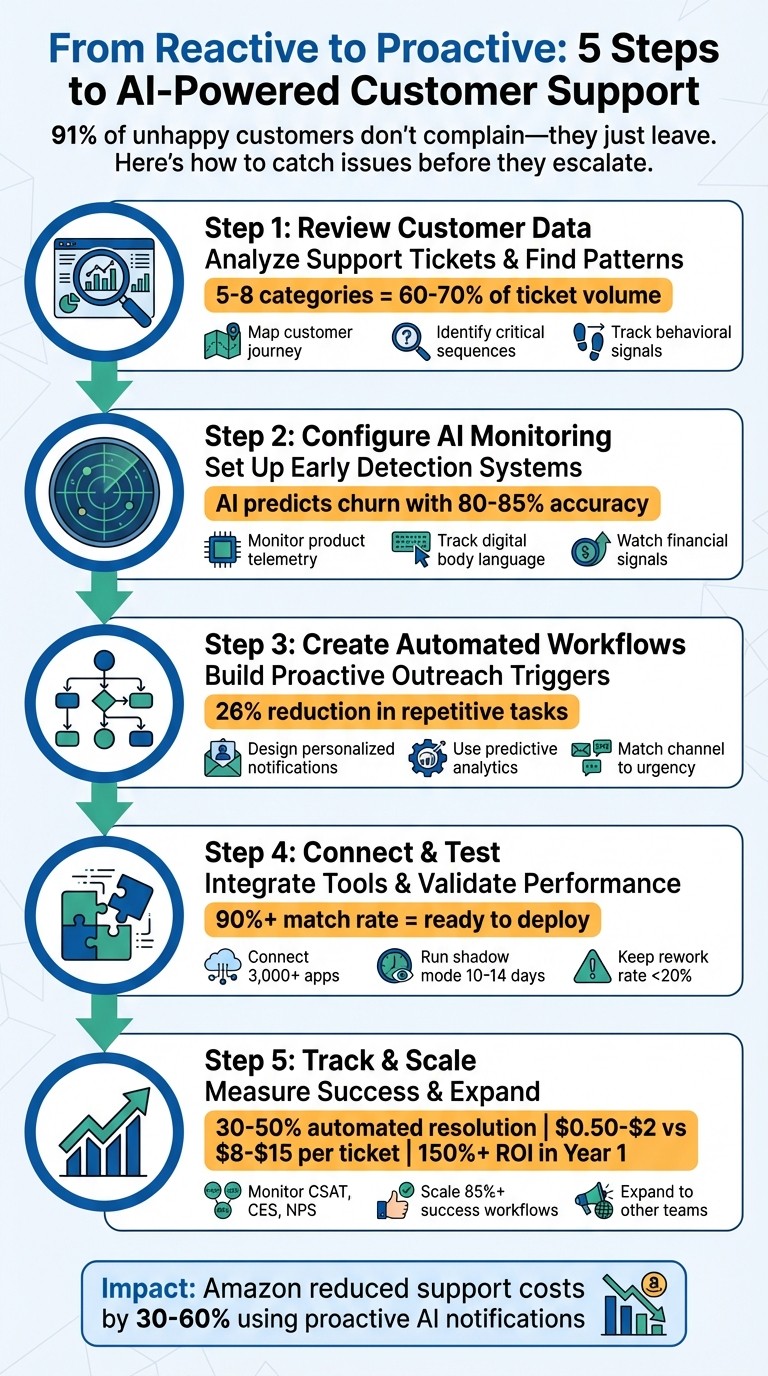
5-Step Process to Automate Proactive Customer Support with AI
AWS re:Invent 2025-The AI revolution in customer support: Building predictive service systems-SPS315
Step 1: Review Customer Data and Find Automation Opportunities
Start by digging into your customer support data. Export your last 200–500 support tickets and sort them by issue type. You’ll likely notice a trend: 5–8 categories often account for 60–70% of your total ticket volume. These recurring, straightforward issues - like password resets, order tracking, or billing inquiries - are prime candidates for automation.
Map Your Customer Journey
To understand where customers face challenges, map out their journey by analyzing every digital interaction where they might get stuck. This includes email clicks, chat sessions, app navigation, form abandonment, and approval delays. AI can turn these static maps into dynamic systems that adjust in real time based on user behavior across multiple touchpoints.
Focus on "Critical Journey Sequences" - the key steps that differentiate successful users from those who churn. For instance, customers who connect an integration like Slack within the first 24 hours of signing up convert at 8.3x the rate of those who don’t. This insight highlights an opportunity for proactive engagement.
Another metric to watch is "Return Velocity." Users who return to your product within 4 hours of signing up have an 82% conversion rate, compared to just 18% for those who return after 48 hours. Smaller actions, like viewing the pricing page or downloading a template, also reveal areas where automation can re-engage users. These insights from mapped interactions are essential for spotting real-time behavioral patterns.
Use Behavioral Data to Spot Patterns
Once you’ve mapped the customer journey, leverage behavioral data to identify friction points as they happen. AI can monitor "digital body language", such as rage-clicking, quick page bounces, or spending excessive time on a simple task. These frustration signals often indicate the need for support, even before a customer submits a ticket. Keep an eye on usage drops, repeated errors, app crashes, or users abandoning features like onboarding after 7 days. In fact, 68% of customers expect brands to anticipate their needs before they even reach out. AI systems can predict churn and detect pain points with 80–85% accuracy.
Don’t overlook transactional signals either. Patterns like declined payments, upcoming subscription renewals, or shipping delays can all serve as triggers for proactive intervention. For instance, set a threshold like a 14-day drop in login frequency to automatically activate outreach. Look for "Negative Predictive Signals", such as users signing up but failing to start a project within 24 hours. These insights are key for configuring AI systems to monitor and respond effectively in the next step.
Step 2: Configure AI Monitoring with Rivulo for Early Detection
Set up AI monitoring now to catch potential issues before they escalate into support tickets. Rivulo's conversational interface makes this process seamless, eliminating the need for coding or engineering delays.
Set Up Monitoring Using Rivulo's Conversational Interface
Rivulo takes a "show, don't tell" approach, allowing you to teach the AI by simply demonstrating a task. For instance, you can share your screen while performing an action - like checking for failed payments on your billing dashboard - and Rivulo will automatically learn and create the workflow for you.
"Teach Rivulo by showing, not telling... Just share your screen and let Rivulo watch you work. It learns the steps and builds the workflow for you." – Rivulo
Once the workflow is generated, you can refine it through plain-language instructions. For example, you can say, "Notify the team if a user spends more than 10 minutes on the checkout page", and Rivulo will update the logic accordingly - no technical jargon needed. This conversational design is especially helpful for teams using older systems without modern APIs, as Rivulo operates directly in the browser and can monitor any web-based platform.
For more complex or sensitive scenarios, you can include a human-in-the-loop. Rivulo will check in with team members when necessary, ensuring automations stay aligned while handling repetitive tasks in the background. Start small by focusing on a single high-impact signal, such as payment failures, before expanding to monitor more intricate patterns.
Real-Time Signals to Monitor
Rivulo can be configured to detect specific triggers that suggest a customer might need assistance. These triggers fall into several categories:
Product telemetry: Look for signs like usage drops, repeated error loops, or customers abandoning workflows mid-process. These signals often indicate confusion or frustration.
Digital body language: Behaviors like rage-clicking or spending an unusually long time on a task can reveal frustration before a ticket is submitted.
Financial signals: Keep an eye on failed payments, billing mismatches, or subscription errors. These situations often require immediate attention to prevent churn. Automated notifications with one-click retry links can help.
Intent signals: Actions like repeated visits to cancellation pages or frequent help searches can highlight high-risk moments where proactive outreach can make a difference.
SLA monitoring: Set alerts for tickets nearing SLA breach deadlines, such as within two hours, to prioritize escalation.
Here’s a quick overview of signal categories, triggers, and suggested actions:
Signal Category | Specific Triggers | Recommended Action |
|---|---|---|
Product Telemetry | Usage drops, repeated errors, abandonment | Send guided tutorial or tooltip |
Digital Body Language | Rage-clicking, excessive time on task | Proactive chat invitation |
Financial Signals | Payment failures, billing mismatches | Automated notification with retry link |
Intent Signals | Cancellation page visits, repeated searches | Route to retention specialist |
SLA Monitoring | Time to breach < 2 hours | Auto-escalate to "Urgent" priority |
To maintain flexibility across different priorities, use percentage-based alerts instead of fixed time reminders. For example, trigger notifications when 75% of the target response time has passed. This ensures relevance regardless of the urgency level.
Real-time monitoring is no longer optional - 68% of customers expect brands to anticipate their needs before they reach out. By configuring these signals, you're set to move on to creating personalized automated outreach workflows in the next step.
Step 3: Create Automated Workflows for Proactive Outreach
Automated outreach workflows are crucial for moving from reactive to proactive customer support. Once monitoring is set up, design workflows that automatically engage customers based on specific triggers. For example, you could set up a rule like: “If a customer visits the pricing page three times without purchasing, draft a help offer”. Tools like Rivulo make this process easy - no coding required.
Design Personalized Notifications and Alerts
Integrating Rivulo with your existing communication tools - such as Slack, Gmail, HubSpot, or Intercom - lets you create multi-channel notifications. These notifications can be tailored to customer behavior. For instance, if someone abandons a feature setup, Rivulo can generate a draft of a helpful "how-to" guide.
To maintain quality, use "draft-first" guardrails. This means Rivulo prepares a draft message for human review before it’s sent. This approach is especially useful for sensitive topics like billing issues or retention conversations. A CX lead highlighted the value of this strategy:
"The cost savings are real, but it's customer trust and loyalty that separate winners from the rest".
It’s also important to match the communication channel to the urgency of the situation. For example:
Use in-app nudges for real-time product issues while customers are actively engaged.
Send detailed emails for updates like billing changes or scheduled maintenance.
Reserve SMS for urgent matters, such as service outages or critical security alerts.
Once personalized notifications are in place, take it a step further by incorporating predictive analytics for even earlier outreach.
Use Predictive Analytics for Early Action
Predictive analytics can help you anticipate customer needs before they become problems. By training Rivulo on historical data, you can identify patterns of potential risk. For example, if a customer visits the cancellation page three times in one week, it could trigger a proactive outreach workflow.
As Customer Experience Expert Shep Hyken explains:
"The ability to hyper-personalize will improve. AI will look at a customer's history, including buying patterns, past support calls, how they compare to other customers, and more".
Sentiment analysis adds another layer of intelligence. Rivulo can scan incoming messages for signs of frustration or urgency, automatically escalating critical cases to senior agents. This type of automation is already making an impact - 26% of support professionals report that AI reduces repetitive tasks, while 22% value its ability to predict customer needs.
When building predictive workflows, it’s crucial to separate hard data from AI-generated interpretations. For instance, a workflow might flag that a customer’s usage has dropped by 40% over two weeks (a fact) and suggest potential reasons like feature confusion or competitor interest (an interpretation). This distinction allows human reviewers to validate predictions more efficiently.
To ensure quality as you scale, establish an "error budget." Track how often AI-generated drafts require significant edits. If more than 30% of drafts need heavy corrections, pause that workflow to refine your prompts or adjust the data inputs.
For the best results, align predictive signals with revenue impact. Use a priority matrix that weighs both the likelihood of churn and the customer’s Monthly Recurring Revenue (MRR). This ensures high-value customers receive the quickest attention when early warning signs appear. As Ravi Menon, Senior Venue Strategist, puts it:
"Proactive support is not interruption - it's a guided hand offered when a customer is most likely to benefit".
Step 4: Connect Rivulo to Your Tools and Test Workflows
With your proactive workflows ready, the next step is to link them to your existing tools and ensure they function as intended.
Connect Rivulo to Your Support Tools
Rivulo works with over 3,000 applications, including HubSpot, Intercom, Slack, and Gmail - all without requiring any coding. It can automate browser-based tools, making it easy to integrate with your support systems.
For CRM platforms, Rivulo handles tasks like syncing contacts, logging activities, and updating deal stages automatically. When paired with tools like Intercom, Rivulo can tag conversations based on sentiment, update customer details when behaviors shift, or prioritize ticket routing based on urgency. These integrations ensure that the real-time signals you set up earlier activate the right workflows.
Setting up Rivulo is straightforward. You can describe your workflow needs in plain language or demonstrate them via screen sharing. For example, you might say, “If a customer’s usage drops by 30% over two weeks, draft an email offering help and post it to our #support-review Slack channel.” Rivulo will translate your request into an automated workflow, no technical expertise required.
Test and Refine Your Workflows
Once your integrations are active, it’s critical to test the workflows to ensure they perform as expected. Start by running them in shadow mode for 10–14 days. In this mode, Rivulo operates in the background - creating drafts and flagging issues for review - so your team can evaluate the AI’s output and address any edge cases before they affect customers.
During testing, configure Rivulo to send drafts to a private Slack channel or an internal dashboard for review. Keep an eye on the rework rate - the percentage of AI drafts that need significant edits. If more than 15–20% of drafts require major changes, pause the workflow and tweak your prompts or input data. A partner agency using a two-approval process saved 40 hours per week by refining their workflows.
Begin testing with low-risk tasks, like internal ticket tagging or updating knowledge bases, before moving to customer-facing workflows like proactive outreach. Use a small group of 5–10 trusted users to identify potential gaps. Always include a fallback plan in your automations: if the AI encounters an error or its confidence drops below 80%, the task should be sent to a human for review.
Track the match rate between suggested and sent outputs during testing. Once this rate exceeds 90%, you can move from shadow mode to fully autonomous operation for clearly defined workflows. As Conduit wisely points out:
"Automation is a garden, not a building. It requires maintenance".
To keep things running smoothly, regularly review logs and transcripts to spot new trends or areas for improvement. These early tests lay the groundwork for expanding your automations to more customer segments and teams.
Step 5: Track Performance and Scale Your Automations
After your workflows are functioning smoothly, the next step is to evaluate their effectiveness and expand them throughout your organization.
Metrics to Track
To gauge success, focus on four key areas: operational efficiency, quality, customer experience, and business impact. For efficiency, monitor metrics like the Automated Resolution Rate (percentage of issues resolved without human intervention) and First Response Time. The benchmarks? Aim for 30–50% automated resolution, 80–95% faster response times, and a 20–40% reduction in Average Handle Time.
Quality is just as important. Keep the Hallucination Rate (instances where AI generates incorrect but plausible information) under 2% and strive for a Response Accuracy Rate of 90% or higher. Customer experience metrics like CSAT (Customer Satisfaction), CES (Customer Effort Score - target 5.5+ out of 7), and NPS (Net Promoter Score) offer deeper insights. Break down CSAT scores by interaction type - AI-only, AI-assisted, and human-only - to identify where automation shines.
On the business side, aim for a 150%+ ROI in Year 1 and track revenue retention. AI-resolved tickets cost significantly less, ranging from $0.50 to $2.00, compared to $8.00–$15.00 for human-resolved tickets. For proactive support, monitor Proactive Support Alerts, such as signals for outages or security risks, to measure how well you're addressing issues before customers even report them.
"The organizations that get the most value from AI support are not necessarily those with the most advanced technology. They are the ones that measure with discipline." - Twig
Stick to a consistent review schedule: weekly for operational metrics, monthly for strategic trends, and quarterly for ROI. Additionally, analyze 200 support interactions monthly to uncover new opportunities for automation. These practices ensure you can confidently expand your automation strategy.
Expand Automations to Other Teams
Once your metrics confirm the success of your automation efforts, it's time to scale. Focus on workflows with a resolution rate of 85% or higher, but keep in mind that performance can vary depending on the topic. For instance, you might see a 70% deflection rate for shipping inquiries but only 20% for technical issues. Prioritize scaling the workflows that consistently deliver strong results.
In January 2026, a 12-person agency using Rivulo's "Capture → Normalize → Enrich → Draft → Verify" workflow reduced their meeting recap time from 14 hours to just 4 hours per week, saving a total of 40 hours.
Rivulo's tools, such as background task management and integration with legacy systems, allow you to replicate successful workflows across teams like Customer Support, Operations, Finance, or Technical Support without starting from scratch. Its conversational interface also makes it easy for non-technical teams to define their needs in plain language.
When expanding, focus on automating high-volume, low-judgment tasks that occur at least five times a week. Examples include password resets, order tracking, and billing updates. However, avoid automating high-risk areas like complaint resolution or refund processing, where human judgment is critical.
Keep an eye on the rework rate - if it surpasses 20%, pause and address the underlying issues before scaling further. A "Draft-first" approach, where AI drafts responses for human review, can help maintain quality during expansion.
"Support work is more fulfilling when teams are trusted advisors for customers, not human FAQ databases." - Pylon
Scaling these proven workflows strengthens proactive support, ensuring customers receive timely and effective assistance at every interaction.
Common Mistakes and How to Avoid Them
When automating proactive support, teams can easily fall into some predictable pitfalls. One of the biggest issues? Thinking of automation as a "set it and forget it" solution. Products evolve, and what works today might be outdated in just a few months. For example, AI responses that were accurate in January could start delivering irrelevant answers by March. To keep automation effective, teams need to regularly update workflows, assign clear ownership, and ensure ongoing maintenance.
Another frequent misstep is relying on engineering for every small change. When operations teams have to wait for developers to tweak workflows, it creates bottlenecks and slows progress. Rivulo solves this by letting non-technical users update workflows themselves. All they need to do is share their screen while demonstrating the process, and Rivulo learns the steps. This eliminates the need for constant engineering support, keeping things running smoothly.
Over-automation without human involvement is another common issue. Customers can end up stuck in frustrating loops, unable to get the help they need. The solution? Incorporating human-in-the-loop orchestration. Rivulo’s system includes built-in check-ins that allow teams to step in when necessary. It also makes it easy to set boundaries, ensuring tasks get escalated to a teammate when appropriate. As Typewise wisely puts it:
"Automate where it helps. Escalate when it matters".
For teams still using outdated systems, manual work like copy-pasting between tools can lead to inefficiencies and errors. Rivulo bypasses this entirely by working directly in the browser, connecting systems without the need for complex technical integrations. Lastly, automation should steer clear of high-stakes tickets such as billing disputes or legal issues, where empathy and human judgment are essential. Instead, focus automation efforts on simpler, repetitive tasks like password resets or order tracking, leaving sensitive cases for human agents.
Here’s a quick look at how Rivulo addresses these common mistakes:
Common Mistake | Impact | How Rivulo Prevents It |
|---|---|---|
Treating it as a one-time setup | AI responses become outdated as products evolve | Workflows can be updated instantly using a conversational interface |
Requiring engineers for changes | Workflow adjustments cause delays and bottlenecks | Non-technical teams can demonstrate updates by sharing their screen |
No human oversight | Customers get stuck in automation loops | Built-in check-ins ensure clear handoff points to teammates |
Ignoring legacy systems | Manual processes between tools lead to errors | Browser-based automation connects web tools without APIs |
Automating sensitive tickets | Critical issues lose the human touch | Enables human review for high-stakes cases |
Wrapping It All Up
Proactive support automation isn't just a buzzword - it’s a game-changer for customer service teams. By following a structured approach that includes auditing customer journeys, setting up AI monitoring, building automated outreach workflows, integrating tools, and keeping an eye on performance, your team can shift from constantly putting out fires to preventing them altogether. AI can catch issues like shipping delays or payment hiccups in real time, tackling them before they snowball into bigger frustrations.
This approach represents a major mindset shift - from reacting to problems after they arise to predicting and preventing them. Companies such as Amazon and Stripe are already leading the way, using these methods to manage customer expectations and cut down on support requests.
Platforms like Rivulo make adopting this strategy accessible. With its no-code setup, you don’t need to rely on engineering teams or dive into coding. You can configure monitoring signals, design workflows, and even connect older systems using an intuitive interface. If you’re stuck, you can simply share your screen to demonstrate a process, removing the common roadblocks that slow down automation projects.
One key tip: Always ensure there’s a clear path for customers to reach a human agent when needed, and keep your knowledge base up-to-date so AI responses stay relevant. Proactive support not only improves customer satisfaction but also frees up your team to handle more complex challenges. With tools like Rivulo and the right strategies, you can build systems that truly work for you - not the other way around.
FAQs
What customer data do I need to start proactive support with AI?
To kick off proactive support with AI, start by collecting real-time data on customer activities across various channels, including web, mobile apps, voice interactions, and social media. Pair this with historical interaction data and an understanding of common issues customers face - like slow response times or repetitive inquiries. This combination allows AI to analyze customer behavior, predict their needs, and deliver personalized outreach that feels timely and relevant.
How do I choose the best triggers for proactive outreach?
To choose effective triggers, pay attention to customer data signals that indicate when action is necessary. Some key triggers to monitor include shifts in product usage, patterns in support tickets, lifecycle milestones, or changes in NPS scores. Focus on notable changes or potential risks, like a drop in engagement or repeated problems. By automating these detections, you can ensure timely and tailored outreach, boosting both engagement and customer satisfaction without the need for constant manual oversight.
When should AI automation hand off to a human agent?
When using AI automation, there are times when a human agent needs to step in. This is especially true for complex issues, unusual scenarios, emotionally charged customers, or questions that fall outside the AI's knowledge base. Escalation is also crucial if the AI repeatedly fails to resolve the problem or if the customer's frustration levels rise.
To maintain customer trust, it's essential to ensure a seamless transition. This means passing along all relevant context and details during the handoff, so the human agent can pick up where the AI left off without making the customer repeat themselves.
Related Blog Posts

Hand over your first workflow this week
Hand Rivulo your most tedious workflow or your team’s most-asked question. Either way, it starts by understanding how your business works, and then it takes care of the rest.